What it does
Edform is a browser-based teaching platform for K-12 teachers, tutors and schools. Its AI tools draft lesson plans, quizzes, slides, worksheets, rubrics, exam-style questions and parent messages for the teacher's grade, subject, language and school system, from a topic or from the teacher's own text, file, photo, web page or YouTube video. The same questions then become auto-graded homework, live or team games, interactive lessons, printouts or flashcards, with reports per student and per question. AI tools are for teachers only; students join with a code and need no email.
Official source 1 ↗ · Official source 2 ↗Features
- 100+ AI tools for teachers. Over 100 AI tools in groups for lesson preparation, tasks and assessment, working with text, ideas and activities, communication and student support: lesson and unit plans, slides, quizzes, worksheets, rubrics, text levelling, feedback on student writing, parent messages, IEP goals and more. Official source 1 ↗ · Official source 2 ↗
- Generate from your own material. AI tools take a topic, pasted text, a file up to 20 MB (PDF, Word, PowerPoint and more), a photo of a book page or the board, a web page link or a YouTube video with subtitles. Official source 1 ↗
- Curriculum and exam-style questions. AI uses the stages, grading and programme of the teacher's school system, and dedicated tools write practice in the style of exams such as SAT, ACT, AP, GCSE, A level, NAPLAN, HSC, IB and Cambridge IGCSE, with mark schemes. Official source 1 ↗ · Official source 2 ↗
- Refine, export and turn into activities. Results can be refined with one-click suggestions or a typed instruction, edited by hand, exported to Word, PDF or PowerPoint, and saved as a quiz, flashcard or lesson activity for the class. Official source 1 ↗ · Official source 2 ↗
- Quiz maker and one question set for everything. Quizzes support 13 question types, and the same questions become homework, live or team games, lesson slides, printable worksheets, flashcards or video stops without copying. Official source 1 ↗
- Interactive worksheets, lessons and video. Turn a PDF or photo into a self-marking online worksheet, build slide lessons with polls and questions for live or self-paced use, and add questions that pop up inside any video. Official source 1 ↗ · Official source 2 ↗
- Classroom games. Any quiz can run as a live race, a timed quiz with a leaderboard, an arcade or word game, or a team game on one screen for classes without devices; the site lists 27 game modes. Official source 1 ↗ · Official source 2 ↗
- Rule-based auto-grading. Ten closed question types are graded on Edform's servers as students hand in, with partial credit and teacher-set accepted spellings and number tolerances. Grading does not use AI; open answers go to the teacher, with an optional rubric. Official source 1 ↗
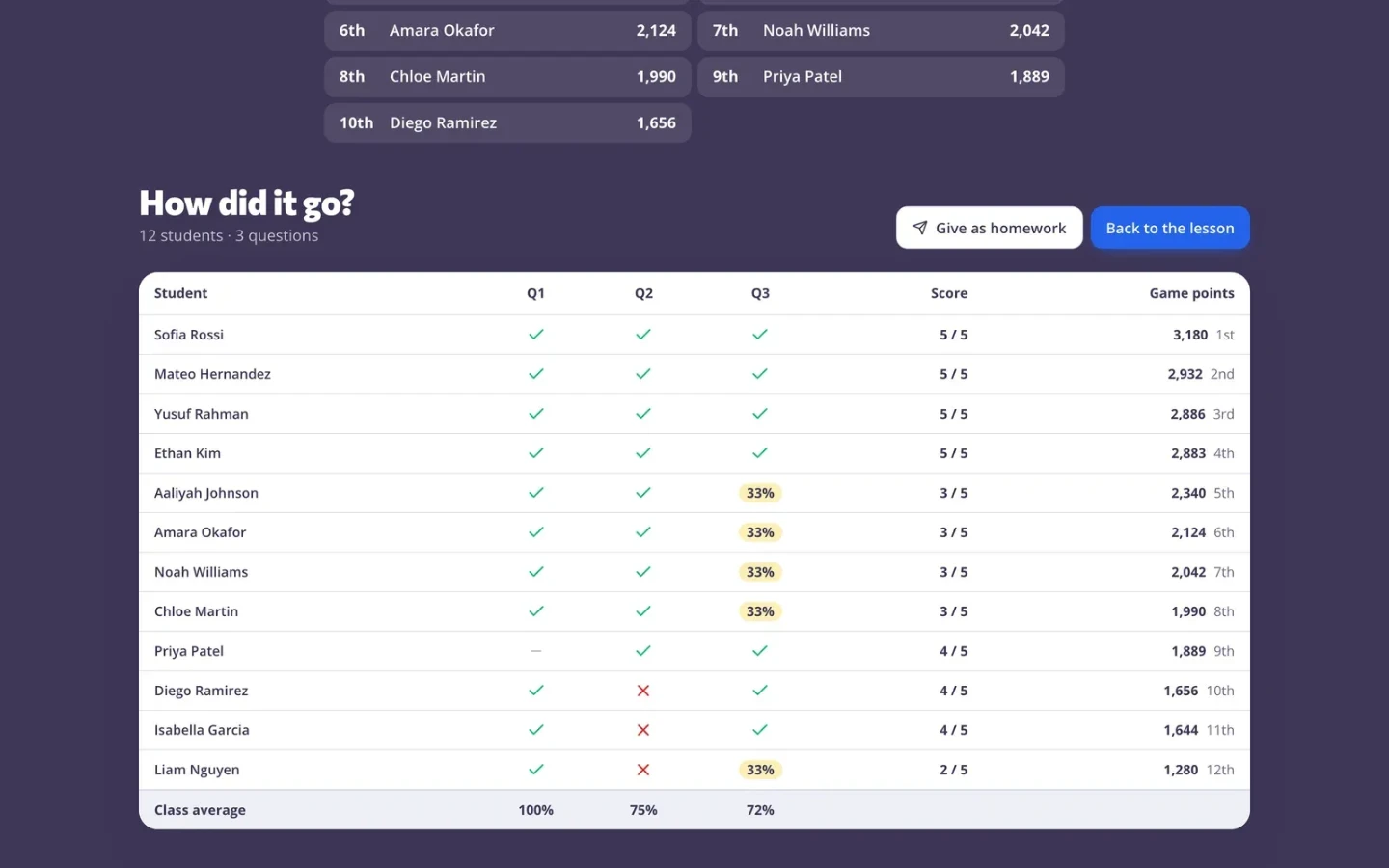
- Reports and accommodations. Reports show each student's answers, the hardest questions and the most common wrong answers; teachers can give extra time, extra attempts, personal deadlines and read-aloud. Official source 1 ↗ · Official source 2 ↗
- Classroom screen and tools. A projector screen with timers, name pickers, noise meters, instructions and polls, plus printable makers. Official source 1 ↗ · Official source 2 ↗
- Community library and school tools. Teachers can publish to and reuse a free library of shared activities; schools get shared seats, single sign-on and digital flyers for families. Official source 1 ↗ · Official source 2 ↗
Pricing & free limits
Every feature: classroom tools and screens, tests, quizzes and games, live sessions and homework, classes and student logins, and AI teacher tools with 5 AI points a month. Official source 1 ↗
Everything in Basic plus 300 AI points a month, which Edform says is enough for about 300 lesson plans, quizzes or slide decks. Official source 1 ↗
Pro for every teacher with 300 AI points each, email invites, seats that move between teachers, admin control of members and billing, and one invoice. Official source 1 ↗
Billing details
Plans renew automatically until cancelled; after cancelling, Pro stays until the end of the paid period and the account returns to Basic without deleting content. Payment is by card or local methods through Stripe in USD, EUR or GBP. Official source 1 ↗
Payments for partly used periods are not refunded unless the law requires it. Official source 1 ↗
Inviting another teacher with your invite link gives both of you a week of Pro. Official source 1 ↗
Free access & limits
Basic includes 5 AI points a month. Each AI result or change uses 1 point and changing a single quiz question uses 0.1; points reset on the 1st, do not carry over, and are returned if a request fails. Non-AI features are not limited on Basic. Official source 1 ↗
Best for & limitations
Turning a photo of a textbook page into a quiz with an answer key, then assigning it as auto-graded homework with a code and a deadline. Official source 1 ↗ · Official source 2 ↗
Running a review game in a classroom without student devices, using teams on one shared screen. Official source 1 ↗
Preparing exam practice with mark schemes for a national qualification such as GCSE, NAPLAN or the HSC. Official source 1 ↗
Special education teachers drafting IEP goals, present-levels statements and behaviour intervention plans. Official source 1 ↗
Leaving a substitute teacher a ready plan with routines, tasks and an answer key. Official source 1 ↗
- Operator not disclosed. The terms, privacy policy and footer name no company or country; the terms are governed by "the country where Edform is registered" and the only contact is support@edform.com. Official source 1 ↗ · Official source 2 ↗
- AI output must be checked. Edform warns that AI drafts can be wrong, biased or unsuitable and must be reviewed before use with students; requests unsuitable for a school platform are refused. Official source 1 ↗ · Official source 2 ↗
- Free AI allowance is small. Basic's 5 AI points cover about five AI results a month; heavier AI use needs Pro or a school seat. Official source 1 ↗
- Long source material is truncated. Very long uploaded material is shortened and only the beginning may be used; files are limited to 20 MB. Official source 1 ↗
- Teacher requests go to OpenAI. AI prompts, attached documents, pictures and results are sent to OpenAI in the US with storage turned off; student answers are not sent to AI and student data is not used for training. Official source 1 ↗ · Official source 2 ↗


 Submit a tool