


Ordalin
Submit a tool

Reviewed tool profile

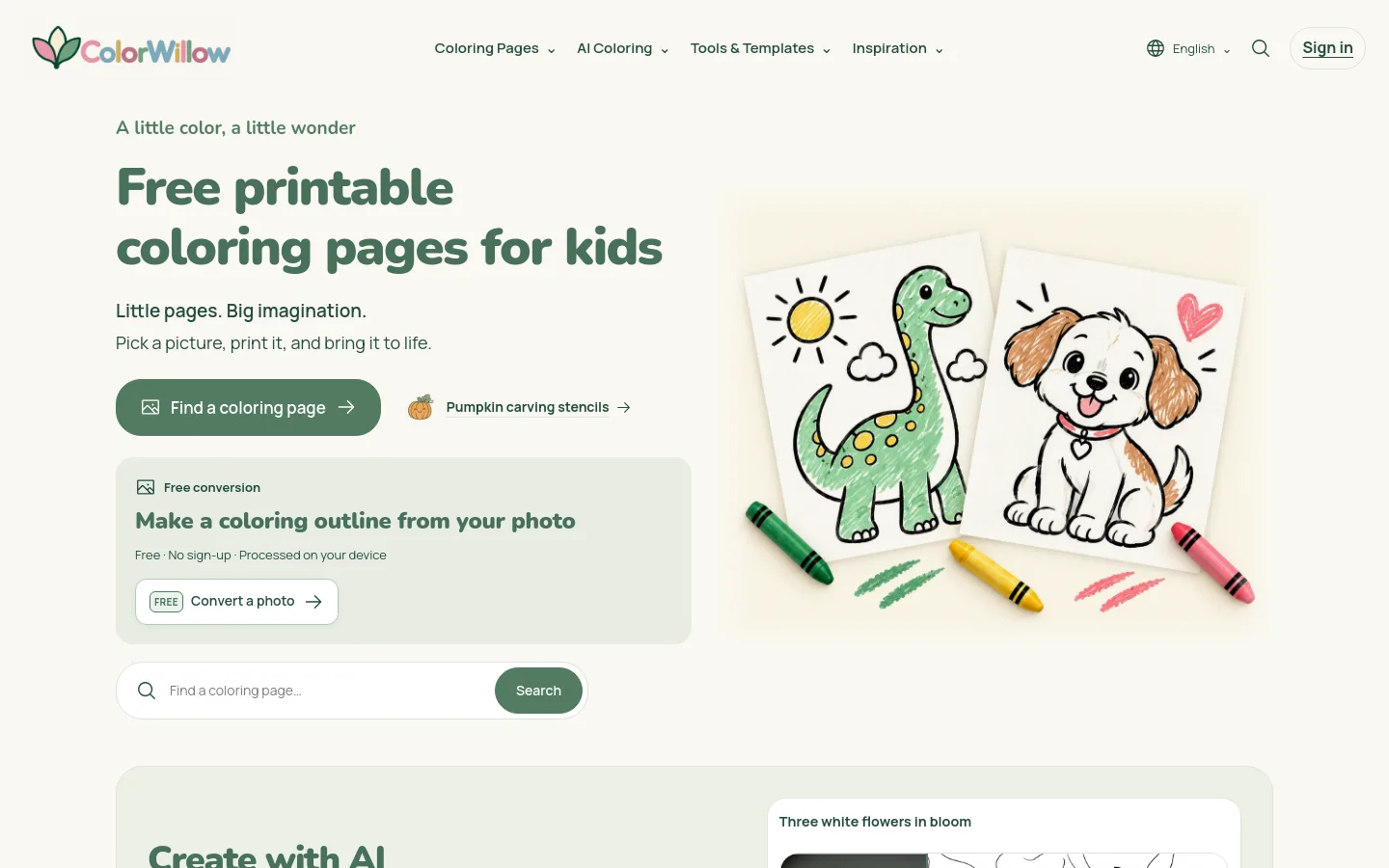
ColorWillow

AI photo-to-coloring-page maker with four drawing styles, plus a free on-device outline converter and a free printable coloring page library.

Sources checked

Visit website ↗
Pricing
Freemium. The printable library and on-device conversion are free without signing up. A free account adds 50 one-time welcome credits valid for 7 days (a standard AI generation costs 10 credits) and 200 MB of storage. Plus is $6.99 a month or $69.90 a year with 500 credits per service month and 3 GB; Studio is $12.99 a month or $129.90 a year with 1,200 credits per service month and 10 GB. A $1.99 pack adds 100 credits valid for 12 months. Prices are in USD. Official source 1 ↗ · Official source 2 ↗
Available as
Runs in the browser. Accounts use Google sign-in; a signed-in computer can show a code so a phone can send one photo without signing in. · A ColorWillow Chrome extension converts images you deliberately choose, with free on-device conversion or AI conversion that uploads the selected photo. · Accepts JPEG, PNG, WebP or HEIC/HEIF still photos up to 10 MB and 20 megapixels. Results are raster images to download as PNG or print on A4 or US Letter. · The site interface is offered in 11 languages: English, Spanish, Portuguese, French, German, Japanese, Korean, Simplified and Traditional Chinese, Italian and Dutch. Official source 1 ↗ · Official source 2 ↗ Official source 1 ↗ Official source 1 ↗ Official source 1 ↗
Primary group
Image & Design

Also consider

See all 6 similar tools ↓

What it does

ColorWillow is a coloring-page website with one AI feature: AI conversion turns a photo you upload into a printable coloring page, redrawn as clean outlines in one of four styles (Classic, Anime, Kawaii or Comic) with adjustable detail, line weight and background. It needs a Google sign-in and credits. Most of the site is not AI-driven for the user: a free library of printable kids' coloring pages (which ColorWillow says includes AI-assisted designs it reviews before publishing), a free converter that traces a photo's edges on your own device, and a mandala maker, all usable without an account.

Official source 1 ↗ · Official source 2 ↗ · Official source 3 ↗ · Official source 4 ↗

Features

  • Four AI drawing styles. AI conversion redraws a photo in Classic (close to the photo), Anime, Kawaii or Comic style. Styles change how shapes are drawn and do not add color. Official source 1 ↗
  • Detail, line weight and background controls. Choose simple, medium or detailed line work, standard or bold outlines, and whether to keep or simplify the background, or start from the Easy coloring, Cute character or Keep the scene presets. Changing settings uses no credits. Official source 1 ↗
  • Example previews for every setting. Before spending credits, you can preview real results from one sample cat-and-dog photo for all 48 combinations of style, detail, line weight and background. Official source 1 ↗
  • Background generation tasks. An AI task keeps running if you leave the page, finishes within a generation window of up to three minutes or is marked failed, and credits are only consumed once a valid result is stored. Official source 1 ↗ · Official source 2 ↗
  • Private library of originals and results. Signed-in uploads and results are saved privately in My creations, where an uploaded original can be reused for new generations without storing another copy. ColorWillow says it does not use photos or results to train AI models. Official source 1 ↗ · Official source 2 ↗
  • Commercial use of AI results. Results generated with any credits can be downloaded, printed, modified, shared and used commercially without an extra licence, attribution or revenue share, provided you have rights to the input photo. Official source 1 ↗
  • Free on-device photo converter (not AI). A free converter traces a photo's visible edges in the browser at 512 or 1024 px, with no upload, account or credits, then downloads a PNG or prints. It does not redesign the picture into larger coloring shapes the way AI conversion does. Official source 1 ↗
  • Free printable coloring library. A free library of kids' coloring pages by theme and style can be browsed, downloaded and printed on A4 or US Letter without an account; a print list collects several pages to print together or save as one PDF. Official source 1 ↗ · Official source 2 ↗
  • Mandala maker. A free mandala maker builds patterns from petals, leaves and your own strokes and exports SVG, PNG or PDF without sign-up; designs you make may be used commercially, including for sale. Official source 1 ↗ · Official source 2 ↗

Pricing & free limits

Free (no sign-up)

$0Free

Printable library and on-device conversion only; no AI credits and no private storage. Official source 1 ↗

Free account

$0Free, Google sign-in

50 welcome credits once, valid for 7 days (5 standard AI generations), 200 MB private storage, phone upload and reuse of saved originals. Official source 1 ↗ · Official source 2 ↗

Plus

$6.99per month, or $69.90 per year (about $5.83 a month)

500 credits each month (about 50 standard AI pages) and 3 GB private storage. Official source 1 ↗

Studio

$12.99per month, or $129.90 per year (about $10.83 a month)

1,200 credits each month (about 120 standard AI pages) and 10 GB private storage. Official source 1 ↗

Billing details

Subscription credits arrive each service month and expire at its end with no rollover; yearly plans are charged upfront but still issue credits monthly. Credits with the earliest expiry are used first. Official source 1 ↗ · Official source 2 ↗

Cancelling stops future renewal without a refund or deleting creations; downgrades and monthly/yearly switches take effect at the end of the paid period. Official source 1 ↗ · Official source 2 ↗

Within 14 days, an unused credit pack or first subscription purchase may be fully refunded if its credits have not been used; after credits are used, cancellation does not refund unused balances or remaining annual time. Official source 1 ↗

Prices are in US dollars, with any applicable tax shown at checkout. Official source 1 ↗ · Official source 2 ↗

Free access & limits

New accounts get 50 credits once, valid for 7 days, with no card required; that covers 5 standard AI generations. Existing accounts and re-registrations do not get them again. Official source 1 ↗

Free accounts have 200 MB of private storage. Over the allowance, existing files stay available but new uploads, saves and AI results are paused. Official source 1 ↗

The on-device converter and the printable library are free without signing in or spending credits. Official source 1 ↗ · Official source 2 ↗

Best for & limitations

Turn a pet, family or place photo into a personal coloring page, then check eyes, ears and markings against the original before printing. Official source 1 ↗ · Official source 2 ↗

Make a photo greeting card: print the converted page, color it and add a handwritten message. Official source 1 ↗

Parents and teachers print free coloring pages for home and classroom activities, including free classroom handouts. Official source 1 ↗
  • AI redraws can change faces and details. AI conversion can alter expressions, proportions, small features, lettering and coat patterns, and ColorWillow does not guarantee results are accurate or complete. Official source 1 ↗ · Official source 2 ↗
  • One photo at a time, no batch or books. The converter handles one photo per submission; batch conversion, storybooks and coloring-book assembly are not available. Official source 1 ↗
  • Raster output only. Conversion results are raster PNG images, not editable vector drawings. Official source 1 ↗ · Official source 2 ↗
  • Simplify background is not a cutout. Simplify background asks the AI for less background detail; it does not guarantee a clean cutout or transparent background. Official source 1 ↗
  • Photos are processed by third-party AI services. For AI conversion, a copy of your photo is sent to third-party AI processing services; the terms name models that may include Nano Banana 2.1 and GPT Image. Official source 1 ↗ · Official source 2 ↗
  • Library pages are for personal and classroom use. Library coloring pages may not be sold, redistributed as files or collections, or used in commercial products without written permission. This differs from your own AI results. Official source 1 ↗
  • No online coloring. Pages must be downloaded or printed; coloring on screen, for example on an iPad, is not available. Official source 1 ↗
  • Accounts are for adults only. Accounts belong to adults such as parents and teachers; there are no child accounts or child profiles. Official source 1 ↗
  • Session recording on public pages. Public pages use Google Analytics 4 and Microsoft Clarity session recordings; account and library pages do not load them. Official source 1 ↗
ColorWillow product screenshot
Website previewFixed desktop viewport · 1440 × 900

Similar tools

Published tools that share its categories.

StylMorphRedraw a photo as comic, cartoon, game-poster or coloring-page art from fixed presets, with one free image and one-time credit packs.
Image & DesignFree trialChecked Oct 16
Visit
AI Hairstyle FitPreview one haircut on your own photo, compare it with the original and take a barber card with cutting notes to your appointment.
Image & DesignFree trialChecked Oct 15
Visit
ArtCraftOpen-source AI image and video studio where you stage shots on a 2D canvas or in 3D, then let models like Nano Banana and Seedance render them.
Image & DesignFree planChecked Oct 12
Visit