



Ordalin
Submit a tool

Reviewed tool profile

ShroomPen

Free BYOK Chrome extension that replies, rewrites, fixes grammar and translates in any text field, using facts from the tabs you pick.

Sources checked

Visit website ↗
Pricing
Free. ShroomPen charges nothing and adds no markup; you pay your AI provider directly at its own prices, or nothing with a local model, OpenRouter's free models or Gemini's free AI Studio tier. Official source 1 ↗ · Official source 2 ↗

Available as
Chrome extension, installed from the Chrome Web Store. Works on normal websites such as Gmail, LinkedIn, Google Docs, help desks, CMSs and forms. · Connects to OpenRouter, OpenAI, Anthropic, Gemini or any OpenAI-compatible endpoint, including local Ollama and LM Studio servers. Official source 1 ↗ Official source 1 ↗ · Official source 2 ↗
Primary group
Writing & Language

Also consider

See all 6 similar tools ↓

What it does

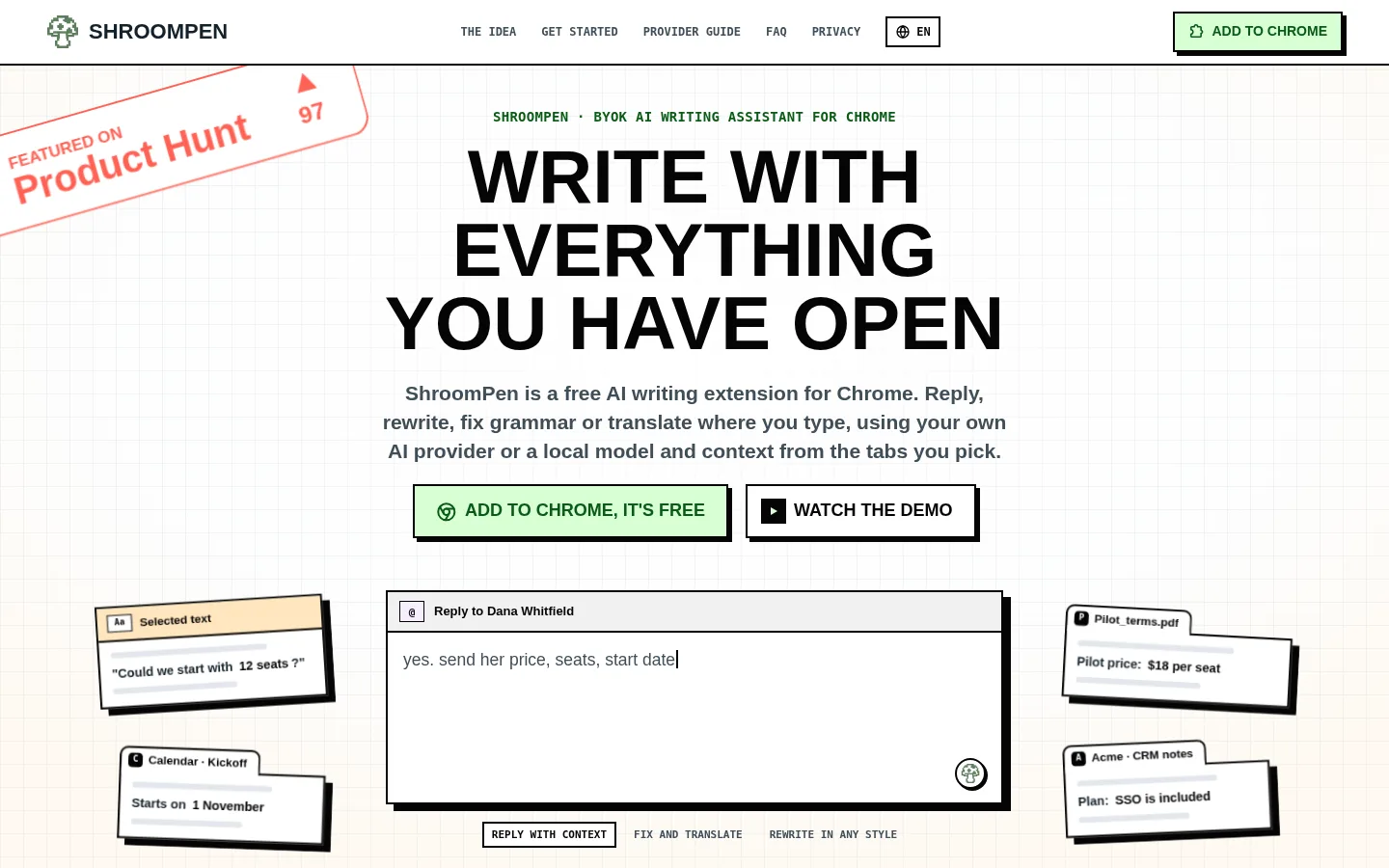
ShroomPen is a free, bring-your-own-key AI writing assistant for Chrome. In any text field it can reply to the message in front of you, rewrite, fix grammar or translate. You type a rough note, tick the open tabs that hold the facts (an order page, a CRM record, a PDF), and it writes the text from them. It runs on your own OpenRouter, OpenAI, Anthropic or Gemini key, or on a local model through Ollama or LM Studio. There is no ShroomPen account, server or telemetry. It is built by a solo developer.

Official source 1 ↗ · Official source 2 ↗

Features

  • Reply, rewrite, fix grammar, translate. Four actions on whatever is in the field: answer the message in front of you from your rough note, rewrite it more clearly, fix spelling and punctuation in the language you wrote, or translate the selected text. Official source 1 ↗
  • Context from the tabs you pick. Tick the current page and other open tabs, such as invoices, docs, notes or a CRM page, and names, order numbers and dates are pulled from them into the reply. Official source 1 ↗
  • Bring your own key or local model. Sign in with OpenRouter, paste an OpenAI, Anthropic or Gemini key, or point it at a local Ollama or LM Studio server with no key. Official source 1 ↗ · Official source 2 ↗
  • Request preview. You can open each request before it goes out and read exactly what your provider will receive, with your key hidden. Official source 1 ↗
  • Privacy controls. It asks before reading anything, reads tabs only when you attach them, skips password, card, bank and one-time-code fields, and can be switched off per site. Official source 1 ↗
  • Keyboard shortcut overlay. Open it with Ctrl + Q or the right-click menu; a small overlay appears over the page. Official source 1 ↗

Pricing & free limits

Billing details

Provider usage is billed by OpenRouter, OpenAI, Anthropic or Google directly, on your own account and at their prices. Short generations usually cost fractions of a cent on pay-per-use plans. Official source 1 ↗ · Official source 2 ↗

Free access & limits

No ShroomPen limits are listed. You need an account with your chosen provider, or none if you run a model locally. Official source 1 ↗ · Official source 2 ↗

Best for & limitations

Answer a support ticket with the order number, courier and delivery date pulled from the tracking tab. Official source 1 ↗

Draft a proposal in Google Docs from your CRM notes and a product page. Official source 1 ↗

Fix or translate a reply in Gmail or LinkedIn using a free local model. Official source 1 ↗
  • Chrome only. It is a Chrome extension and stays off Chrome's own pages such as settings and the Web Store. Official source 1 ↗
  • You need your own model. Nothing works until you connect a provider key or a local server; quality and cost depend on that model. Official source 1 ↗
  • Ollama needs an extra setting. Ollama refuses the extension's requests with a 403 error unless you set OLLAMA_ORIGINS to allow it. Official source 1 ↗
  • Early solo project. ShroomPen is built by a solo developer and is at version 0.0.5. Official source 1 ↗
ShroomPen product screenshot
Website previewFixed desktop viewport · 1440 × 900

Similar tools

Published tools that share its categories.

GodwitA free, open-source desktop email client with an AI assistant that reads, summarizes, translates and drafts mail using your own model.
Writing & LanguageFreeChecked Nov 1
Visit
TypelessAI voice dictation that turns rambling speech into clean, formatted text in any app on desktop and mobile.
Voice & SpeechFree planChecked Oct 31
Visit
ScapeA Mac email client that sorts your Gmail inbox, drafts replies from email and meeting context, and records meetings locally.
Writing & LanguageFree planChecked Oct 31
Visit