



Ordalin
Submit a tool

Reviewed tool profile

Godwit

A free, open-source desktop email client with an AI assistant that reads, summarizes, translates and drafts mail using your own model.

Sources checked

Visit website ↗
Pricing
Free and open source under the Apache-2.0 license, with no Godwit account. There are no paid plans. The AI features need a model you add: a cloud provider bills you under its own terms, while a local model such as Ollama or LM Studio runs on your own computer. Official source 1 ↗ · Official source 2 ↗
Available as
macOS 12 or later (disk image or Homebrew). · Windows, from the Microsoft Store or as x64 and ARM64 installers. · Linux, as a Debian/Ubuntu package, including ARM64. Official source 1 ↗ Official source 1 ↗ Official source 1 ↗
Primary group
Writing & Language

Also consider

See all 6 similar tools ↓

What it does

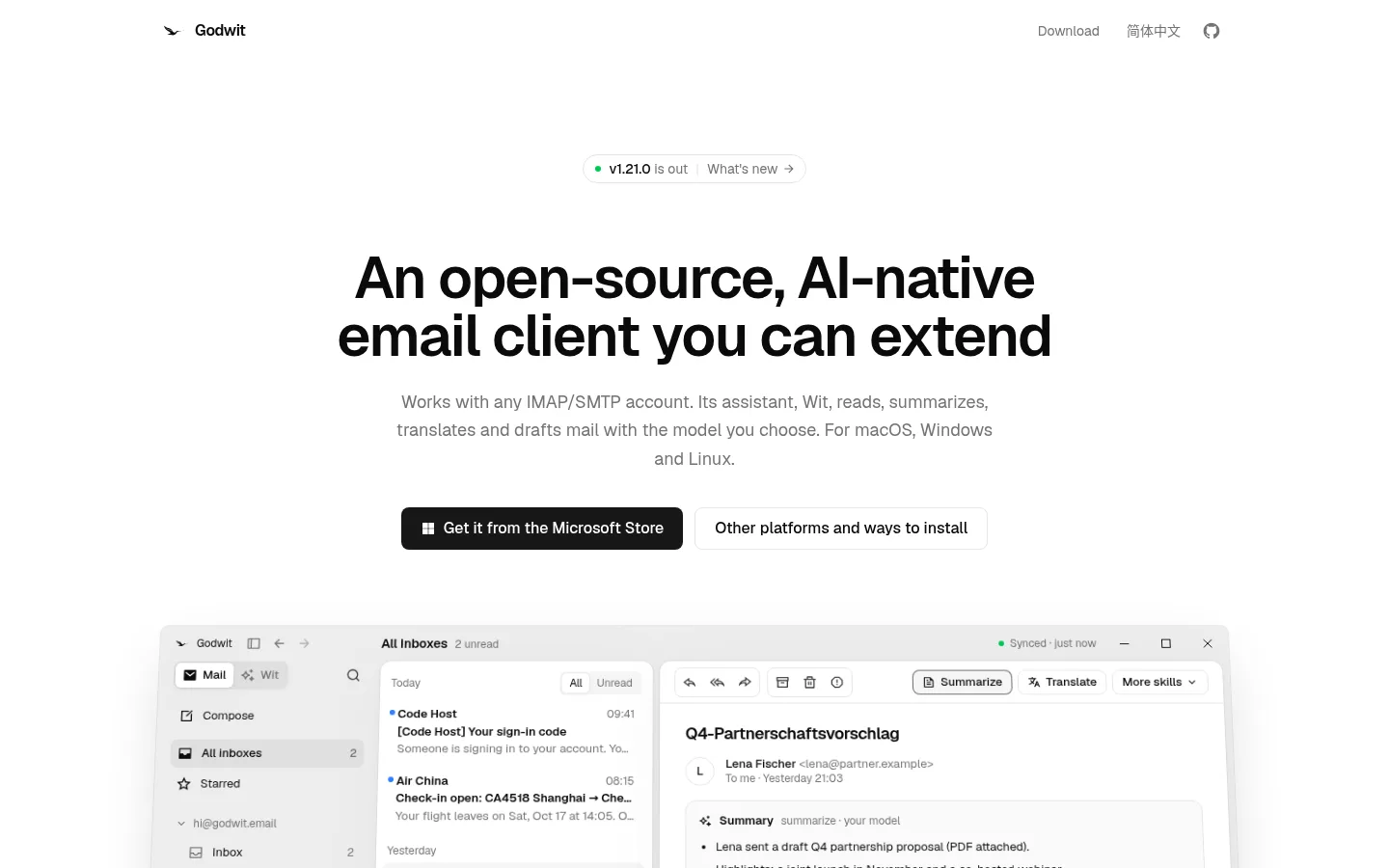
Godwit is a free, open-source desktop email client from The Godwit Authors, released under the Apache-2.0 license for macOS, Windows and Linux. It works with any IMAP/SMTP account, and its built-in assistant, Wit, reads, summarizes, translates and drafts mail using an AI model you add yourself, either a cloud service or a local one such as Ollama. Godwit has no account and no telemetry, and its own servers never receive your mail.

Official source 1 ↗ · Official source 2 ↗

Features

  • Email client for any IMAP/SMTP account. Godwit syncs mail over IMAP/SMTP with offline changes, conversations, full-text search and HTML compose. Setup is detected for Gmail, Outlook, iCloud, Yahoo, QQ Mail, 163/126, Lark/Feishu, DingTalk and others. Official source 1 ↗
  • Wit, an assistant for your mailbox. Wit answers questions about the mail you have synced, reads PDF, Office and CSV attachments and drafts replies. It never sends anything without your approval. Official source 1 ↗
  • AI actions on messages and drafts. Summarize, translate, adjust tone and length, or pick a quick reply on a message, a selection or a draft. Official source 1 ↗
  • Bring your own model, cloud or local. Godwit works with any OpenAI-compatible or Anthropic-compatible service, including local servers such as Ollama and LM Studio. API keys are kept in the system keychain. Official source 1 ↗ · Official source 2 ↗
  • Skills, plugins and MCP. A SKILL.md file adds a button. TypeScript plugins with declared permissions add cards, actions and Wit tools, and MCP servers give Wit external tools. Official source 1 ↗
  • MCP server for other agents. The godwit mcp server lets Claude, Cursor and other agents read your mail and create drafts, but never send. Official source 1 ↗ · Official source 2 ↗

Pricing & free limits

Open source

FreeApache-2.0, no account

The whole app with no paid tier. AI features run on a model you add; a cloud provider's usage is billed by that provider, and a local model such as Ollama runs on your computer. Official source 1 ↗

Billing details

Godwit itself has nothing to buy. Any AI costs come from the model provider you connect, and what that provider does with your content is up to its own policy. Official source 1 ↗ · Official source 2 ↗

Free access & limits

Free access and its limits were not established by the checked official sources.

Best for & limitations

Catch up on a busy inbox by asking Wit which emails need a reply this week and having it draft the answers for you to edit. Official source 1 ↗

Read and answer mail in another language with one-click translation and tone adjustment. Official source 1 ↗

Keep mail and AI on your own computer by pairing Godwit with a local model such as Ollama. Official source 1 ↗ · Official source 2 ↗

Let Claude or Cursor look through your mail and prepare drafts through the read-only MCP server. Official source 1 ↗
  • No AI until you add a model. Godwit does not include a model. The AI features need a cloud service or local model that you set up, and cloud usage is billed and handled by that provider. Official source 1 ↗ · Official source 2 ↗
  • Automatic labels send new mail to your model. Automatic labelling is on by default and sends new Inbox mail to your configured model; notification filtering and verification-code detection also use it. You can turn labels off in Settings. Official source 1 ↗
  • Remote images load by default. The privacy policy says remote images and sender avatars load automatically by default. Godwit fetches them without cookies or a referrer, but senders still see your IP address. Official source 1 ↗
  • Community support only. There is no company or account behind the app; questions go to the project's GitHub issues. Official source 1 ↗
Godwit product screenshot
Website previewFixed desktop viewport · 1440 × 900

Similar tools

Published tools that share its categories.

TypelessAI voice dictation that turns rambling speech into clean, formatted text in any app on desktop and mobile.
Voice & SpeechFree planChecked Oct 31
Visit
ShroomPenFree BYOK Chrome extension that replies, rewrites, fixes grammar and translates in any text field, using facts from the tabs you pick.
Writing & LanguageFreeChecked Oct 31
Visit
ScapeA Mac email client that sorts your Gmail inbox, drafts replies from email and meeting context, and records meetings locally.
Writing & LanguageFree planChecked Oct 31
Visit