
Ordalin
Submit a tool

Website-checked tool profile

Llama

Free Mac and Windows app from the llama.cpp team that runs open AI models locally, with browser chat and an OpenAI-compatible local API.

Sources checked

Visit website ↗
Pricing
Free and open source. The Mac and Windows apps are published under the MIT license on GitHub, and there are no paid tiers, API keys or usage bills: the models run on your own hardware, so the real cost is memory, disk space and electricity. Official source 1 ↗ · Official source 2 ↗ · Official source 3 ↗

Available as
macOS: a native 4 MB menu bar app, installed from the website, GitHub Releases or Homebrew (brew install --cask llama-app). · Windows 11: a system tray app (x64 and ARM64 .msixbundle) with an Alt+Space overlay for chatting from any app. · Linux and other systems: no desktop app; the site offers the llama.cpp command-line tools (llama cli, llama serve) through a one-line install script, package managers, Docker or a source build. Official source 1 ↗ · Official source 2 ↗ Official source 1 ↗ Official source 1 ↗ · Official source 2 ↗
Primary group
Coding & Development

Also consider

See all 4 similar tools ↓

What it does

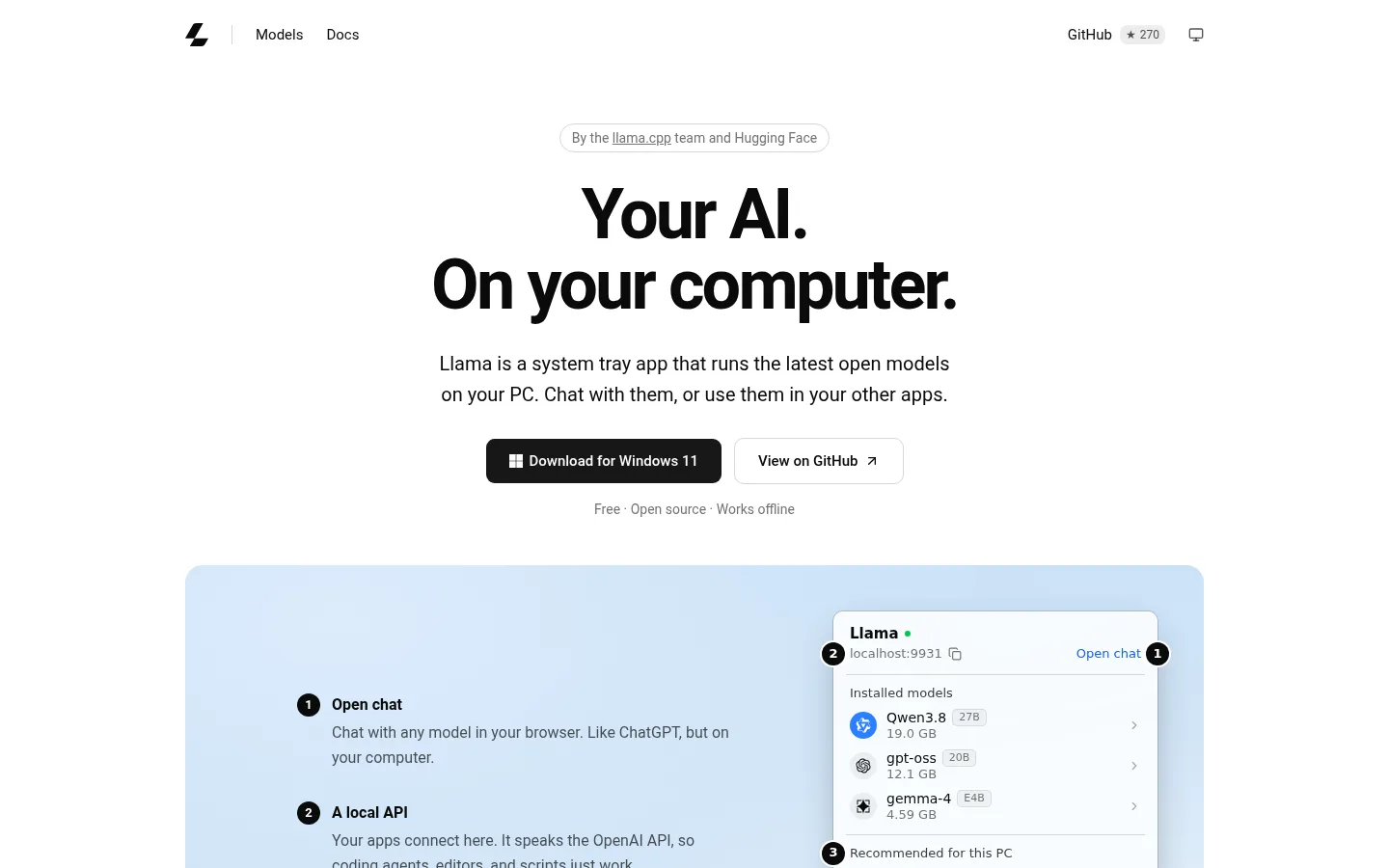
Llama (llama.app) is a free desktop app from the llama.cpp team and Hugging Face for running open AI models on your own computer. It is not Meta's Llama model family: it is a small menu bar app on Mac and a system tray app on Windows 11 that downloads GGUF models from Hugging Face, picks settings that fit your hardware, and lets you chat with them in the browser. It also runs a local server that speaks the OpenAI and Anthropic APIs, so coding agents, editors and your own scripts can use the same models offline.

Official source 1 ↗ · Official source 2 ↗ · Official source 3 ↗

Features

  • Hardware-aware model setup. Llama checks your machine and configures each model automatically, choosing the highest quantization and context size that fit in memory and turning on image input or speculative decoding where the model supports them. Every llama.cpp setting is still editable in a plain-text file. Official source 1 ↗
  • One-click model recommendations. The app lists models that fit your computer and installs them in one click. The homepage suggests Gemma 4 for 16 GB machines, GPT-OSS for 24 GB and Qwen 3.8 for 32 GB or more, and any GGUF model from Hugging Face can be added. Official source 1 ↗ · Official source 2 ↗
  • Browser chat. "Open chat" opens the built-in llama.cpp web UI, which renders Markdown, code and maths, shows reasoning in a collapsible block, accepts images, PDFs and audio for models that support them, and lets you branch, search and export conversations. Official source 1 ↗ · Official source 2 ↗
  • Local OpenAI- and Anthropic-compatible API. A server on localhost:9931 exposes OpenAI-compatible endpoints and an Anthropic-style /v1/messages endpoint, with streaming, tool calling, structured JSON output and vision, so existing SDKs work by changing only the base URL. Official source 1 ↗ · Official source 2 ↗
  • Works with coding agents. The docs show how to point the Pi coding harness, the OpenAI Codex CLI and the ChatGPT desktop app at a model served by Llama, and recommend a context window of at least 32k tokens for agent work. Official source 1 ↗
  • Light on memory and disk. Models load only when something asks for one and unload after five minutes idle. Each model is stored once in the standard Hugging Face cache and shared with llama.cpp and other tools. Official source 1 ↗
  • Access from your other devices. An "Allow network access" setting can expose the server over Tailscale, which authenticates and encrypts the connection, or to the whole local network. Official source 1 ↗

Pricing & free limits

Billing details

Billing details were not established by the checked official sources.

Free access & limits

There is no usage cap: everything runs offline on your machine. What you can run depends on its memory; the homepage pairs the suggested models with 16 GB, 24 GB and 32 GB of memory or more. Official source 1 ↗

Best for & limitations

Asking a local model to summarise a private document such as a lease, without uploading it to a cloud service. Official source 1 ↗ · Official source 2 ↗

Running a coding agent such as Pi or Codex CLI against a model on your own computer instead of a paid API. Official source 1 ↗

Giving several apps one shared local AI backend, so each model is downloaded once instead of bundled into every app. Official source 1 ↗
  • Needs a well-equipped computer. Model quality is limited by your memory: the homepage starts its suggestions at 16 GB, and larger models such as Qwen 3.8 27B take 19 GB of disk and 32 GB of memory or more. Official source 1 ↗
  • No desktop app on Linux or older Windows. The desktop app is for macOS and Windows 11 only; on Linux you get the command-line tools instead. Official source 1 ↗
  • Network mode has no password. If you share the server with your whole network instead of Tailscale, anyone on that network can reach it, so the README warns to use it only on trusted networks. Official source 1 ↗
Llama product screenshot
Website previewFixed desktop viewport · 1440 × 900

Similar tools

Published tools that share its categories.