



Ordalin
Submit a tool

Reviewed tool profile

TextDet

Offline Android OCR that turns photos, receipts and screenshots into editable text, plus a free in-browser text detector.

Sources checked

Visit website ↗
Pricing
Freemium. The Android app's scanning, editing, search, tags and TXT or Markdown export are free with no daily limit, and the browser detector is free. TextDet Pro adds multi-page documents, PDF import, searchable PDF, Word and CSV export, receipt tables and on-device translation for $3.99 a month, $19.99 a year with a 7-day free trial, or $29.99 once; prices vary by country. Official source 1 ↗ · Official source 2 ↗

Available as
Android app on Google Play, and a web detector that runs in any modern browser with WebGPU or WebAssembly. Official source 1 ↗ · Official source 2 ↗
Primary group
Research & Data

Also consider

See all 6 similar tools ↓

What it does

TextDet is an offline OCR app for Android from NornWorks LLC, plus a free website that detects and reads text in images inside your browser. Photograph a receipt, page, sign or screenshot and the app turns it into editable, searchable text using two on-device engines, Google ML Kit and PaddleOCR's PP-OCR, with no account, ads or upload. It is not an AI-writing detector: it finds and reads text in pictures.

Official source 1 ↗ · Official source 2 ↗

Features

  • Offline image-to-text on the phone. Receipts, pages, signs and screenshots are read on the device with no internet connection. Google ML Kit covers Latin, Chinese, Japanese, Korean and Devanagari scripts, and PP-OCR is used as a second engine. Official source 1 ↗
  • Editable, searchable library. Fix any misread word, keep every scan on the phone, search across them and tag scans to find them again. Official source 1 ↗
  • Export, read aloud and tap to act. Save text as TXT or Markdown or have it read aloud. Web addresses, email addresses and phone numbers in the text become buttons to open, write or call. Official source 1 ↗
  • Pro documents and exports. TextDet Pro groups several pages into one document, imports whole PDFs, exports searchable PDF, Word and CSV, saves to a folder, and turns receipt line items and tables into CSV. Official source 1 ↗
  • On-device translation (Pro). Pro translates between 59 languages on the phone with ML Kit. Each language pack (31 to 48 MB) is downloaded once after you confirm, then works offline. Official source 1 ↗ · Official source 2 ↗
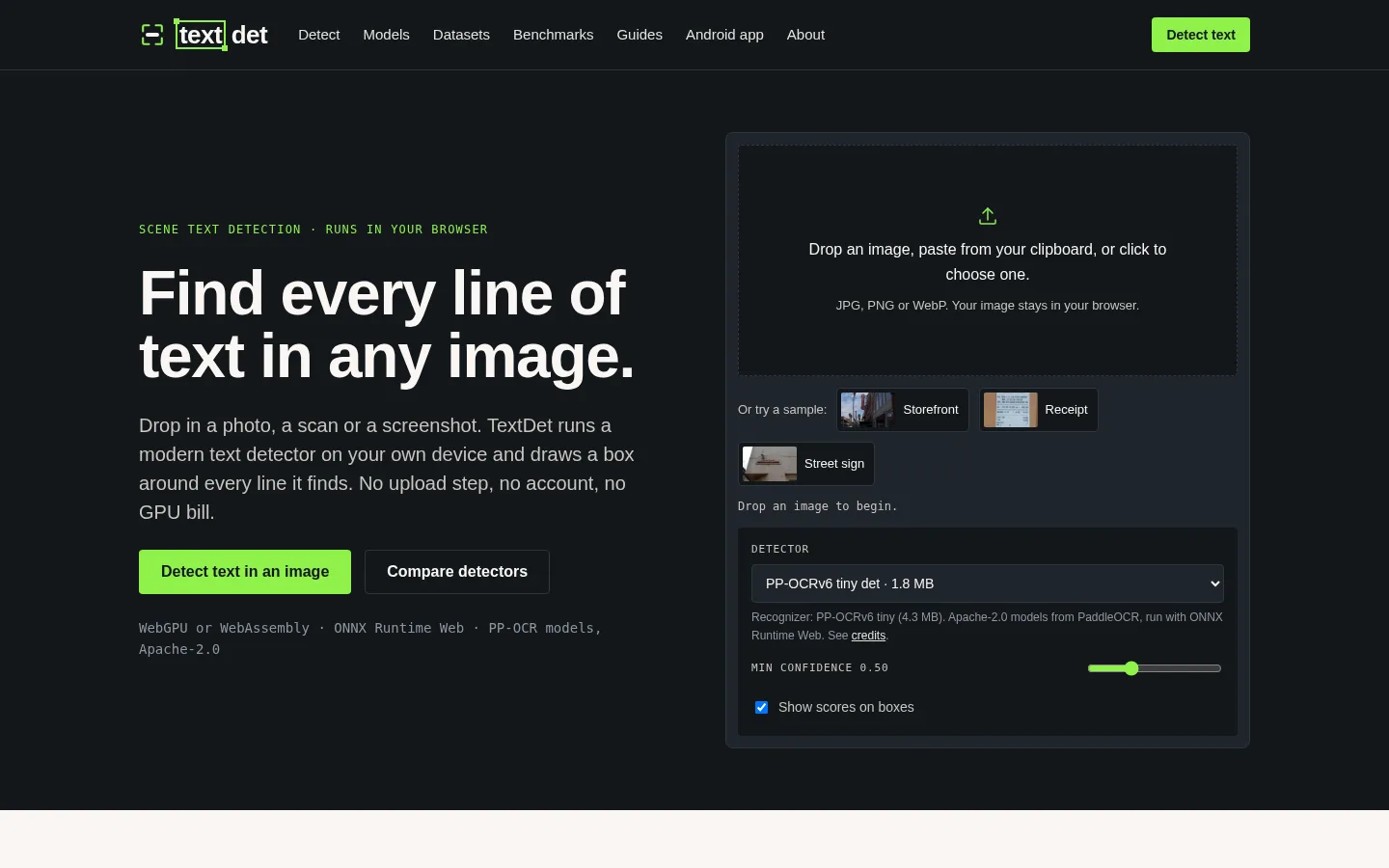
  • Browser text detector. On textdet.com, drop an image and PP-OCR models running in your tab box every line of text, show a confidence score and read it. Results copy as JSON or text, or download as an annotated PNG; images never leave the browser and it works offline after the first load. Official source 1 ↗
  • Text-detection reference guides. The site also documents a decade of scene-text detectors, benchmark datasets and OCR benchmarks, with runnable OpenCV and Python tutorials. Official source 1 ↗ · Official source 2 ↗

Pricing & free limits

TextDet Pro monthly

$3.99per month

Multi-page documents, PDF import, searchable PDF/Word/CSV export, receipt tables and on-device translation between 59 languages. Official source 1 ↗

TextDet Pro yearly

$19.99per year, 7-day free trial

The same Pro features billed yearly, with a 7-day free trial. Official source 1 ↗

Billing details

Pro is bought through Google Play, which handles payment, refunds and cancellation; prices vary by country. Official source 1 ↗ · Official source 2 ↗

Free access & limits

The free app has no daily limit or ads; multi-page documents, PDF import, Word/CSV/searchable-PDF export, receipt tables and translation need Pro. Official source 1 ↗

Best for & limitations

Copying the text from a receipt, book page, whiteboard or sign on an Android phone without sending the photo to a cloud service. Official source 1 ↗ · Official source 2 ↗

Turning receipt line items into a CSV for expenses with TextDet Pro. Official source 1 ↗

Checking which lines of text a modern detector finds in an image, and exporting the boxes as JSON, from a browser. Official source 1 ↗
  • Android only. The app is published only on Google Play for Android; there is no iPhone app. The website detector handles single images in the browser. Official source 1 ↗ · Official source 2 ↗
  • Main engine covers five scripts. Google ML Kit reads Latin, Chinese, Japanese, Korean and Devanagari; other scripts depend on the PP-OCR fallback. Official source 1 ↗
  • Google components send diagnostics. The scanner and ML Kit recogniser come from Google and send Google diagnostic and usage data such as device model and timings, though not image content. Official source 1 ↗
  • Useful exports are behind Pro. Multi-page documents, PDF import, Word, CSV and searchable-PDF export, receipt tables and translation all require TextDet Pro. Official source 1 ↗
TextDet product screenshot
Website previewFixed desktop viewport · 1440 × 900

Similar tools

Published tools that share its categories.

SparkBotA Chrome extension that answers your saved questions about web pages and PDFs, quoting the line behind each answer.
Research & DataFree planChecked Oct 31
Visit
HobFree, open-source desktop AI that works on your files like Claude or ChatGPT, running open models locally on Mac, Windows and Linux.
Research & DataFreeChecked Oct 27
Visit
Doc2XParse PDFs and scans into Word, Markdown, LaTeX or Excel with formulas and tables intact, and translate them with your choice of LLM.
Research & DataFree planChecked Oct 17
Visit
DottrAI contract assistant in your inbox that drafts, reviews and gets contracts signed, priced at about $1 per contract.
Research & DataFree trialChecked Oct 17
Visit