

Ordalin
Submit a tool

ArtCraft MCP (VectorCraft and CADCraft)

Both apps let Claude Code draw real files through their own commands. In our test it made a coffee shop badge in VectorCraft and a dimensioned floor plan in CADCraft, each in about a minute for about $0.50.

Checked 2026-11-04
Tested 2026-11-04 in Claude Code 2.1.318

What our test produced

VectorCraftBadge saved as SVG and PNG, redrawn once after it checked its render
Time
78 s
Cost
$0.50
Turns
31
CADCraftCorrect plan; we checked walls, door, window and layers in the DXF
Time
54 s
Cost
$0.48
Turns
31
Round dark brown badge with a cream coffee cup, saucer and steam, and the words Ordal Roasters along a curve
VectorCraft: the 512-pixel PNG the agent exported, unedited.
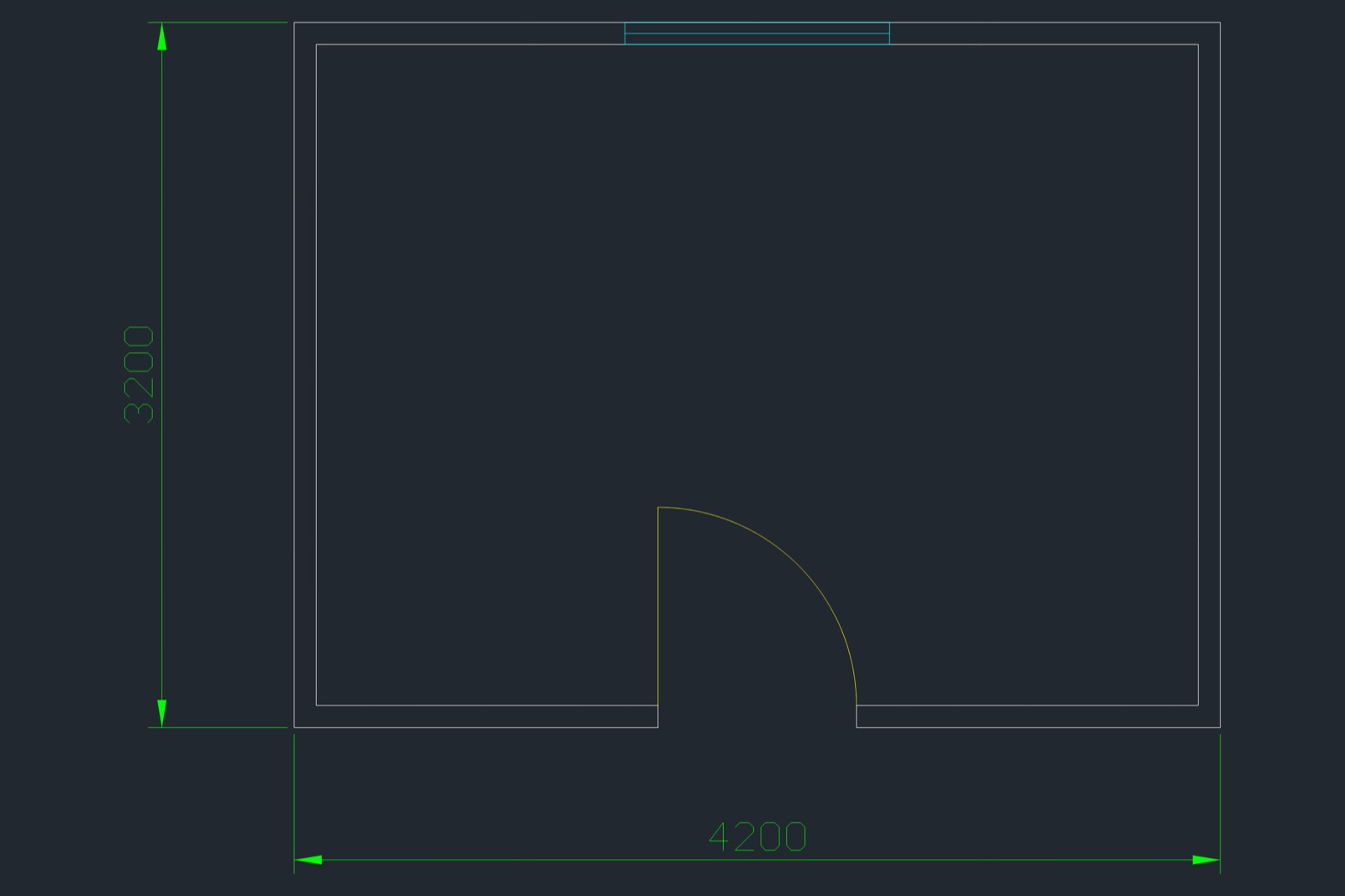
CAD floor plan of one room with 100 mm walls, a door with a swing arc in the bottom wall, a window in the top wall and dimensions of 4200 and 3200
CADCraft: the PNG render of plan.dxf. The dimensions measure the outside of the walls, 4200 by 3200 mm.

Best for

  • Simple logos, badges, icons and diagrams you want as real SVG, PDF or PNG files, not generated pictures
  • 2D drafting tasks that come as numbers: room plans, brackets, panels and layouts saved as DXF
  • Checking what an agent drew; both servers can render the drawing as a picture and report its geometry

Not the best fit for

  • Illustration or photo-real images; the agent builds from shapes, so the result looks like clip art
  • 3D models; CADCraft is described as 2D and 3D, but we tested only 2D drafting
  • Production work that needs every file feature; both apps are in early development, and CADCraft's README lists entity types it does not keep on save

How it works

  1. 1

    The app's own commands

    Each server exposes a few drawing tools plus a way to run any menu command with JSON parameters. VectorCraft has draw_shape, draw_path, add_text, pathfinder, transform and command_run; CADCraft has command_line (typed exactly like the AutoCAD-style command line), execute and script. list_commands shows what each command accepts.

  2. 2

    Headless or watching live

    By default VectorCraft tries a running app on port 7979 and falls back to an in-process engine; --headless forces it. CADCraft runs headless with cadcraft-cli mcp, or bridges to the app with --connect, and --lazy or --launch can start the bridge before the app is open.

  3. 3

    Look, check, fix

    render_preview (VectorCraft) and render (CADCraft) return a picture the agent can look at. inspect_document, inspect_drawing and query_entities return objects, layers and geometry, and CADCraft's area, shapes and loops commands measure closed shapes, so the agent can prove a drawing is right before saving.

Set it up

  1. 1
    Get the command-line tool
    # macOS: download vectorcraft-cli-<version>-macos-universal.zip or
    # cadcraft-cli-<version>-macos-universal.zip from the GitHub release and unzip it
    # Linux (deb, rpm): vectorcraft-cli is installed with the app in /usr/bin

    On macOS the CLI is a separate download from the app. On Windows, VectorCraft's installer puts vectorcraft-cli.exe in its program folder but not on PATH. Both projects can also be built from source with Rust.

  2. 2
    VectorCraft in Claude Code
    claude mcp add vectorcraft -- vectorcraft-cli mcp \
      --automation-read-root /path/to/project \
      --automation-write-root /path/to/project

    This is how we ran it. The two root flags imply headless mode and keep file access inside the folder. Leave them out and use --connect 127.0.0.1:7979 to drive the open app instead.

  3. 3
    CADCraft in Claude Code
    claude mcp add cadcraft -- cadcraft-cli mcp

    Headless, with no window. To watch it draw, start the app with cadcraft --control 7979 and use cadcraft-cli mcp --connect 127.0.0.1:7979 --launch.

  4. 4
    Any MCP client
    {
      "mcpServers": {
        "vectorcraft": { "command": "/full/path/to/vectorcraft-cli", "args": ["mcp", "--headless"] },
        "cadcraft": { "command": "/full/path/to/cadcraft-cli", "args": ["mcp"] }
      }
    }

    Use the full path if the client does not inherit your shell's PATH. In Claude Code, /mcp should then list 33 VectorCraft tools and 12 CADCraft tools in headless mode.

What it can access

  • Files in VectorCraft: by default, any path the agent names can be read or written. Start it with --automation-read-root and --automation-write-root to confine reads and writes to folders you choose; we did, and every save landed inside.
  • Files in CADCraft: open and save take any path the agent names; we found no option to confine them in headless mode. Run it in a folder you are happy for the agent to write in.
  • The desktop app: in bridged mode the server forwards every call to the running app through a control port on 127.0.0.1, so the agent edits the drawing you have open and can use screenshot and UI tools.
  • Disk: the CLIs are self-contained (334 MB unpacked for VectorCraft, 179 MB for CADCraft). Neither left new files in the home folder in our test.
  • Accounts and money: none. Both are free and need no login or API key.

Reference

Tools it adds13
vectorcraft: draw_shape, draw_path
Draw rectangles, ellipses, polygons and stars, or any SVG-style path, with fill and stroke.
vectorcraft: add_text, text_wrap
Add point, area or on-path text in an installed font.
vectorcraft: set_paint, transform, pathfinder, apply_effect
Recolour, move, scale and rotate, combine shapes, and add effects.
vectorcraft: command_list, command_run, command_batch
Find and run any of the app's menu commands with JSON parameters, one at a time or in a batch.
vectorcraft: doc_inspect, render_preview
Read the document's artboards, layers and objects, and render it as an image the agent can look at.
vectorcraft: open_file, save_file, export
Open and save documents and export SVG, PDF or PNG, with text optionally turned into outlines.
vectorcraft: undo, redo, select_tool, pointer_gesture, press_key
History, and tool and pointer actions as a person would use them.
vectorcraft: screenshot, ui_inspect, type_text, answer_dialog, open_panel
Window tools that only work when connected to the running app.
cadcraft: command_line, script
Type at the AutoCAD-style command line, such as "pline 0,0 4000,0 4000,3000 c", or run a multi-line script.
cadcraft: execute, list_commands
Run any command with JSON parameters, never a dialog, and look up each command's parameters.
cadcraft: inspect_drawing, query_entities, find_text
Read layers, styles, counts and entities with their geometry, filtered by type, layer or area, and find text.
cadcraft: render
A PNG of the drawing or one window of it, for the agent to look at.
cadcraft: new_drawing, open, save, cancel
Start a metric or imperial drawing, open DXF or DWG, save DXF or export SVG, PNG or PDF, and press Escape.
Key facts
Maintainer
ArtCraft (Storyteller) (official)
Licence
MIT or Apache-2.0
Version checked
VectorCraft 0.21.0, CADCraft 0.17.0
Transport
stdio (local); headless, or bridged to the running desktop app
Needs
No account or API key; macOS, Windows, Linux or FreeBSD. The desktop app only for the live mode
Works with
Claude Code, Claude Desktop and other MCP clients that start stdio servers
Install
Download the vectorcraft-cli or cadcraft-cli release for your system (on macOS a separate cli zip; on Linux it ships with the app), then add it to your agent, for example claude mcp add vectorcraft -- vectorcraft-cli mcp --headless, or claude mcp add cadcraft -- cadcraft-cli mcp

From the server’s own repository or docs. “Not stated” means they do not say.

Our test

VectorCraft (an Illustrator-style vector app) and CADCraft (an AutoCAD-style 2D drafting app) are free, open-source desktop apps by the ArtCraft team, written in Rust under the MIT or Apache-2.0 licence. Each command-line tool includes an MCP server, so an agent such as Claude Code can drive the app's own commands: draw shapes and paths, set layers, add text and dimensions, check the result, render a picture of it and save a real file. It runs without a window, or bridged to the open app so you can watch. We gave Claude Code one job in each. In VectorCraft it drew a 512-pixel coffee shop badge, looked at its render, redrew a cup it judged funnel-shaped and exported SVG and PNG in 78 seconds. In CADCraft it drew a 4 by 3 metre room with door, swing, window, layers and dimensions, checked the areas and saved a DXF in 54 seconds. Both cost about $0.50 at API prices.

2026-11-04 · Claude Code 2.1.318, headless (claude -p), project settings only, each server added with --mcp-config · claude-opus-5-5 · version VectorCraft 0.21.0 (commit 42de898), CADCraft 0.17.0 (commit 2099288), macOS universal CLIs
What we asked

VectorCraft: make a square 512 x 512 badge for a coffee shop called Ordal Roasters: a dark brown circle, a cream coffee cup drawn from simple shapes in the middle, and the name in a curve or a line under the cup; look at your render and fix anything wrong; save badge.svg and badge.png. CADCraft: draw a metric floor plan of one room, 4000 x 3000 mm inside, 100 mm walls, a 900 mm door gap centred in the bottom wall with a swing arc and a 1200 mm window in the top wall, on separate layers with the two overall dimensions; check closed shapes and areas; save plan.dxf and plan.png.

Tools listed on connect45

vectorcraft: add_text, answer_dialog, apply_effect, command_batch, command_list, command_run, create_graph, doc_inspect, draw_path, draw_shape, export, inspect_document, inspect_ui, invoke_menu, list_commands, open_file, open_panel, pathfinder, pointer_gesture, press_key, redo, render_preview, run_command, save_file, screenshot, select_tool, set_paint, text_wrap, transform, type_text, ui_inspect, ui_screenshot, undo cadcraft: cancel, command_line, execute, find_text, inspect_drawing, list_commands, new_drawing, open, query_entities, render, save, script

VectorCraft: the first cup, then the redrawAfter the first render_preview, the agent judged the straight tapered cup looked like a funnel, deleted it and drew a rounded bowl. The final badge is a brown circle with a cream ring, cup, saucer, three steam lines and ORDAL ROASTERS along a curve, with the letters turned into outlines in the SVG.
draw_path({ d: "M176 190 L316 190 L306 262 C300 290 280 302 256 302 C232 302 212 290 206 262 Z",
            fill: "#f3e6cf", name: "Cup body" })
render_preview({ max_side: 512 })            → [image]
command_run({ id: "select.set", params: { ids: [4, 5, 6, 7, 9] } })
command_run({ id: "edit.clear" })
draw_path({ d: "M176 192 L320 192 C320 252 294 294 248 294 C202 294 176 252 176 192 Z",
            fill: "#f3e6cf", name: "Cup body" })
add_text({ text: "ORDAL ROASTERS", path: 14, mode: "onPath", size: 34, font: "Georgia" })
export({ path: "badge.svg", format: "svg", outlineText: true })   → 21,628 bytes
CADCraft: the walls as one command lineIt drew the walls and the door gap as a single closed polyline typed at the command line, then used execute for the door, arc, window and dimensions.
command_line({ text: "pline 1550,-100 -100,-100 -100,3100 4100,3100 4100,-100 2450,-100
                     2450,0 4000,0 4000,3000 0,3000 0,0 1550,0 c" })
execute({ command: "arc", params: { center: [1550, 0], radius: 900, start: 0, end: 90 } })
execute({ command: "dimstyle", params: { name: "Plan50", current: true, DIMSCALE: 50, DIMDEC: 0 } })
execute({ command: "dimlinear", params: { p1: [-100, -100], p2: [4100, -100], at: [2000, -700] } })
CADCraft: the checkThe wall area is exactly 4200 × 3200 − 4000 × 3000 − the 900 × 100 door gap. One script call stopped at its first line because the clayer command wanted a named parameter, so nothing in it was drawn; the agent redid those steps with execute, and inspect_drawing then counted one arc, two lines and two polylines.
execute({ command: "area", params: { handle: "100" } })
→ Area = 1350000.0000, Perimeter = 27200.0000      (walls)
execute({ command: "area", params: { handle: "103" } })
→ Area = 120000.0000, Perimeter = 2600.0000        (window)
inspect_drawing → Arc 1, Dimension 2, Line 2, Polyline 2; both polylines closed: true

What we tested

We downloaded the macOS command-line tools from each project's latest release (VectorCraft 0.21.0 and CADCraft 0.17.0, both published on 3 November 2026) and connected each to Claude Code in headless mode, one server per run. VectorCraft ran with its read and write roots set to the test folder; CADCraft had no such option. We asked for one ordinary job in each: a coffee shop badge in VectorCraft, and a one-room floor plan with a door, window, layers and dimensions in CADCraft. Each request told the agent to check its work and save real files. The test sessions also had a few of our own general skills loaded.

What we found

  • Both connected and listed their tools: 33 in VectorCraft, including a few names that mean the same thing, and 12 in CADCraft. The window-only tools appeared in VectorCraft's list even though they cannot work headless.
  • VectorCraft made a usable badge. Brown circle, cream ring, cup with handle, saucer, steam and the shop name along a curve, exported as a 22 KB SVG with outlined text and a 512-pixel PNG. The agent looked at its first render, called the tapered cup a funnel and redrew it. The run took 31 turns, 78 seconds and $0.50 at API prices.
  • CADCraft made a correct plan. We checked the PNG and the DXF: 100 mm walls around a 4000 by 3000 mm room, a 900 mm door gap centred in the bottom wall with a 90-degree swing, a 1200 mm window in the top wall, two overall dimensions, and Walls, Doors, Windows and Dimensions layers in the file. The agent proved the wall and window areas with the area command. The run took 31 turns, 54 seconds and $0.48.
  • The commands are easy for an agent to find. Both runs looked up each command's parameters with command_list or list_commands, and recovered from small errors on their own: an object id that no longer existed in VectorCraft and a script line in CADCraft.
  • The file confinement differs. VectorCraft kept every write inside the folder we named. CADCraft wrote where it was told, which in our test was the right folder, but nothing would have stopped it writing elsewhere.

This is one small job in each app with one model, so read it as an example, not a benchmark.

FAQ

What are VectorCraft and CADCraft?

Two open-source desktop apps from the ArtCraft team, written in Rust and licensed MIT or Apache-2.0. VectorCraft is a vector illustration app in the style of Illustrator; CADCraft is a 2D and 3D CAD app with an AutoCAD-style command line, layers, dimensions and DXF files. Both run on macOS, Windows, Linux and FreeBSD and in the browser. The same team makes PhotoCraft, FilmCraft and other Craft apps.

Can Claude really draw with them?

In our test, yes. Claude Code drew a clean coffee shop badge in VectorCraft and a dimensioned room plan in CADCraft, each in about a minute, and checked its own work: it looked at the badge render and redrew the cup, and it measured the plan's areas before saving. The results look like simple vector art and a correct technical drawing, not like illustrations.

Do I need the desktop app open?

No. Both servers run headless with no window, which is how we tested. If you want to watch, start the app with its control port and connect the server to it; the window tools such as screenshots only work that way.

Can it open my existing files?

VectorCraft opens its own .vectorcraft files, SVG, PDF and PDF-compatible .ai, EPS, DXF and Affinity documents, and exports SVG, PDF, PNG, JPEG and WebP. CADCraft reads DXF from R12 to 2018 and DWG from R13 to 2018, writes DXF or DWG as R2000, and exports SVG, PNG and PDF. Its README warns that entity types it does not model yet are not kept on save, so try it on a copy.

Is it safe to let an agent use them?

VectorCraft can be held to the folders you name with --automation-read-root and --automation-write-root. CADCraft's headless server had no such option, so its open and save calls can use any path your account can reach. Neither needs a login, and both run on your machine.

Is it free?

Yes. Both apps and their command-line tools are free and open source. You pay only for the AI agent you connect. Our two runs cost about $0.50 each at API prices.

Repository

  1. github.comgithub.com/storytold/vectorcraft ↗