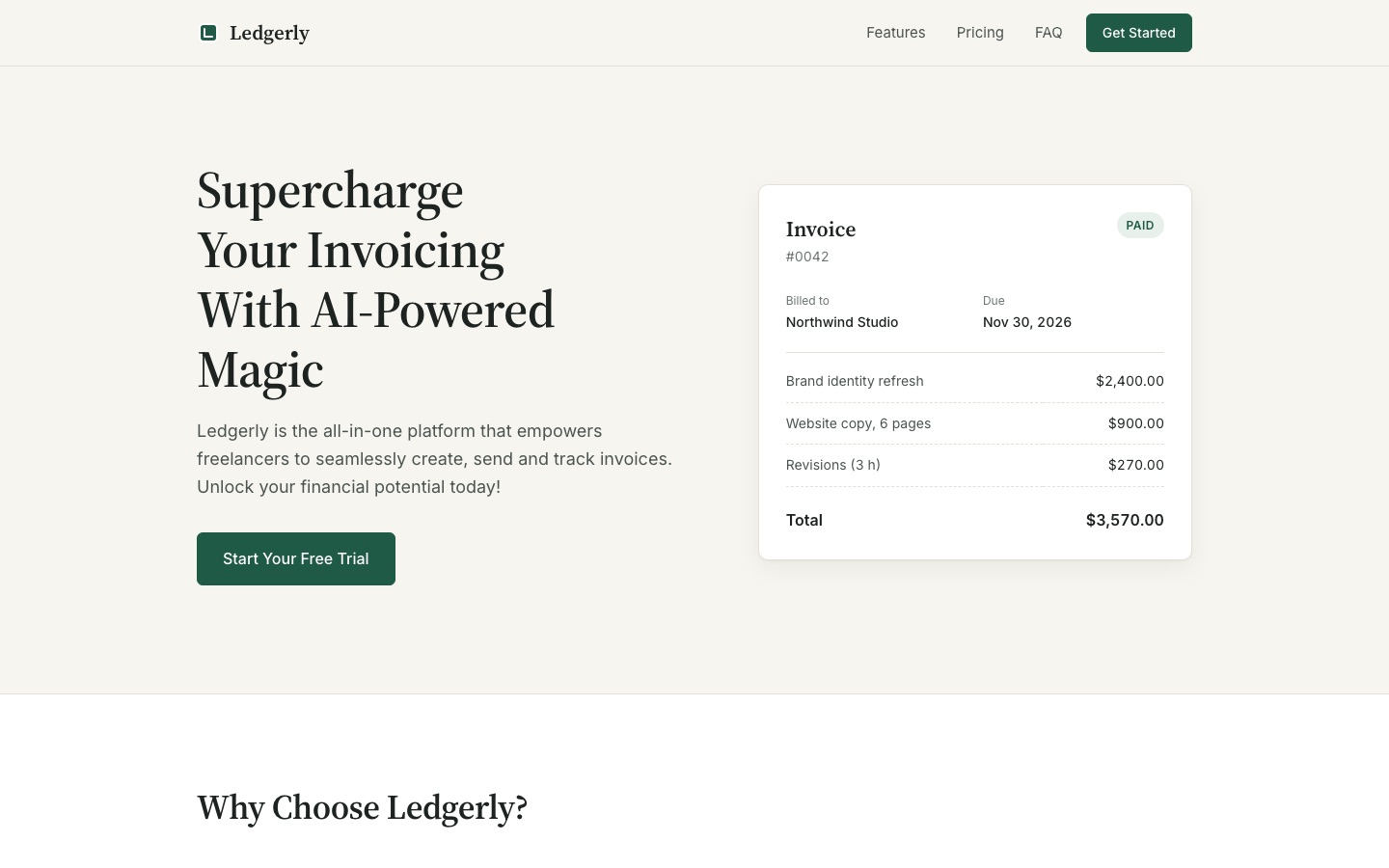
With Impeccable, Claude Code checked its page with the skill's detector and fixed what it flagged. The plain agent's page was already close, so the visible difference was small, at twice the cost.
Checked 2026-11-04
Tested 2026-11-04 with claude-opus-5-5
What our test produced
With the skillA calm page, checked and fixed with the skill's detector
Time
149 s
Cost
$0.83
Turns
24
Same model, no skillA similar calm page, plus a made-up sample invoice
Time
86 s
Cost
$0.41
Turns
12
With the skill: the first screen at 1440 pixels, captured by us in Chrome.
No skill: the first screen at 1440 pixels. The invoice, client and amounts are made up.
Best for
+Developers who want named design moves (polish, quieter, typeset, layout) instead of "make it look better"
+Teams that want a design check in CI or in the agent's loop, with no LLM and no API key
+Reviewing an existing page or component; the README says it is strongest on interfaces that already exist
Not the best fit for
–A big jump over a strong model on a simple page; in our test the plain agent already removed the gradients, emoji and grey-on-colour text
–Copy changes on their own; it flagged "Supercharge" as a buzzword but left the wording alone when asked to keep it
–Unreviewed live mode in an unfamiliar repository; its Apply step can start Codex or Claude Code with approvals and sandboxing off
How it works
1
One skill, 24 named commands
You name a move and a target: /impeccable polish settings, /impeccable quieter the landing page, /impeccable critique the pricing cards. Each command loads its own playbook. There are commands to steer (bolder, quieter, distill, colorize, typeset, layout, animate, delight, overdrive), to review (critique, audit), to finish (polish, harden, clarify, adapt, optimize, onboard) and to plan (shape, init, document, extract).
2
Project context files
/impeccable init reads the code, asks what it cannot infer, and writes PRODUCT.md. /impeccable document writes DESIGN.md from your current visual system. Later commands read both. Small refinements such as polish can run without them, as in our test.
3
A rule-based slop detector
A bundled engine checks pages against 62 rules, from overused fonts and gradient text to low contrast and cramped padding. It runs without an LLM. On CSS files it can only match patterns; rules such as contrast and tiny text need a rendered page, so point it at your dev server for the full check.
4
A hook that checks every edit
The installer offers a design hook for Claude Code, Cursor, Codex, GitHub Copilot, Grok Build and Hermes Agent. It scans each UI file the agent edits and hands the findings back before the agent says it is done.
Try it
1
Any supported agent
npx impeccable install
Run it in your project root. It detects your coding tools, asks for project or global install, and offers the design hook; the README says to accept it. Reload your tool afterwards.
2
Claude Code plugin
/plugin marketplace add pbakaus/impeccable
Then open /plugin and install Impeccable. This installs the skill without running the npx installer.
3
Codex: approve the hook
/hooks
In Codex, open /hooks and approve the project hook after installing, and again after an update that changes it. Commands start with $impeccable instead of /impeccable.
4
Set up the project once
/impeccable init
Writes PRODUCT.md. Run /impeccable document too if you want DESIGN.md written from your current styles.
5
Use it
/impeccable critique the pricing cards
/impeccable polish the landing page
/impeccable audit checkout
The README recommends narrow targets: one section reviewed closely beats a whole page at a glance.
Exit code 2 means findings, 1 means a target could not be scanned. The URL form uses your installed Chrome or Edge.
7
Turn off telemetry
npx impeccable telemetry off
Or set DO_NOT_TRACK=1. When a new design starts, the skill still fetches visual directions from impeccable.style; telemetry off stops the anonymous record of which ones you picked.
English commands; works on any web front end (HTML, CSS, JSX, TSX and the common frameworks)
What it produces
Edits to your front-end code from 24 design commands (polish, bolder, quieter, audit, critique and more), plus a detector with 62 rules for common AI design tells
Install
Run npx impeccable install in your project and accept the design hook, or in Claude Code run /plugin marketplace add pbakaus/impeccable and install it from /plugin
From the skill’s own repository. “Not stated” means the repository does not say.
Our test
Impeccable is a free, Apache-2.0 design skill by Paul Bakaus for coding agents. It adds 24 commands such as polish, bolder, quieter, critique and audit, and a detector with 62 rules for the tells of AI-made pages: Inter everywhere, purple gradients, cards inside cards, grey text on colour. We gave Claude Code the same purple-gradient pricing page with and without the plugin. Both runs produced a calm, green, readable page. With Impeccable, the agent ran the detector on its own work, fixed what it flagged and avoided the fonts and cream background the detector calls defaults; it also took twice as long and cost twice as much.
/impeccable polish this landing page. Context: Ledgerly is invoicing software for freelancers (designers, developers, writers). The page should feel calm and trustworthy, not hyped. Keep all the copy, the three plans and their prices. Work only on index.html and styles.css, and don't ask me questions: decide yourself.
The page we started from: part of styles.cssA typical AI-made SaaS page: Inter, purple gradients, gradient headline text, light grey text, emoji icons and a scaled-up "popular" card. Impeccable's detector found 26 problems in it.
With Impeccable: the new colours and fonts291 lines added and 73 removed in two files. After its first version the agent ran the detector, which flagged a cream background and cramped padding in three sections. It switched to a cool grey and fixed the padding. The final check left one finding: the word "Supercharge" in the copy it was told to keep.
/* Ledgerly — cool ledger-paper grey, ink, one ledger green. */
:root {
  --paper: #f2f4f2;
  --ink: #1c2220;
  --ink-soft: #4d5552;      /* 7.0:1 on paper */
  --ink-faint: #69716d;     /* 4.7:1 on paper */
  --accent: #1f5a47;        /* ledger green, 7.6:1 on paper */
  --serif: "Newsreader", "Iowan Old Style", Georgia, serif;
  --sans: "Public Sans", system-ui, -apple-system, "Segoe UI", sans-serif;
}
Same model, no plugin: the new colours and fonts312 lines added and 74 removed. It reached a very similar page and added a sample invoice card beside the headline. The detector flagged its Inter font and cream background, and two lines of grey text at 4.4:1 contrast, just under the 4.5:1 that WCAG AA asks for.
We wrote a small pricing page for a made-up invoicing app, Ledgerly, with the habits Impeccable targets: Inter, a purple gradient hero, gradient headline text, light grey text, emoji icons, pill buttons and a scaled-up "Most Popular" card. Impeccable's own detector found 26 problems in it.
We asked Claude Code to polish it once with the Impeccable plugin loaded from the repository at commit f864521 (plugin version 4.8.0) and once with nothing installed. Both runs used the same model and settings, could read and edit files and run commands, and got the same brief: calm and trustworthy, keep the copy and prices, no questions. The plain run's request was the same sentence without the /impeccable command. We then ran Impeccable's detector on both results. The test sessions also had a few of our own general skills loaded, the same for both runs.
What we found
Both pages came out calm and close to each other. Each run removed the gradients and emoji, chose a serif for headings, a single deep green (#1f5a47 in both) as the only accent, outline icons, equal-height plan cards and visible keyboard focus. The plain run also added a sample invoice beside the headline, with a client and amounts it made up.
Impeccable checked its own work. It ran the skill's context step, read the polish and craft playbooks, wrote a first version, then ran the detector. The detector flagged a cream background and cramped padding in three sections; the agent switched to a cool grey and fixed the padding, then took its own screenshots at three widths.
The detector scored the plain page lower. On the finished files, the plain page had three findings (Inter, a cream background, the buzzword) plus two lines of grey text at 4.4:1 contrast, just below WCAG AA. Impeccable's page had one: "Supercharge" in the headline we told both runs to keep. This is the skill's own checker grading its own rules, so read it as "it followed its rules", not as an independent score.
It respected the brief. To silence the buzzword warning it briefly created an .impeccable/config.json, then deleted it because we had said to touch only two files, and told us how to keep it if we wanted.
The Impeccable run took 24 turns, 149 seconds and $0.83 at API prices, as reported by Claude Code. The plain run took 12 turns, 86 seconds and $0.41. Both runs saved screenshots to the system temp folder. This is one small page with one model, so read it as an example, not a benchmark.
FAQ
What is Impeccable?
A design skill for coding agents by Paul Bakaus. It gives the agent 24 named design commands, project context files (PRODUCT.md and DESIGN.md) and a rule-based detector for common AI design tells. It is open source under the Apache 2.0 licence.
Does it make a real difference?
In our one test with Claude Opus 5.5 the plain agent already produced a calm, readable page from the same brief, so the visible gap was small. Impeccable's run checked its own work with the detector and fixed what it found, used fonts and colours outside the detector's list of defaults, and wrote down contrast ratios next to its colours. It took 149 seconds against 86. The README shows a bigger gap on a new page built from a brief.
Do I need an API key or account?
No. The skill and the detector run locally with no API key. The skill's engine downloads once into ~/.impeccable/bin if it is not shipped next to the skill. When a new design starts, it fetches visual directions from impeccable.style.
Which agents does it work with?
The README lists Claude Code, Cursor, Codex CLI, GitHub Copilot, Devin, Replit Agent, Gemini CLI, Grok Build, OpenCode, Google Antigravity, Kiro, Trae, Rovo Dev, Qoder, Mistral Vibe, Pi, Hermes Agent, DeepSeek Harness and Veto. The design hook is available on Claude Code, Cursor, Codex, GitHub Copilot, Grok Build and Hermes Agent.
What does it send or change outside my project?
It keeps its engine in ~/.impeccable (in our test it also wrote hook state and an update-check file there) and its project files under .impeccable/. With telemetry on, it records which suggested design directions you chose, anonymously; the README says project names, files, code and PRODUCT.md are never sent. Live mode can start the codex or claude command with approvals and sandboxing turned off to apply copy edits; set IMPECCABLE_LIVE_COPY_AGENT=chat or off to prevent that.
Can I use the detector in CI?
Yes. npx impeccable detect runs without an agent, and --github prints GitHub Actions annotations. Scan a running page by URL for the rules that need rendering, such as contrast and tiny text.
Is it free?
Yes. It is open source under the Apache 2.0 licence. You still pay for the AI agent you run it in.