On a 15-second Kling 3.0 clip, Claude Code with rea-video called every shot AI video and pointed to the frames that gave it away. On our own 78-second Remotion explainer the agent's reply was right, but the report it saved still says 47% AI video and 44% 3D, so read the reply, not only report.html.
Checked 2026-11-04
Tested 2026-11-04 with claude-opus-5-5
What our test produced
Kling 3.0 clip, 15 sAll four shots called AI video, with frame evidence
Time
3 min
Cost
$0.57
Turns
24
Remotion explainer, 78 sReply right; report.html still says AI video and 3D
Time
5 min
Cost
$0.84
Turns
30
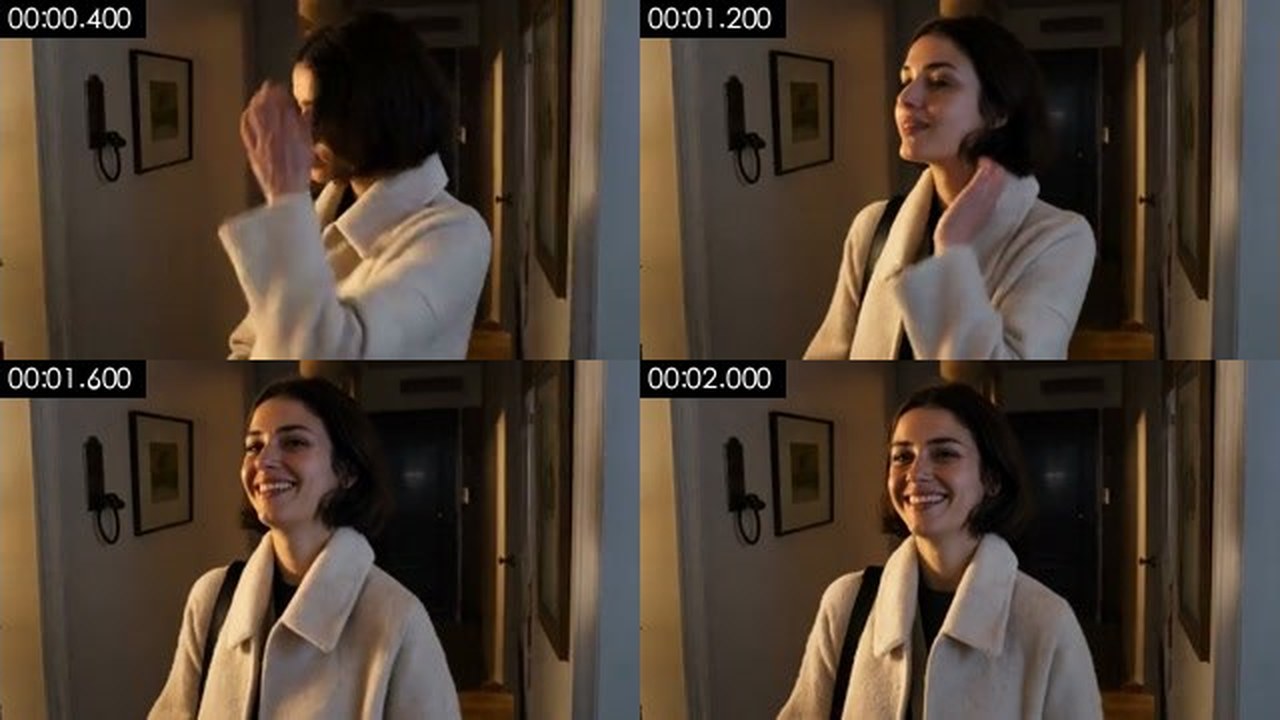
Kling clip, shot 1, at 0.4, 1.2, 1.6 and 2.0 s, from the frame sheet the agent pulled with rea-video tiles. Its main evidence was the bag strap, missing until 1.2 s and then on her shoulder at 1.6 s with nothing putting it there.
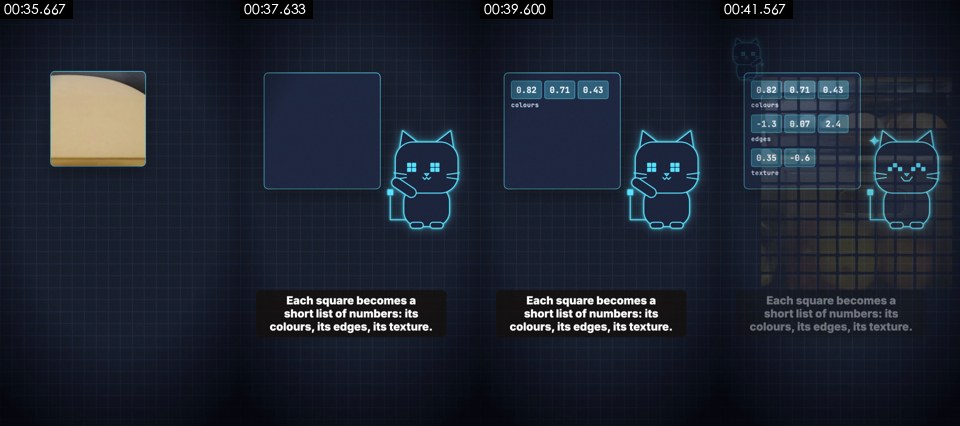
Explainer, shot 11: the tool's own frame sheet. The animation was rendered in code with Remotion; the merged report still labels it 3D render.
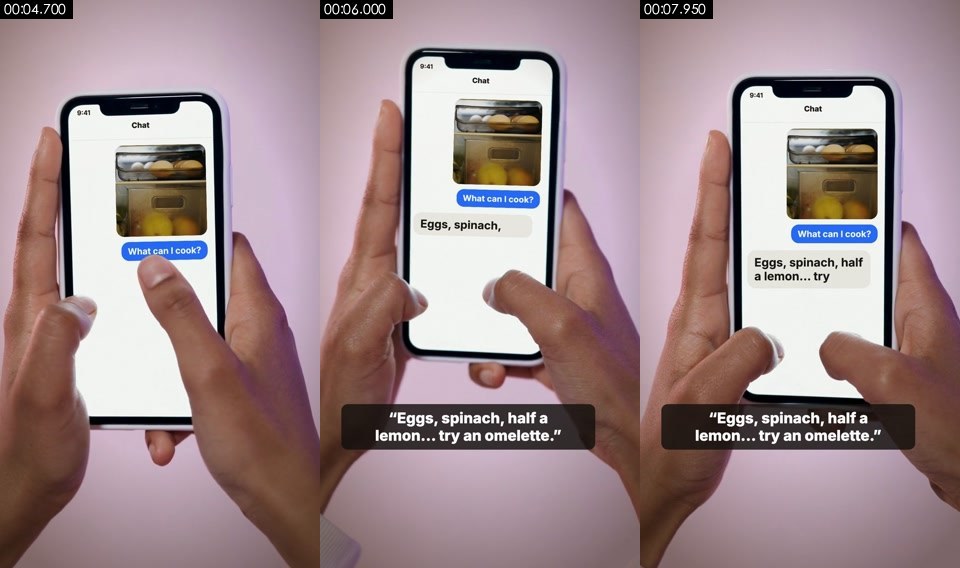
Explainer, shot 3: filmed stock footage with a chat screen composited on. The agent left it unconfirmed between stock footage and AI video; the report says AI video.
Best for
+Creators who want to know whether a viral clip was filmed, generated with AI or built as motion graphics before trying to make one like it
+Breaking a reference video into shots, caption timings, cuts and music tempo for a remake brief
+Claude Code or Codex users who can install a Python tool and ffmpeg and let the agent look at frames
Not the best fit for
–Readers who need the report itself in English: report.html, report.md and the generated prompts are written in Chinese, whatever language you ask in
–A one-click answer from the report alone; on our motion-graphics video the tool's labels stayed wrong after the agent's review
–Telling you who made a clip or which AI model was used; it says how a shot was made, and model guesses come with a warning
–Chat apps without a shell; the skill needs an agent that can run commands
How it works
1
Split and measure
rea-video decompose cuts the video into shots, saves first, middle and last frames of each, separates the sound into voice and music tracks, and measures each shot: frame cadence, sensor noise, whether the whole picture moves as one flat plane, and any AI or renderer tags in the file's metadata.
2
Label each shot, with evidence
Every shot gets a probability for each of ten picture types. Hard evidence such as an AI-generator tag or a 24-frame cadence counts for more than how a shot looks. Shots it is unsure about are flagged for review, and anything it cannot decide is written as unconfirmed rather than guessed.
3
The agent checks the frames
rea-video review writes a task list of frames to look at. The agent fills in its own verdict for each shot, and rea-video apply-review merges those answers with the measurements, so strong evidence still counts. A separate vision model such as Gemini can be added, but the README says the agent's own review was more accurate.
4
Report and remake plan
The output is a one-line verdict, a shot table, caption and sticker timings (exportable as SRT or ASS), voice, music and effect notes, a list of real material you would need, and a remake plan grouped into AI generations, film shoots and code. A paid generation step, capsule-cinema, runs only after a dry run and your approval.
Try it
1
Ask your agent
Install https://github.com/JuneYaooo/rea-video, then break down this video: /path/to/video.mp4
This is the README's own quick start, for Claude Code, Codex or any agent that can run commands. The agent installs the tool, reads the workflow and runs it. You need ffmpeg and Python 3.10 or later.
A virtual environment keeps it apart from your other Python projects; ours took about 280 MB. The first run downloads a 64 MB voice-separation model into ~/.cache/rea-video.
Or clone the repository and run bash scripts/install_skill.sh, which installs the tool and links the skill into ~/.claude/skills, ~/.codex/skills and ~/.agents/skills.
Any OpenAI-compatible endpoint that takes images or video, such as Gemini or Doubao. It sends short clips and key frames of each shot to that service, which also lets it hear sound effects. We ran without one.
Key facts
Author
June (JuneYaooo)
Licence
MIT, as stated in plugin.json and pyproject.toml; the repository has no LICENSE file
Version checked
0.1.0
Works with
Claude Code (as a plugin) and Codex; any agent that can run shell commands and, ideally, look at images
Language
Works on videos in any language (on-screen text is read in Chinese and English, or Japanese); the agent replied in English when asked, but report.html, report.md and the generated prompts are in Chinese
What it produces
A shot-by-shot breakdown of how a video was made (filmed, AI video, 3D, code-rendered, screen recording and more), its captions, edit and sound, a remake plan, and report.html, report.md, breakdown.json, frame sheets and separated voice and music tracks
Install
Ask your agent to install it from the repository URL, or run pip install "rea-video[ocr] @ git+https://github.com/JuneYaooo/rea-video" for the command-line tool and add the skill with /plugin marketplace add JuneYaooo/rea-video, then /plugin install rea-video@rea-video; needs ffmpeg and Python 3.10 or later
From the skill’s own repository. “Not stated” means the repository does not say.
Our test
rea-video is a free agent skill and command-line tool by June (JuneYaooo) that works out how a video was made. It splits the video into shots, measures each one (frame cadence, sensor noise, metadata, on-screen text) and labels it as filmed, AI video, digital human, 3D, 2D animation, stop motion, code-rendered, screen recording, a still with a push-in, or a still frame. It also times every caption, finds stickers and picture-in-picture, separates voice from music, estimates tempo, and writes a remake plan split into what to film, what to generate and what to build in code. An agent that can see images then checks the uncertain shots itself and merges its answers into the result. We gave Claude Code two videos whose making we know: a Kling 3.0 clip and a Remotion explainer made by Ordalin's maintainer. It installed the tool, ran the whole workflow and answered in English in three and five minutes, for $0.57 and $0.84 at API prices.
Install the rea-video command-line tool from https://github.com/JuneYaooo/rea-video into a Python virtual environment in this folder (.venv), then use the rea-video skill to break down this video: <video> . Write all output into ./out in this folder. No VLM is configured, so do the visual review yourself. Answer in English and don't ask me questions.
Kling clip: the agent's shot tableFrom the final reply. It also guessed at a Kling-style multi-shot model from the even shot lengths, which was right, and said nothing in the file proved it.
| # | Time       | Type (final)         | Main evidence
| 1 | 0.00–3.77  | AI video 0.83        | Her bag strap is missing at 0–1.2 s, then appears on her
|   |            |                      | shoulder at 1.6 s with nothing putting it there
| 2 | 3.77–7.50  | AI video 0.69        | The mask appears without coming from anywhere and moves
|   |            |                      | as if it weighs nothing; her fingers blend into it
| 3 | 7.50–11.27 | AI video 0.71        | Real-looking wool, hair and leather, nothing like clean
|   |            | (tool said 3D, 0.44) | 3D materials; the hallway's doors shift as she walks
| 4 | 11.27–15.00| AI video 0.67        | Her face shape changes as she gets closer; her hand on
|   |            |                      | the door frame turns to mush
Remotion explainer: where the agent overruled the toolFrom the final reply. The merged report kept 47% AI video, 44% 3D and 9% code-rendered.
My verdict is different from the tool's. I gave it my review of all 20 shots, but the merge only changed shot 8 (to code-rendered). For the rest, the tool still says "3D render" or "AI video". Those labels come from texture statistics and from evidence that some source material was 24 or 25 fps. My reasons for disagreeing:
- Nothing on screen has 3D geometry. It's flat vector UI, regular pixel grids and a flat 2D cat mascot.
- None of the animation shows AI-video artifacts like warping or flicker.
- The 24 fps evidence most likely comes from the hands clip and the cross-fades, not from the animation itself.
What we tested
We gave Claude Code two videos whose making we know, so we could check its answers.
A 15-second Kling 3.0 clip: a woman in a cream coat in a dark hallway, with a white mask, in four shots, generated with Kling 3.0 at 854 × 480 by Ordalin's maintainer.
A 78-second vertical explainer made by Ordalin's maintainer: motion graphics rendered in code with Remotion, real stock photos, one filmed stock clip of hands holding a phone with a chat screen composited on, captions, a text-to-speech voice, library music and sound effects.
For each one we ran the same request in a fresh folder: install the tool from GitHub into a virtual environment, break the video down with the rea-video skill, do the visual review yourself because no vision model is configured, and answer in English. The skill was loaded from the repository at commit faadcfd (version 0.1.0). Both runs installed the tool, ran decompose, review, apply-review and summary, pulled extra frame sheets for close calls, and finished without help.
What we found
The AI clip was called right, for the right reasons. All four Kling shots ended as AI video. The tool alone had called the hallway walk 3D; the agent changed it to AI video, citing wool, hair and leather that looked real and doors that shifted as she walked. Its evidence was concrete: a bag strap that appears from nowhere, a hand on the door frame that turns to mush.
It said what it could not know. It put the chance of a filmed 24p shoot at about 15%, guessed a Kling-style multi-shot model only from the even shot lengths, and left the music's source unconfirmed because it could not listen.
The report got our explainer wrong, and stayed wrong. The tool read the file's Remotion tag but still labelled the video 47% AI video, 44% 3D and 9% code-rendered. The agent reviewed all 20 shots and said it was nearly all code-rendered motion graphics, which is right. The merge then changed only one shot, so report.html still carries the wrong split and a remake plan of 14 AI video generations. The agent's reply flagged the disagreement, wrote its own corrected table to a separate file and suggested adding the video to the tool's test set.
The filmed clip stayed unconfirmed. The agent could not tell whether the hands-and-phone shot was stock footage or AI video and left it at roughly even odds; the report calls it AI video. It did see that the chat screen was added afterwards. It also called the voice likely text-to-speech, which was right.
The edit and captions came out in detail. It found 42 caption lines with their style and timing, and 35 sound-effect candidates. It warned that its count of 433 text labels was inflated by the numbers inside the animation.
Everything except the reply is in Chinese. Both reports and every generated prompt were in Chinese, though we asked for English and the agent answered in English.
The runs took 24 and 30 turns, 3 and 5 minutes, and $0.57 and $0.84 at API prices, as reported by Claude Code. These are two videos with one model, so read them as examples, not a benchmark.
The author's own figures
The README reports how often the shot type is right, weighted by shot duration, on its own test videos:
Original files, tools only (offline, free): 98.3% on the tuning set of 15 videos, 99.6% and 98.9% on two held-out sets of 9 and 7.
Recompressed downloads, 10 videos: 88.6% with tools only, 99.6% with a Gemini vision model, 100% with the agent's visual review.
It also reports 97 to 99% for finding real embedded material and every shot boundary correct. The README notes that platform recompression wipes out the noise evidence the tools rely on, which is why downloaded videos need a visual check.
FAQ
What does rea-video do?
It reverse-engineers a video. For every shot it says whether the picture was filmed, AI-generated, a digital human, 3D, 2D animation, stop motion, rendered in code, a screen recording or a still image, with the evidence. It also lists captions with timings, stickers, cuts, voice, music and sound effects, the real material you would need, and a plan to remake the video.
Is rea-video the same as REA?
No. REA (Reverse Engineer Anything, rea.tools) is a separate project for coding agents. The rea-video README credits it as the inspiration for its approach: trace what you see back to how it was made and back every claim with evidence.
Do I need a vision model or an API key?
No. The measurements run offline and free, and an agent that can see images, such as Claude Code, checks the uncertain shots itself; that is how we tested it. A video-capable model such as Gemini or Doubao can be added through an OpenAI-compatible endpoint. It also hears the soundtrack, so sound effects and voice sources are less often left unconfirmed. Without one, the agent marks audio guesses as unconfirmed.
Is the report in English?
No. In our test the agent answered in English because we asked, but report.html, report.md and the image and video prompts in the remake plan were written in Chinese. On-screen text recognition covers Chinese and English by default and Japanese with --ocr-lang ja.
How accurate is it?
The README reports 98 to 99.6% on original files with the tools alone, and 88.6% on recompressed downloads, rising to 100% with the agent's visual review. The figures are by shot duration, on about 40 videos in its own test sets. In our test it was right on a Kling clip but labelled our code-rendered explainer as AI video and 3D, even after the agent's correct review.
Can it remake the video for me?
Partly. It writes the plan: what to film with lighting and kit, what to generate and with which model, and what to build in Remotion. AI shots can be sent to the author's capsule-cinema pipeline, which calls paid video models only after a dry run and your approval. We did not test generation.
What does it leave on my computer?
The output folder (report, frame sheets and separated audio; 50 MB for our 78-second video), the Python environment you install it into (about 280 MB), and a 64 MB voice-separation model in ~/.cache/rea-video.
Is it free?
Yes. The plugin and package files state the MIT licence, though the repository has no LICENSE file. You pay for the agent you run it in and for any vision model or video generation you add. The README asks you to remake videos only with material you have the rights to.