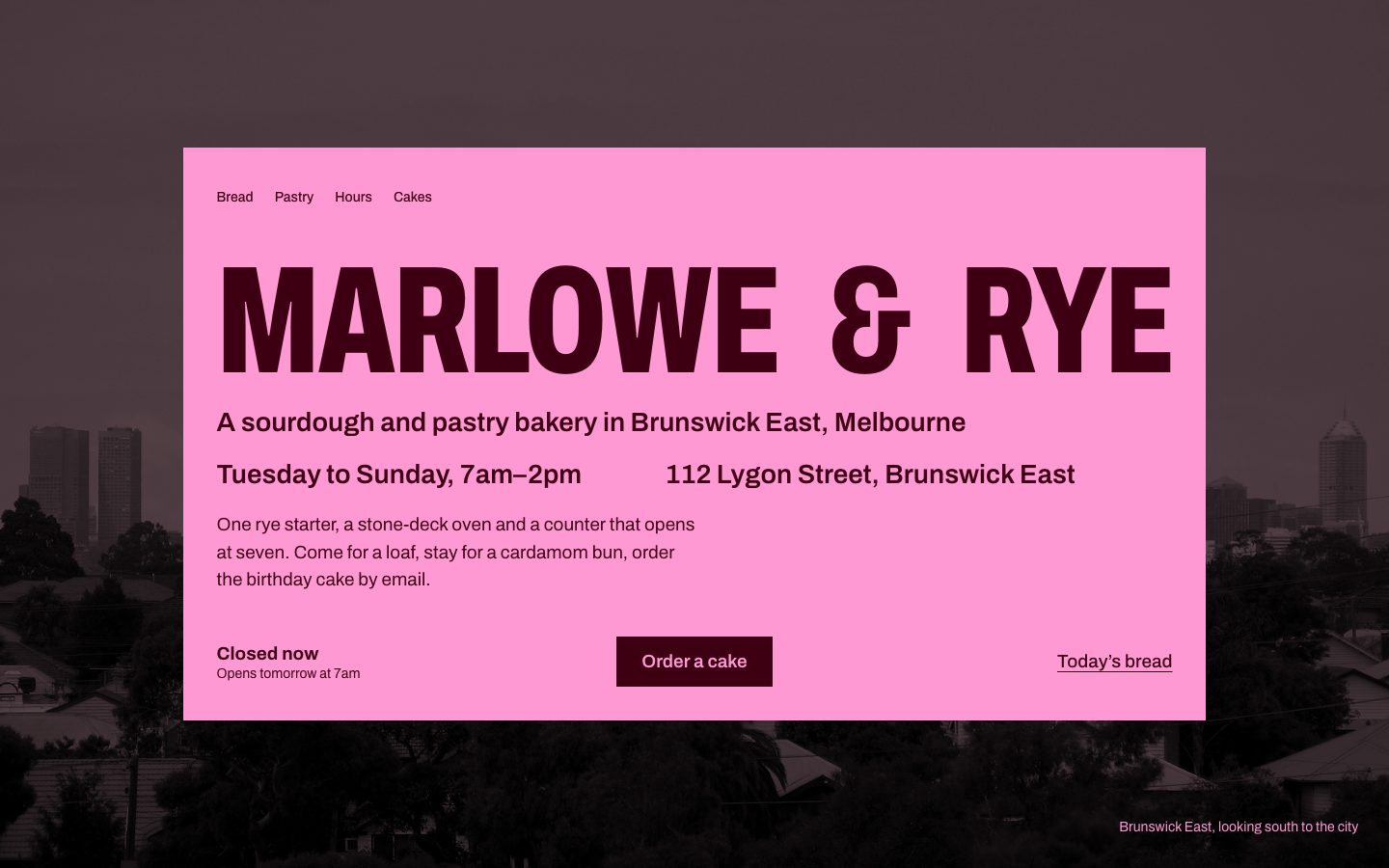
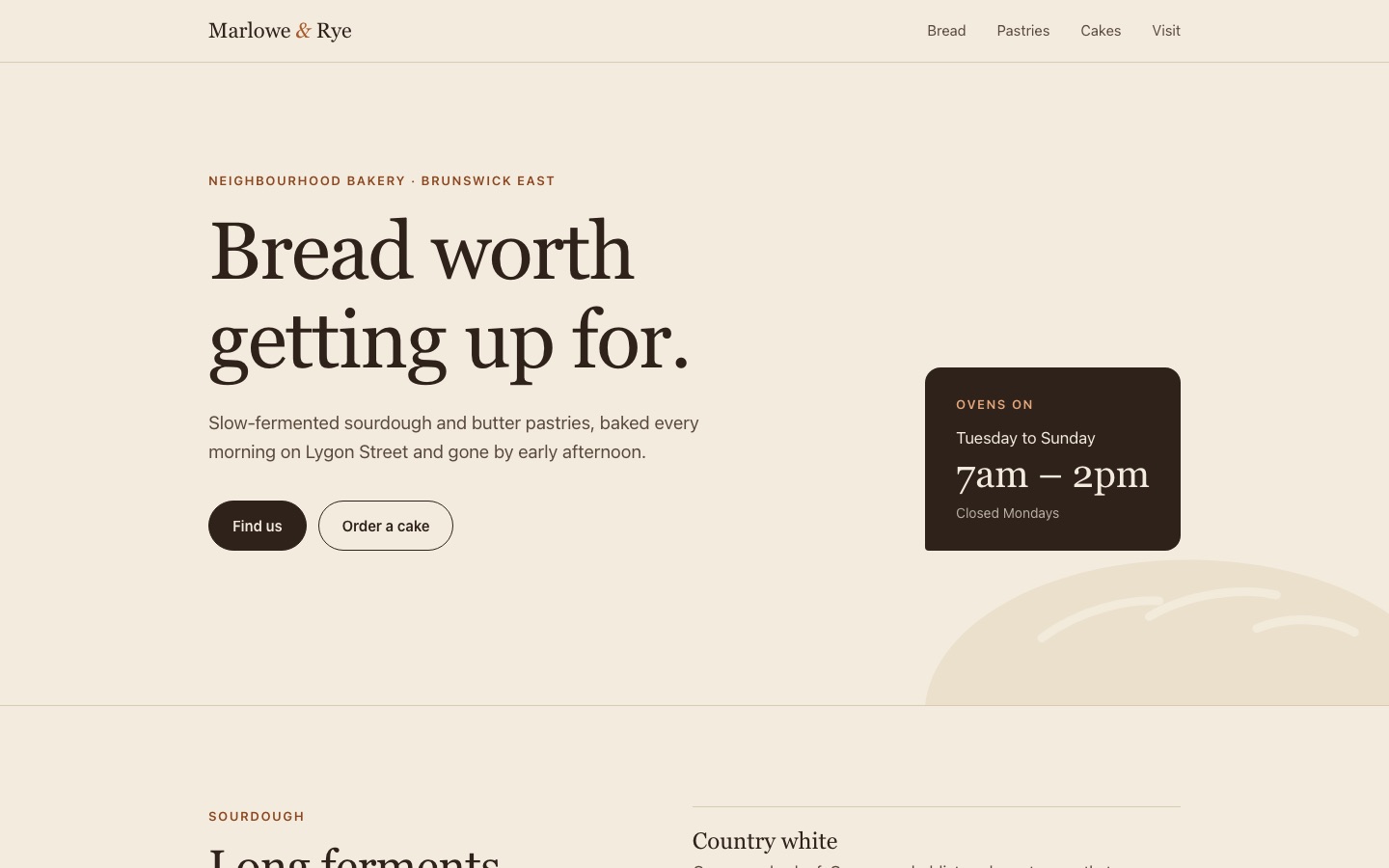
With the skill, Claude Code designed a real page instead of the familiar cream template, with credited photographs and a browser check. It also took 18 minutes, cost 12 times as much and made up 32 prices.
Checked 2026-11-04
Tested 2026-11-04 with claude-opus-5-5
What our test produced
With the skillA designed page with credited pictures; passed its own browser check
Time
18 min
Cost
$5.15
Turns
61
Same model, no skillThe familiar cream page, no pictures
Time
104 s
Cost
$0.42
Turns
12
With the skill: the first screen at 1440 pixels, from the skill's own browser check.
No skill: the first screen at 1440 pixels, captured by us in Chrome.
Best for
+Landing pages, one-pagers and shop or event sites that should not look like every other AI-built page
+Briefs without photographs, where credited pictures from open collections are better than none
+Agents you want to check their own work in a browser at desktop, tablet and phone widths before they stop
Not the best fit for
–Quick drafts; our run took 18 minutes and about 12 times the plain agent's cost
–Pages that must use only the facts you supply; in our test it invented a priced menu and a baking timetable
–Strict no-JavaScript or light-weight briefs; it added a script and 6.5 MB of pictures and footage
How it works
1
A script deals the direction
draw.mjs reads the brief and sector and deals three of 20 directions, such as "The page is the object" or "The split stage". The agent picks one, then the script deals its typeface, palette, hero and a blueprint for each section from a library the author distilled from 247 curated sites.
2
Real pictures, with credits
assets.mjs searches Wikimedia Commons, Openverse, the Met, the Art Institute of Chicago, NASA and the Internet Archive for public-domain, CC0, CC BY and CC BY-SA files, downloads them into assets/, and writes the credit lines for the footer. It needs no API key.
3
A browser check that fails the page
lint.mjs scans the source for banned patterns. inspect.mjs opens the page in your installed Chrome, Edge or Chromium at 1440, 768 and 390 pixels, measures headlines, labels, rules, contrast, motion and covered text, saves screenshots, and lists every FAIL and WARN with a fix.
4
Look and fix
The agent must read its own screenshots and fix the worst problems, up to three rounds. Dashboards and app screens take a separate route with their own styles and inspect.mjs --app checks.
Start a new Codex session afterwards so the skill loads.
4
Ask for a page
Use the design-taste-frontend skill. Build a one-page website for <your business>: <what it sells, hours, address, the one action you want>.
We named the skill in our request. Give it the real facts you have, prices included, or it will write its own. Expect 20 to 45 minutes per page.
Key facts
Author
Leon Lin (Leonxlnx)
Licence
MIT
Version checked
2.1.5
Works with
Claude Code and Codex (plugins), plus the other agents the npx skills CLI installs into
Language
English; works on any web front end (plain HTML and CSS, React, Next.js, Vue, Svelte, Astro, Tailwind)
What it produces
A landing page, one-pager or app screen built from a dealt art direction, with credited open-licence pictures and screenshots from its own browser check
Install
Run npx skills add https://github.com/Leonxlnx/taste-skill --skill "design-taste-frontend", or in Claude Code run /plugin marketplace add Leonxlnx/taste-skill, then /plugin install taste-skill@taste-skill
From the skill’s own repository. “Not stated” means the repository does not say.
Our test
Taste Skill is a free, MIT-licensed skill by Leon Lin that tries to stop coding agents from building the same average landing page. A script deals three of 20 researched art directions, the agent picks one, finds openly licensed pictures of the subject's world, builds the page and then measures it in a real browser at three widths, failing it on things like eyebrow labels, hairline rules and headlines that wrap too far. We asked Claude Code for a one-page bakery site with and without it. With the skill, it built the page as the shop's pink hours card over a photograph of Brunswick East, with real credited pictures, a footage loop and a cake order form; it took six browser checks to get from 7 failures to none. Without it, Claude Code made the familiar cream page with a serif headline, rounded buttons and no pictures in 104 seconds. The skill run took 18 minutes and $5.15 at API prices against $0.42, and it invented 32 prices the brief never gave.
Build a one-page website in this folder for Marlowe & Rye, a neighbourhood bakery in Melbourne: sourdough, pastries, opening hours (Tue to Sun, 7am to 2pm), the address 112 Lygon Street, Brunswick East, and a call to order celebration cakes by email. Plain HTML and CSS, no build step. Don't ask me questions: decide yourself.
With the skill: the direction it was dealtOf the three directions offered, the agent chose "The page is the object" and built the page as the bakery's hours card. The script dealt the rest.
# DIRECTION SHEET — The page is the object
seed 1520007814 · drawn 2026-11-04 · sector restaurant

| Hero        | Card over a dim room
| Type        | Archivo
| Colour      | Burgundy and bubblegum
| Sections    | intro (Title, note, facts row) → list (Giant word, filled bar rows)
              → showcase (Output slips along the edge) → contact (Clip-out coupon form)
              → cta (The reply card) → footer (The back of the card)
| Motion      | Pinned story
| Photographs | the "City by day" set, as atmosphere
With the skill: the first browser checkThe first finished page failed seven checks. It took five more rounds to reach no failures; the one warning left was a pinned title crossing a picture, which the agent kept.
RESULT: 7 FAIL, 8 WARN — not done.
  [headline-lines] @1440px  "BAKED ON LYGON STREET" → 3 lines; "ORDER A CELEBRATION CAKE" → 3 lines
  [eyebrow] @768px  "Potato & dill" above "PASTRY"
  [edge-text] @768px  "6:30 Croissants" (8px from the right)
  [covered-text] @768px  "SEE YOU AT SEVEN" (screen 7, 100% hidden)
  …
RESULT: 2 FAIL, 1 WARN → 1 FAIL → 1 FAIL → 0 FAIL, 1 WARN — measurements pass.
Same model, no skill: the skill's checker on its pageWe ran the skill's inspect.mjs on the plain agent's page afterwards. It is the skill's own yardstick, so read it as a description of the familiar look, not a quality score.
FAIL  [eyebrow]      4 labels above headings: "Neighbourhood bakery · Brunswick East" above "Bread worth getting up for."
FAIL  [micro-label]  7 tiny uppercase letter-spaced labels
FAIL  [hairline]     13 thin rules or dividers
FAIL  [few-pictures] 0 pictures on the page
FAIL  [still-page]   nothing moves while the page loads and scrolls
WARN  [palette-cream] yellow-cream background #f3ebdd
RESULT: 5 FAIL, 6 WARN — not done.
What we tested
We asked Claude Code for a one-page website for an invented Melbourne bakery: sourdough, pastries, opening hours, an address and a way to order celebration cakes by email, in plain HTML and CSS, without asking questions. We ran it once with the skill copied in from the repository at commit 12af471 (version 2.1.5), naming the skill in the request, and once with nothing installed. Both runs used the same model and settings, could read and write files, run commands and use the web, and had Node and Chrome available. The test sessions also had a few of our own general skills loaded, the same for both runs.
What we found
It did not look like the average page. The plain run made the familiar cream page: a small uppercase label over a large serif headline, two rounded buttons, a dark card with the hours and thin dividers between sections. The skill's run was built as the shop's own hours card in pink over a burgundy ground, with one heavy typeface throughout.
It used real, credited pictures. It searched open collections, downloaded a view of Brunswick East, a photograph of Lygon Street (captioned honestly as further down in Carlton), an 1878 rye field by Ivan Shishkin, two old oven prints and a short oven video, and listed every credit in the footer. The plain page had no pictures at all.
It checked itself and kept fixing. The first browser check failed seven rules, including headlines wrapping to three lines and a headline hidden under a picture on tablet. After six checks it passed with one warning, and both pages read well on a phone.
It made up details. The skill's page priced 32 items, from a $5.50 croissant to cakes from $65, and printed a baking timetable. None of that was in the brief. The plain run invented menu items but no prices.
It cost much more and weighed more. The skill run took 61 turns, 18 minutes and $5.15 at API prices; the plain run took 12 turns, 104 seconds and $0.42. The skill's page also added a 6.7 KB script for an open-or-closed sign, the order form and motion, and 6.5 MB of pictures and footage, against two small files.
This is one brief with one model, so read it as an example, not a benchmark.
FAQ
What is Taste Skill?
An open-source Agent Skill, installed as design-taste-frontend, that makes a coding agent design a page instead of assembling the average landing page. It deals an art direction from a library of 20, finds credited pictures from open collections, and checks the result in a real browser at three widths before the agent may finish.
Does it make a real difference?
In our test, yes, to the look. The plain agent built a cream page with a serif headline, small uppercase labels, rounded buttons and no pictures. With the skill, the page was a pink hours card over a dimmed photograph of Brunswick East, set in one heavy typeface, with old prints of rye and ovens, a footage loop and a cake order form. Which one suits a bakery is a matter of taste, but the skill's page did not look templated.
How long does it take and what does it cost?
The README says 30 to 45 minutes and a few hundred thousand tokens per build. Ours took 61 turns, 18 minutes and $5.15 at API prices, as reported by Claude Code. The plain agent took 12 turns, 104 seconds and $0.42.
Where do the pictures come from, and can I use them?
From open collections such as Wikimedia Commons, Openverse and the Met. It offers only public-domain, CC0, CC BY and CC BY-SA files, saves their details in assets/credits.json and puts the credits in the footer. CC BY-SA pictures carry a share-alike condition if you change them. Replace them with your own photographs when you have them.
Will it make things up?
It can. Our brief gave hours, an address and the products, but no prices. The skill run filled the menu, cake sizes and a baking timetable with 32 prices and times of its own; the plain run wrote menu items but no prices. Check every fact before you publish, or give it your real menu.
What does it leave on my machine?
Its working files and screenshots go into a .taste-skill folder in your project, and the pictures into assets/. It also keeps a short list of past directions in ~/.taste-skill/history.json, so it does not deal you the same look twice; set TASTE_SKILL_HISTORY to move it. The browser check starts your installed Chrome in the background.
Is it free?
Yes. It is open source under the MIT licence and needs no API keys. You pay for the agent and model it runs on, and a build uses many of their turns.