



Ordalin
Submit a tool

Reviewed tool profile

RemoveHandwriting

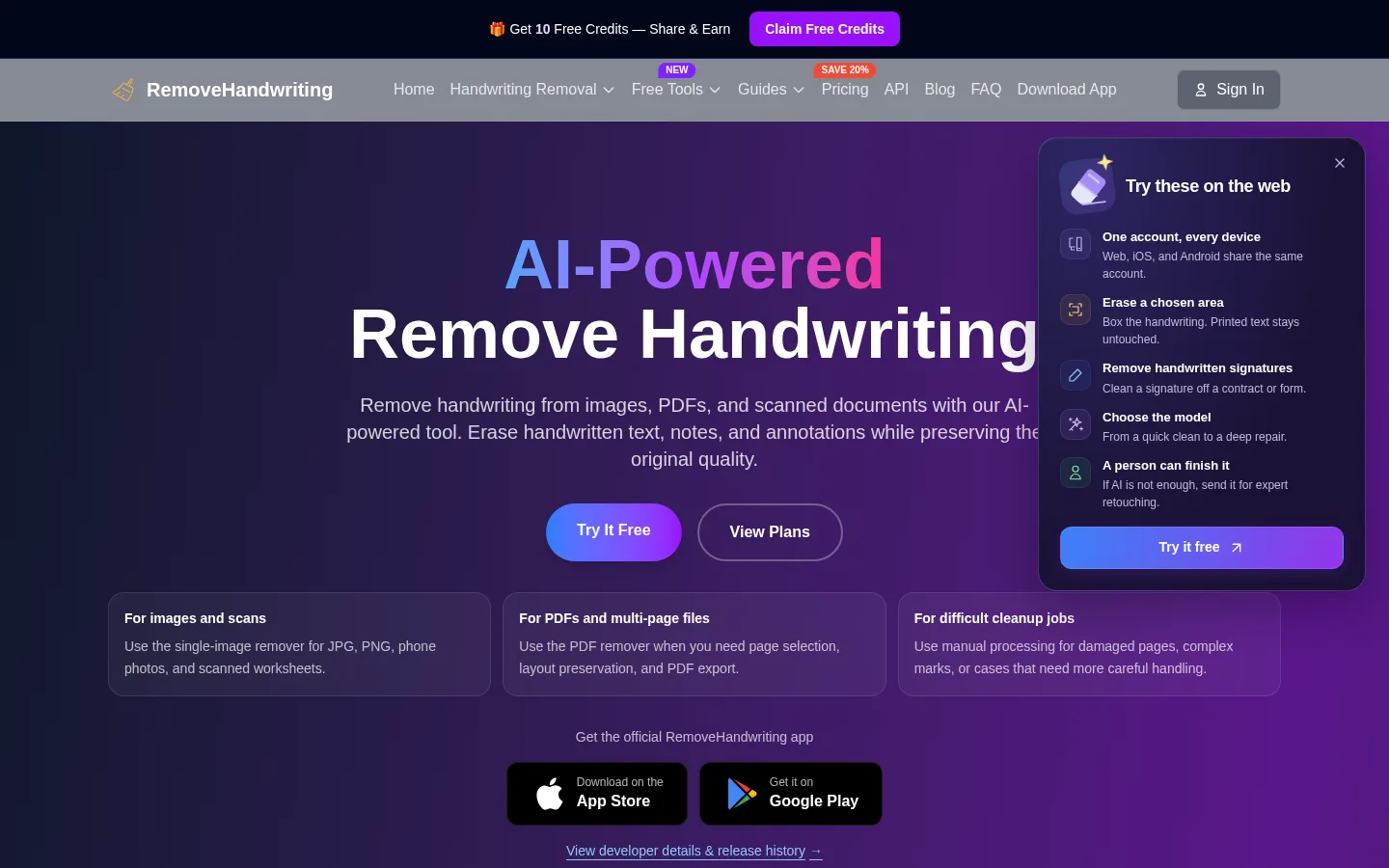
Erase handwritten answers, notes and signatures from photos, scans and PDFs while keeping the printed page.

Sources checked

Visit website ↗
Pricing
Credit-based. Standard costs 1 credit per image, Color 3 and Ultra 5. Subscriptions start at $3.90 a month for 60 credits (Basic) or $24.90 a month for 700 credits (Pro), with quarterly and yearly discounts; one-time packs cost $9.99 for 65 credits up to $34.99 for 280 and never expire. A free preview of one Ultra image is available, but trial results can't be downloaded. Official source 1 ↗ · Official source 2 ↗
Available as
Web app for single images (up to 10 MB), PDFs and image batches. · Official iOS (15.5+) and Android (8.0+) apps sharing the same account and credits; processing needs an internet connection. · REST API sold as separate packages: after purchase you get a dedicated API domain and token by email within two hours; images must be under 5 MB and 4,000 px on the longest side. Official source 1 ↗ Official source 1 ↗ Official source 1 ↗
Primary group
Image & Design

Also consider

See all 6 similar tools ↓

What it does

RemoveHandwriting is an AI document-cleanup tool from Shenzhen Liwa Software Technology that erases handwritten answers, notes, pen marks and signatures from photos, scans and PDFs while keeping printed text, tables and layout. You pick one of three models per image (Standard, Color or Ultra), can limit removal to a selected rectangle, clean whole PDFs or batches of images, and send hard cases to a paid human cleanup service. It runs on the web and in iOS and Android apps, with a separate REST API for businesses.

Official source 1 ↗ · Official source 2 ↗

Features

  • Three cleanup models. Standard gives a fast scan-style black-and-white result, Color keeps the original colours, and Ultra handles dense or difficult scans; they cost 1, 3 and 5 credits per image. Official source 1 ↗
  • Selected-area removal. On single images you can draw a rectangle and erase only the handwriting inside it, leaving other marks untouched. This mode requires Ultra. Official source 1 ↗
  • PDF and batch cleanup. PDFs up to 50 MB and 50 pages can be previewed and cleaned page by page, up to 20 pages per run; the bulk tool takes batches of up to 20 images. Official source 1 ↗
  • Signature remover. Removes handwritten signatures from images and scanned PDFs at 5 credits per image or page, while trying to keep dates, notes, stamps and layout. Official source 1 ↗
  • Human expert cleanup. Images the AI can't clean can be sent to the team for manual cleanup, usually within about 12 hours. Official source 1 ↗ · Official source 2 ↗
  • Privacy. Uploaded images and PDFs are deleted after processing and are not used to train AI models. Official source 1 ↗

Pricing & free limits

Credit packs

$9.99–$34.99One-time purchase

Starter 65 credits ($9.99), Popular 130 ($18.99), Bulk 280 ($34.99); credits never expire. Official source 1 ↗

Billing details

Card payments go through Stripe, or you can pay with PayPal. Subscriptions are cancelled from the account page; downgrades need support. Official source 1 ↗

Refund requests must be made within 3 days of purchase, with conditions. Official source 1 ↗

Free access & limits

Without an account you can preview one Ultra image (or one PDF page); a new account gets 1 credit. Trial results can't be downloaded or printed. Official source 1 ↗

Extra credits can be earned in the mobile app by watching ads and through referrals (3 credits each). Official source 1 ↗

Separate browser-based tools for compressing, resizing and converting images are free and don't use credits. Official source 1 ↗

Best for & limitations

Teachers and parents clearing filled-in answers from worksheets and exam papers so they can be reprinted and reused. Official source 1 ↗

Cleaning notes and pen marks from contracts, forms and scanned archives before sharing or re-filing. Official source 1 ↗

Removing a handwritten signature from a document image or scanned PDF. Official source 1 ↗

Apps that need handwriting removal built in, through the REST API. Official source 1 ↗
  • Accuracy depends on scan quality. Blurry, shadowed, low-resolution or densely overlapping images may come out less clean. Official source 1 ↗
  • Overlapping print can be affected. Where handwriting covers printed text or stamps, those details may change, so results need checking. Official source 1 ↗
  • Signature removal is not a PDF edit. Removing a signature does not keep the PDF's editable text layer or any signature validity. Official source 1 ↗
  • Trial output can't be downloaded. The free preview shows a result only; you need credits to process and download it. Official source 1 ↗
  • API sold separately. API access needs its own package and arrives by email, separate from web and app credits. Official source 1 ↗
RemoveHandwriting product screenshot
Website previewFixed desktop viewport · 1440 × 900

Similar tools

Published tools that share its categories.

ComfyUIA free, open-source node-based app for building AI image, video, audio and 3D workflows, with an optional hosted cloud.
Image & DesignFree planChecked Oct 31
Visit
SaybrushBrowser AI photo editor: describe one change in a sentence to remove objects, swap backgrounds, relight, recolor or upscale a photo.
Image & DesignFree planChecked Oct 27
Visit
ForgeSpriteAI sprite generator for static 2D game art, with sample-first sets, selected-area edits and free sprite sheet tools.
Image & DesignFree planChecked Oct 24
Visit
AlphaizeAI image agent that quotes the credit cost before it generates or edits, with versions, free color tools and a PSD batch editor.
Image & DesignFree planChecked Oct 24
Visit