

Ordalin
Submit a tool

Reanimate

Given a 12-second paper-cut title as an MP4, it rebuilt the whole animation in plain HTML, CSS and JavaScript, with every animated part within one frame of the original. It took 15 minutes, 76 turns and $3.59 at API prices, and it said plainly where the copy still differs: flat colours instead of paper texture, and a stand-in font.

Checked 2026-11-07
Tested 2026-11-07 with claude-opus-5-5

The author's demos

The author's own demo film, and two clips from the README of clones measured against the original. The README lists 14 example clones from public sites.

Demo film style: What reanimate does
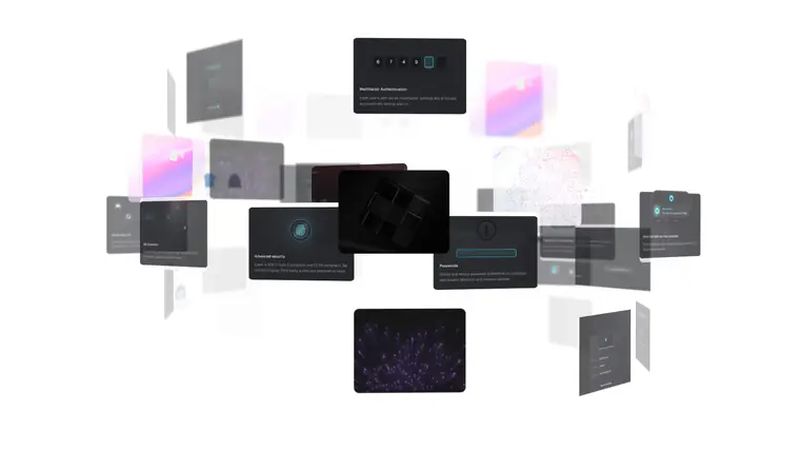
Demo filmWhat reanimate does. The author's walkthrough: the /reanimate request, three browsers recording widgets, copies measured until the difference is gone, and the example clones.
Entrance clone style: Three cards fading in
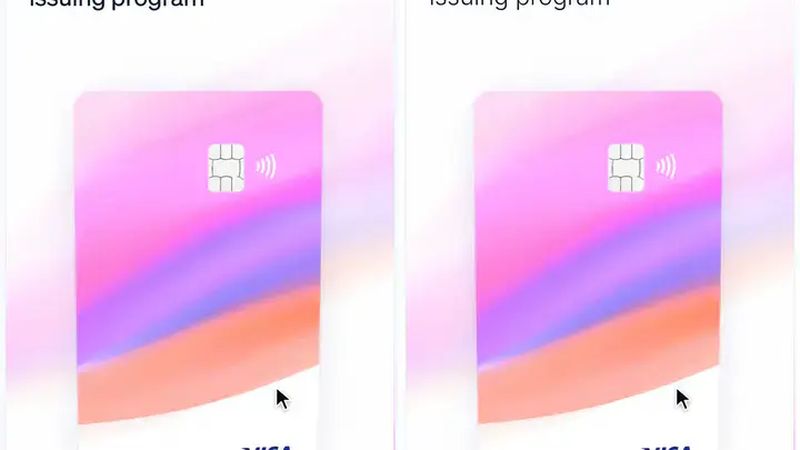
Entrance cloneThree cards fading in. Three cards from the stripe.com homepage on top, and the copy reanimate built below, filmed the same way. The parts appear at the same moments in both.
Hover clone style: A card that tilts
Hover cloneA card that tilts. The same pointer path on the original card and on the copy, side by side. The README says the tilt settles within 0.4 px.

Demo film and clips by Niaz Morshed, from the reanimate repository (MIT). The examples recreate parts of other companies' sites as a study of the technique; the author notes they are not affiliated with or endorsed by those companies.

What our test produced

Paper-cut title, 12 s MP4Every moving part within one frame; 8.6 % pixel mismatch from texture and font
Time
15 min
Cost
$3.59
Turns
76
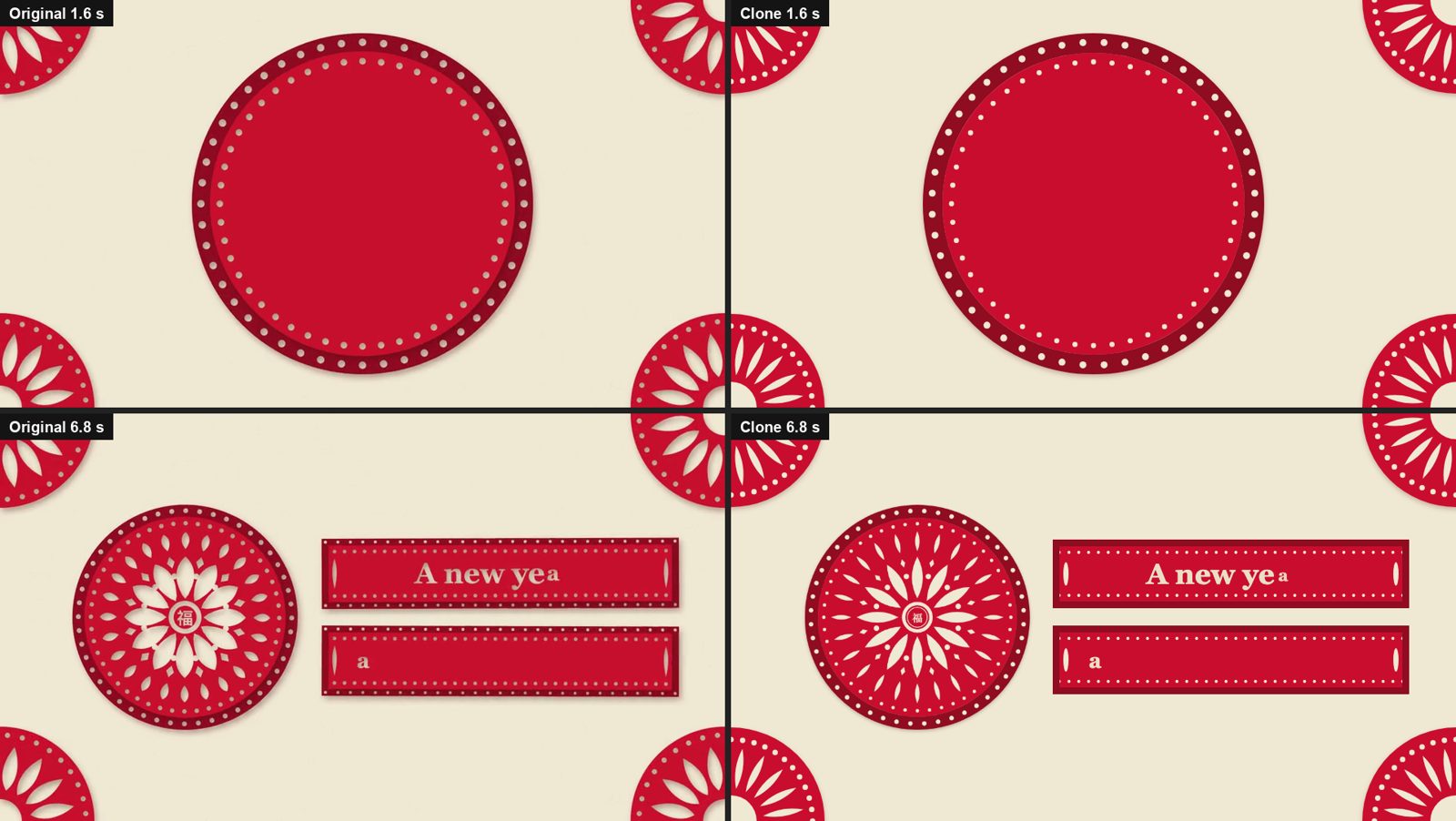
Four frames in a grid: the original paper-cut title and the clone at 1.6 seconds, both showing a red disc growing with corner rosettes; and at 6.8 seconds, both showing the medallion on the left and two red banners with the text A new ye typing in
The original (left) and the clone (right) at 1.6 and 6.8 seconds. The motion lines up; the clone's shapes are flatter, with no paper shadow, and the centre pattern is drawn differently.
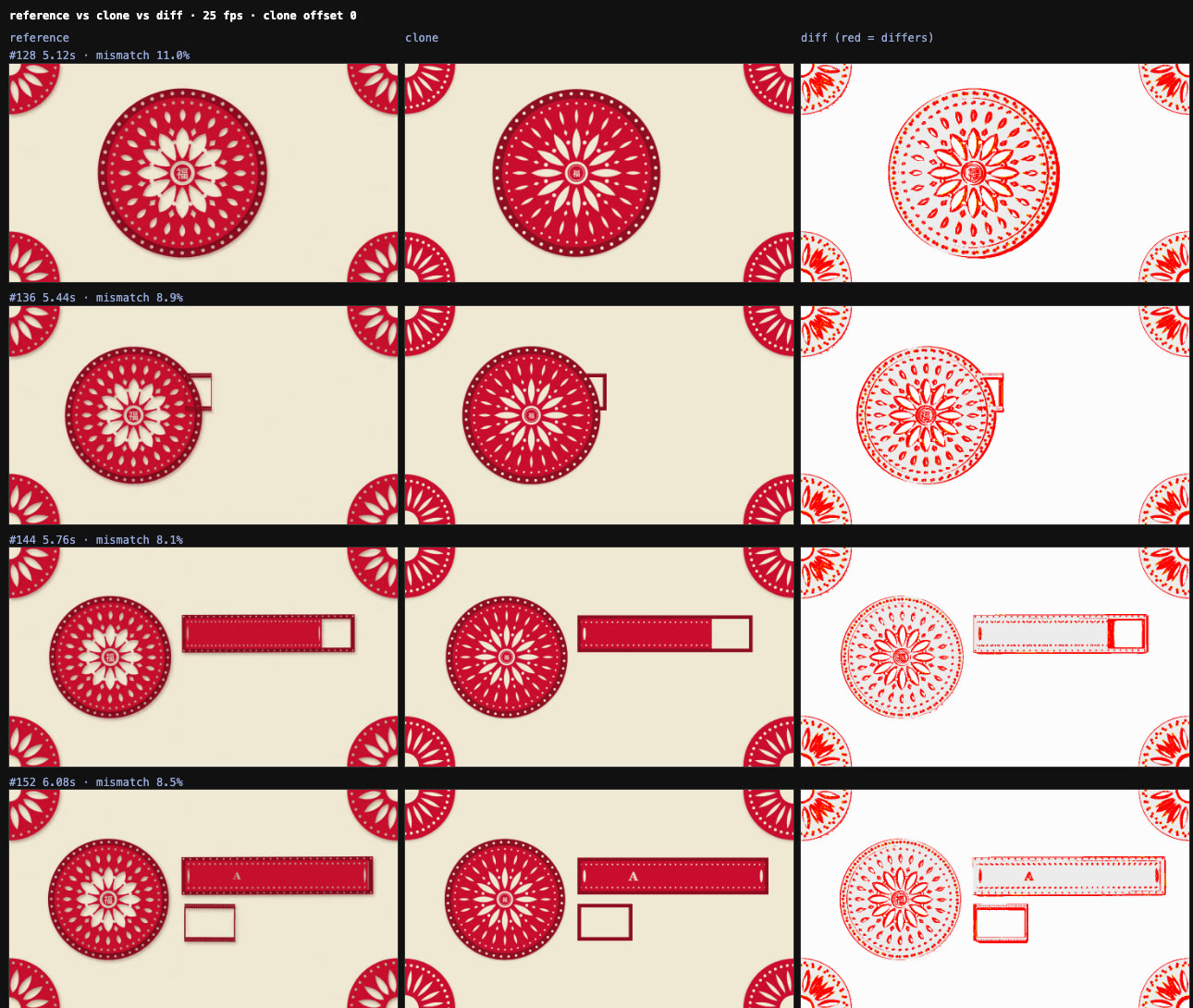
Reanimate's comparison sheet with three columns, reference, clone and diff, for frames from 5.12 to 6.72 seconds, each labelled with its pixel mismatch between 8.1 and 11.0 percent
Part of the skill's own comparison sheet from round 3: reference, clone, and the difference in red, every eighth frame. The red outlines are shape and texture; the timing matches.

Best for

  • Rebuilding a hero entrance, loader, hover effect or marquee you like as a starting point for your own
  • Getting a measured motion spec (timings, easings, staggers) out of a video or GIF
  • Claude Code users who want evidence instead of a copy that only looks about right

Not the best fit for

  • Copying another site's design wholesale; fonts, images and code you clone still belong to their owners, as the README says
  • Quick jobs: our 12-second clip took 15 minutes, and the author's examples took 30 to 90 minutes each
  • Pages behind a login, YouTube or Loom, which it cannot record directly; hand it a screen recording instead
  • Windows, which the README says is untested

How it works

  1. 1

    Scope and fidelity

    It writes down the target, where the code goes and how close it must be. The default, motion-faithful, must match trigger, order, stagger, timing within 80 ms, easing family and distance; colours and fonts may differ. Say "match it exactly" for pixel-faithful (2 % mean mismatch or less), or "clone X and add Y" to build your own parts on top.

  2. 2

    Record the reference

    For a website it films the element in headless Chromium at a fixed viewport and frame rate, and saves every CSS and Web Animations API animation it finds plus each tracked element's position on every frame. For a video or GIF it extracts and crops frames. For canvas and WebGL it traces the GPU calls on a virtual clock, so shaders, uniforms and three.js scenes come out exact.

  3. 3

    Write the motion spec

    One row per element per property: start, duration, from and to, easing and stagger, taken from declared animations first, then fitted curves, then reading frames.

  4. 4

    Build, film, compare, repeat

    It writes the animation in the stack your project already uses (CSS, Framer Motion, GSAP, three.js), films the copy exactly like the reference, and compares timing, easing and pixels with side-by-side sheets. It fixes the biggest difference and goes again, up to five rounds, then reports what still doesn't match and why.

Try it

  1. 1
    Install
    npx skills add NiazMorshed2007/reanimate -g -a claude-code

    Needs Bun 1.1 or later on macOS or Linux. The first run downloads Playwright's Chromium and a static ffmpeg, about 250 MB; Chromium goes into Playwright's shared cache.

  2. 2
    Ask for a clone
    /reanimate the hero entrance on https://example.com, into components/Hero.tsx

    Other forms from the README: a time range of a screen recording ("0:03 to 0:05 of ~/Downloads/loader.mov"), "match it exactly" for pixel-faithful, or "with our logos and pause on hover" to add your own changes.

  3. 3
    What we asked
    /reanimate the paper-cut title animation in ./papercut-title.mp4, the whole 12 seconds, into ./clone/index.html as plain HTML, CSS and JavaScript. Clone the motion (the default level).

Key facts

Author
Niaz Morshed
Licence
MIT
Version checked
Not stated
Works with
Built and tested for Claude Code; other agents that read SKILL.md can install it, untested
Language
English
What it produces
Animation code in your project's stack (CSS, Framer Motion, GSAP, three.js) plus a motion spec, comparison numbers and side-by-side sheets
Install
Run npx skills add NiazMorshed2007/reanimate -g -a claude-code; needs Bun 1.1 or later on macOS or Linux

From the skill’s own repository. “Not stated” means the repository does not say.

Our test

Reanimate is a free, MIT-licensed skill for Claude Code by Niaz Morshed. You point it at an animation you like, on a live website, in a screen recording, an MP4, a GIF or a Lottie file, and say where the code should go. It films the reference in a headless browser, writes a motion spec with the start, duration and easing of every moving part, builds the animation with what your project already uses, then films its copy the same way and compares the two. It repeats that up to five rounds until the timing matches, and reports what still doesn't. For canvas, WebGL and three.js it can also record the GPU calls behind the pixels. We gave it a paper-cut New Year title made in an earlier Ordalin test and asked for a motion-faithful copy.

2026-11-07 · Claude Code 2.1.319, headless (claude -p), skill installed in the project's .claude/skills · claude-opus-5-5 · repository commit 3f7a55a
What we asked

Clone a 12-second, 960×540 paper-cut New Year title from an MP4 into plain HTML, CSS and JavaScript at the default motion-faithful level. The clip came from our own Code Animation Prompts test, so we know how it was made and may publish it; the agent saw only the video.

From the agent's motion specThe first five rows of its spec, measured from the video's frames at 25 fps. The full spec has a row for every part and every move.
| # | element | property | from → to | start ms | duration ms | easing |
| 1 | outer band ring | scale | 0 → 1 | 10 | 780 | easeOutCubic |
| 2 | inner disc | radius | 0 → 200 | 270 | 850 | easeOutCubic |
| 3 | corner rosettes ×4 | scale (origin = corner) | 0 → 1 | 410 | 950 | easeOutCubic |
| 4 | inner dot ring | opacity | 0 → 1 | 1220 | 300 | easeOut |
| 5 | outer leaves ×24 | scale | 0 → 1 | 1650 | 280 | easeOutCubic |
From its final report

The automated whole-frame check still fails its 5% pixel-mismatch bar (8.61%), because the clone has flat colours instead of the reference's paper texture and a different font. The motion level allows that, so I stopped after round 3 of the skill's maximum of 5.

What we tested

We installed the skill from commit 3f7a55a into an empty project folder with one file: a 12-second, 960×540 MP4 of a paper-cut New Year title. The clip came from our own test of Code Animation Prompts, so we could publish both sides, and the agent had never seen how it was made. We asked Claude Code on Claude Opus 5.5 to clone the whole clip into plain HTML, CSS and JavaScript at the default motion-faithful level.

What we found

  • The motion came out right. The agent wrote a 17-row motion spec from the video's frames and rebuilt the clip in about 300 lines of HTML and JavaScript. In its last round every animated part, from the ring and the corner rosettes to the two banners and the text typing in, started and ended within one frame (40 ms) of the original. The medallion's slide was the furthest off, by 10 px at the middle of a 233 px move.
  • It measured instead of guessing. It wrote its own small scripts to track ring radii, banner edges and the slide, and used the skill's comparison sheets after each round. It stopped after three of the five allowed rounds, because the remaining difference was static styling.
  • It was honest about the gap. The skill's whole-frame check failed its 5 % bar at 8.6 %, and the report said so, with the reasons: flat colours instead of paper texture and shadows, slightly different cut-out shapes, and Georgia standing in for a serif it could not identify. At the motion level those are allowed to differ.
  • Setup needed a workaround. Bun 1.3.9 rejected the skill's lockfile ("Unknown lockfile version"). The agent installed the dependencies with npm and setup finished. The first run also downloads Chromium into Playwright's shared cache, which the README mentions, and in our run it left a static-ffmpeg download cache in the user Library folder and a few scratch files in /tmp that the agent's report did not mention.
  • It is not quick. 15 minutes and $3.59 for a 12-second clip with no interaction. The author's live-site examples, with hovers, WebGL and workers, took 30 to 90 minutes each.

The result is a close, editable starting point. Asking for pixel-faithful would have made it chase the texture and the font as well, at more cost.

FAQ

What does reanimate do?

It rebuilds an animation you point it at, then proves the copy moves the same. It records the reference, writes a spec of every moving part, builds the animation in your project, records the copy the same way and compares the two frame by frame, repeating until the numbers match or five rounds are up.

What can it clone from?

A live website (a section, widget or interaction, triggered on load, scroll, hover, click, drag or a pointer path), a screen recording, an MP4, MOV or WebM file, a GIF, a Lottie file or a prototype export. It cannot record pages behind a login, YouTube or Loom; give it a screen recording instead.

Does it work with canvas, WebGL and three.js?

Yes. With its --gl option it traces WebGL, WebGPU and canvas 2D calls and hooks the three.js, Pixi, PlayCanvas, Babylon and OGL scene graphs, so it recovers shader sources, constant uniforms, textures and animated values as curves. A virtual clock with seeded randomness makes every capture identical. We tested only the video path.

How close does the copy get?

That depends on the level you ask for. In our motion-faithful test every animated part started and ended within about one frame (40 ms) of the original, and the copy differed in 8.6 % of pixels because of texture and font. The README's examples report results such as 417 of 417 frames identical, or under 0.6 % of pixels different, at the pixel-faithful level.

What do I need?

Bun 1.1 or later, on macOS or Linux, and about 250 MB for Playwright's Chromium and a static ffmpeg, which the first run downloads. No API keys. In our run, Bun 1.3.9 rejected the skill's lockfile, so the agent installed the script dependencies with npm instead and setup then finished.

Is it free, and can I use what I clone?

The skill is free and MIT-licensed. What you clone is a different matter: the README says fonts, images and code from another site still belong to their owners, so make sure you may use what you copy.

Repository

  1. github.comgithub.com/NiazMorshed2007/reanimate ↗