


Ordalin
Submit a tool

Teardown

Asked for a hydraulic excavator arm, it built a working 3D simulator of a 20-tonne excavator as one 814 KB offline page and filmed a 20-second 1080p, 60 fps video with sound. Its numbers came within about 3 % of a Cat 320 spec sheet. It took 38 minutes, 124 turns and $9.29 at API prices, and rendering needed the real GPU, outside Claude Code's command sandbox.

Checked 2026-11-07
Tested 2026-11-07 with claude-opus-5-5

The author's demos

Three simulators from the README, each a robotic animal built with the skill. The repository also ships three complete machines to start from: a cross-plane V8, the Cessna 337 main landing gear and Theo Jansen's Strandbeest.

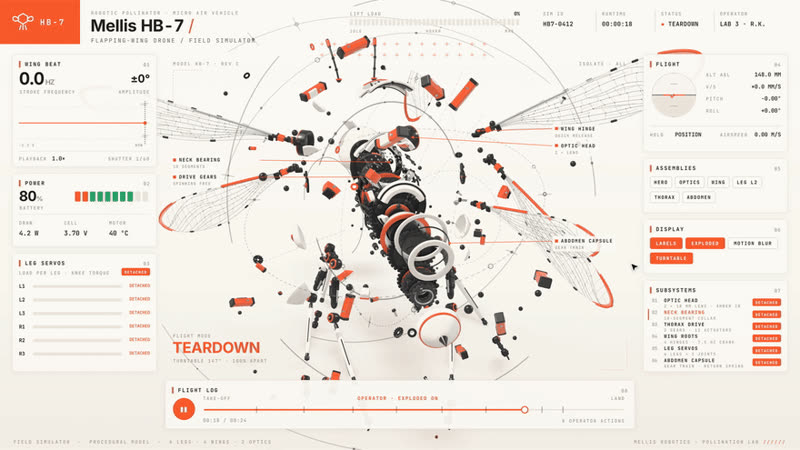
Robotic bee style: Mellis HB-7
Robotic beeMellis HB-7. A robotic bee simulator with live panels around the model.
Robotic scorpion style: Telson SC-8
Robotic scorpionTelson SC-8. A robotic scorpion simulator.
Robotic octopus style: Pelagos OC-8
Robotic octopusPelagos OC-8. A robotic octopus simulator.

Demo animations by elvarofficial, from the teardown repository (MIT). The skill builds on whaleyxbt/claude-motion (MIT); its recorded sound samples are CC0 from Freesound, prepared by Barty-Bart/motion-graphics.

What our test produced

Excavator arm, 20 s videoWorking simulator page and a 1080p 60 fps film with sound; specs within 3 % of a Cat 320
Time
38 min
Cost
$9.29
Turns
124
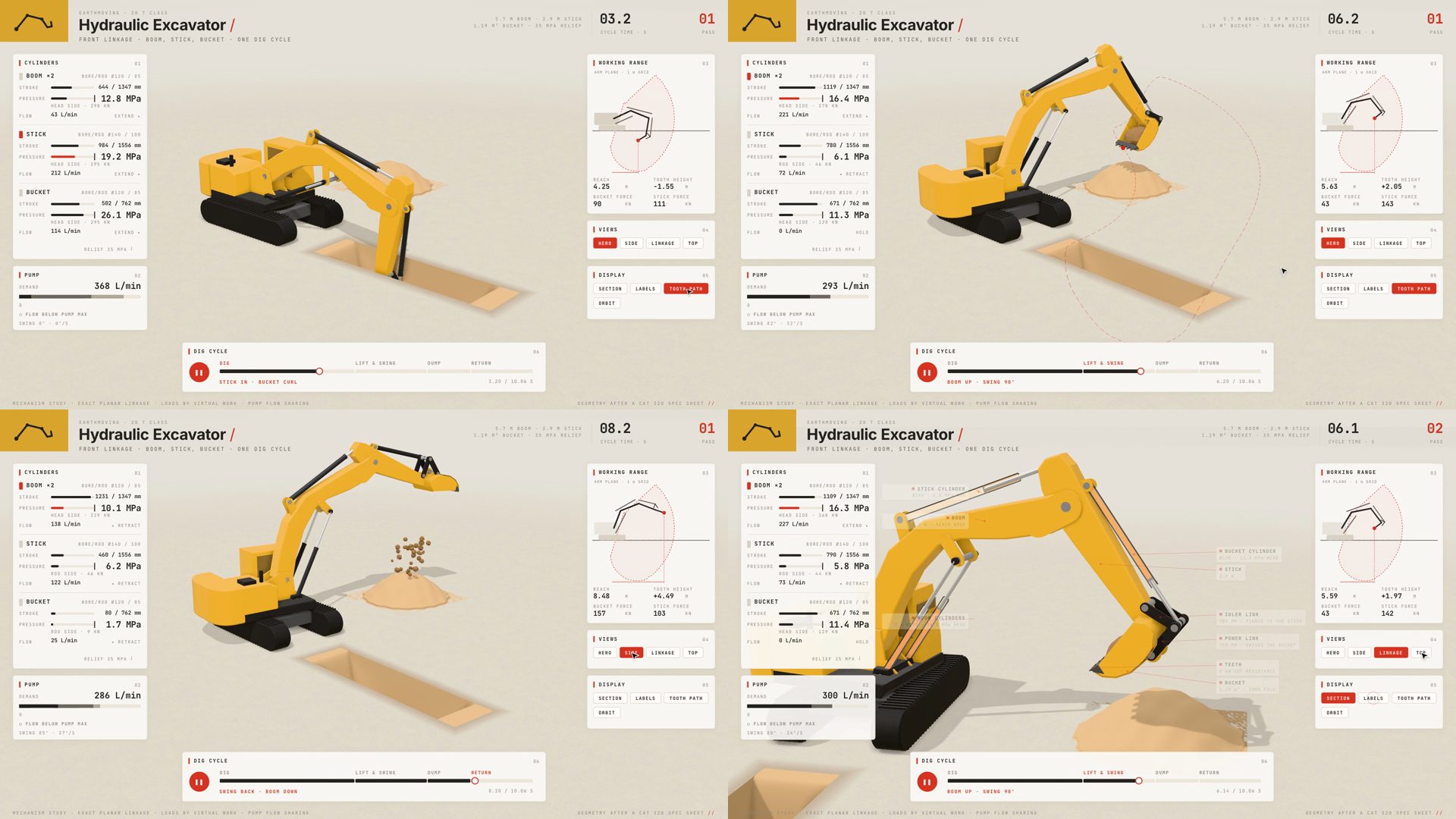
Four frames from the excavator film: the hero view digging into a trench with the tooth path drawn, the boom lifted and swung over a soil pile, soil falling onto the pile, and a top view of the dump; panels for cylinders, pump, working range, views and dig cycle frame each shot
Four moments of the 20-second film at 2, 5, 7 and 15 seconds: dig, lift and swing, dump, and the top view. The cursor presses the view and display buttons on its own.
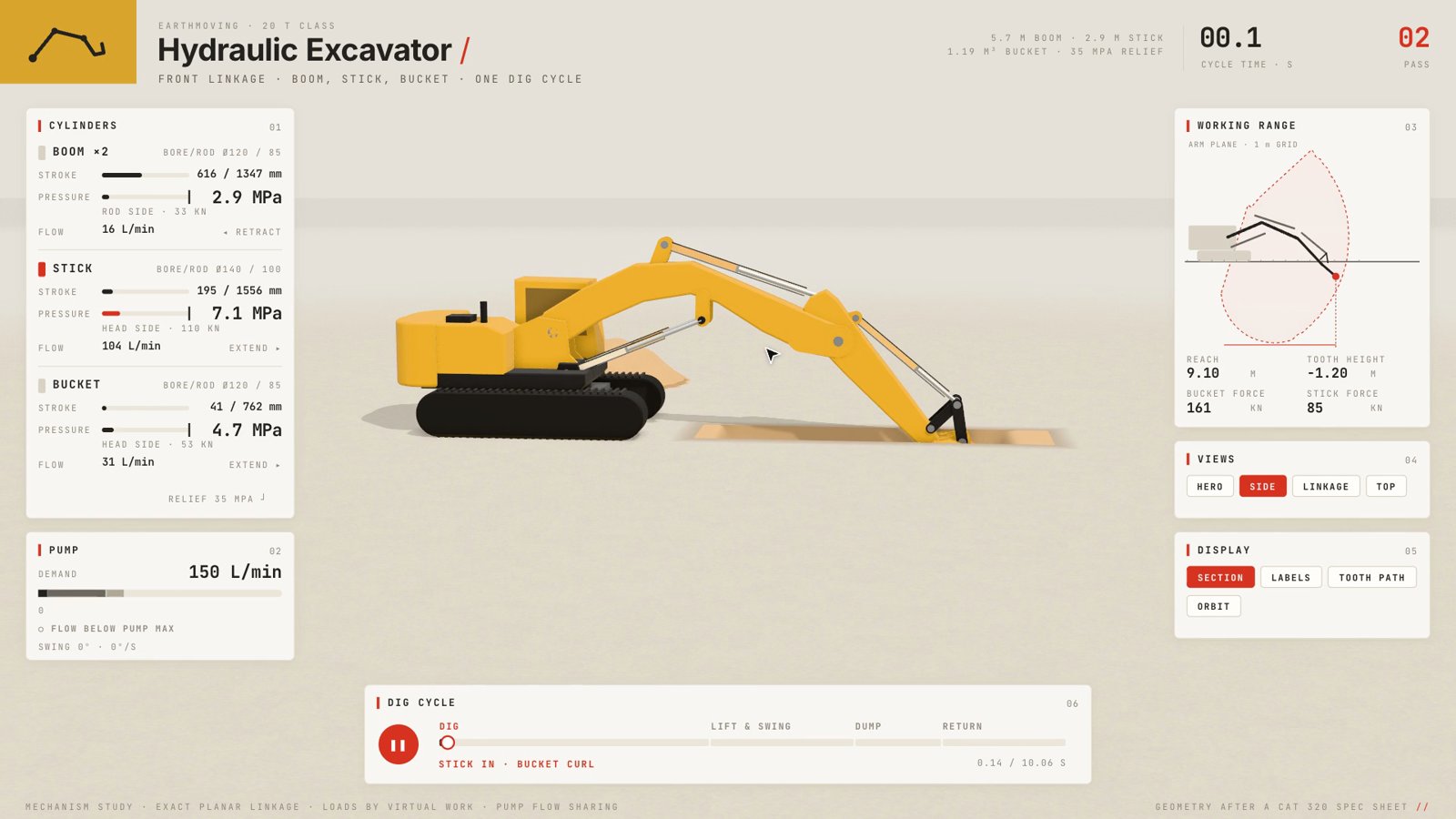
Side view of the excavator at the start of a dig, with the section display on: cylinders cut open, panels reading boom, stick and bucket stroke, pressure and flow, pump demand 150 L/min, reach 9.10 m and a working-range diagram
The side view with cylinders cut open. Every number on the panels, strokes, pressures, flows, reach and digging force, is computed from the same pose that moves the arm.
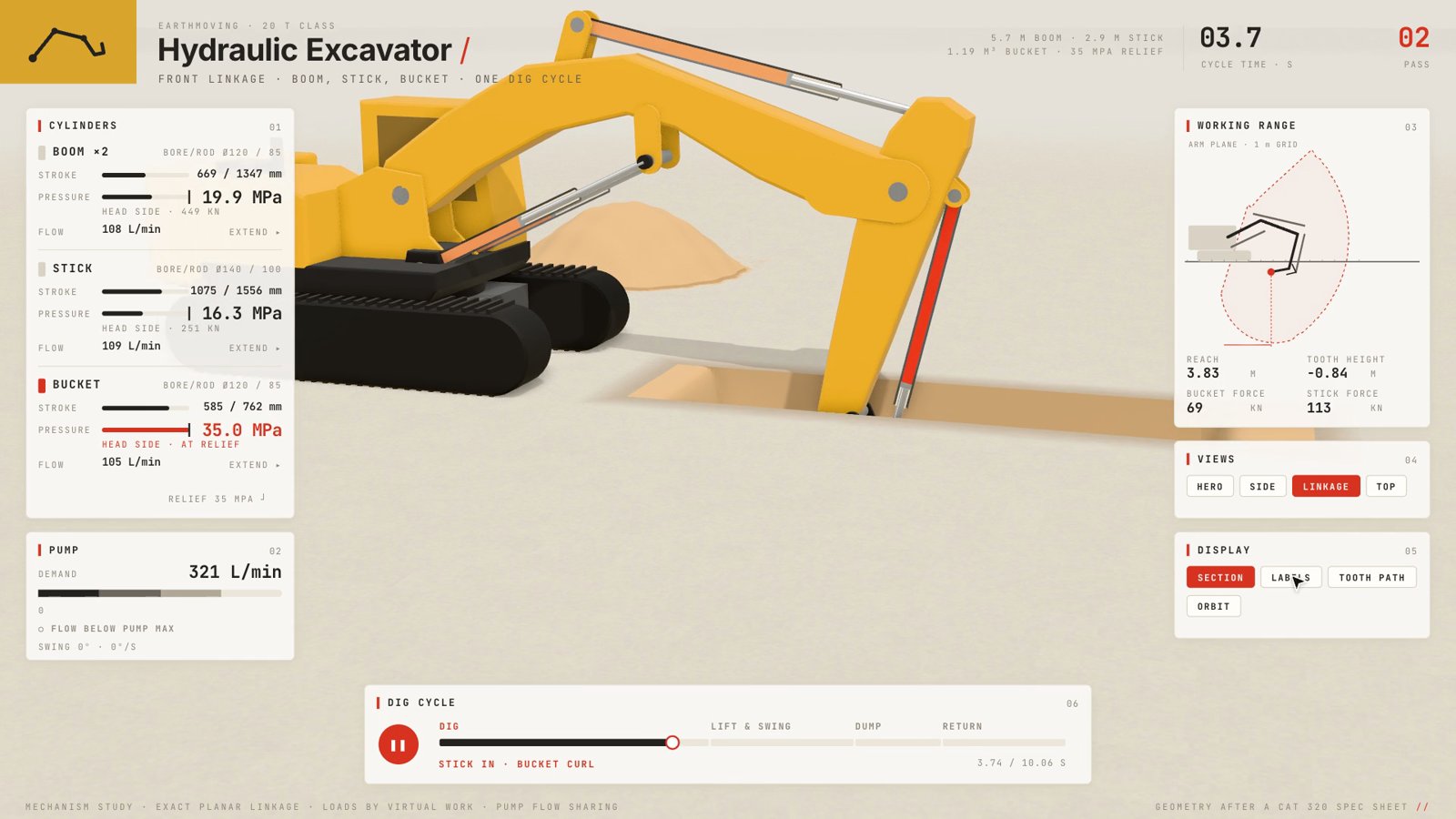
Close-up of the excavator's bucket linkage digging, with the bucket cylinder drawn in red and its panel reading 35.0 MPa, head side, at relief
The linkage close-up mid-dig: the bucket cylinder hits the 35 MPa relief limit and turns red. In this view the cab passes behind the cylinder panel, one composition miss the review loop let through.

Best for

  • Explainer videos and interactive pages about how a machine or mechanism works
  • Teachers, engineers and technical writers who want the numbers on screen to be real
  • Claude Code users with a GPU who can let a long render run

Not the best fit for

  • Quick clips: our 20-second video took 38 minutes and $9.29
  • Machines with no published dimensions; the skill tells the agent never to invent one from a sentence
  • Fully sandboxed setups: headless Chromium inside Claude Code's command sandbox had no WebGL, so rendering had to run outside it

How it works

  1. 1

    Real numbers first

    The agent finds a reference and the real dimensions (bore, stroke, tooth count, link lengths) before it models anything. The math lives in its own file, with one input, such as a crank angle or a cylinder stroke, posing every part and computing every readout.

  2. 2

    The machine, the panels, the tour

    Geometry is built from code in three.js, panels and charts sit in a fixed 1600 × 900 overlay, and a script of camera moves, cutaways and button presses is written as a pure function of time. The live page plays that script as an auto tour until someone clicks, drags or presses a key.

  3. 3

    Review sheets, not guesses

    The agent cannot watch video, so the skill has it render sheets of stills at every beat of the timeline and check them against a list: parts touch and never pass through each other, numbers match the pose, one focal point per frame, labels readable at phone width. It fixes and re-renders until a pass finds nothing.

  4. 4

    Film and score

    capture.mjs renders the film frame by frame to a 60 fps MP4. A Python sound engine builds the score from the same timeline, accents only, mastered to −14 LUFS, and ffmpeg joins the two.

Try it

  1. 1
    Install
    npx skills add elvarofficial/teardown -g -a claude-code

    Then once, in the installed skill folder: npm install && npx playwright install chromium. Needs Node.js 20 or newer, ffmpeg for the video and Python 3 for the sound.

  2. 2
    Ask for a machine
    How does a mechanical watch keep time? Show me as a simulator.

    Or build one of the bundled examples first: node sims/build.mjs v8-live writes an offline page to teardown-out/dist/.

  3. 3
    What we asked
    Make a teardown of a hydraulic excavator arm and record a 20-second video of it. Put the HTML page and the video in ./teardown-out in this folder. Do the skill's first-run setup yourself.

Key facts

Author
elvarofficial
Licence
MIT
Version checked
Not stated
Works with
Claude Code
Language
English
What it produces
One offline HTML page with an interactive 3D machine simulator, and a 60 fps MP4 of its tour with a generated sound score
Install
Run npx skills add elvarofficial/teardown -g -a claude-code, then npm install && npx playwright install chromium in the skill folder; needs Node.js 20+, ffmpeg and Python 3

From the skill’s own repository. “Not stated” means the repository does not say.

Our test

Teardown is a free, MIT-licensed skill for Claude Code by elvarofficial. You ask how a machine works, an engine, a landing gear, a pump, a walking linkage, and it builds the machine in three.js as one offline HTML page: the machine runs in the middle, panels around it read the real numbers, buttons open the part doing the work, and when nobody touches the page it tours itself with a cursor. The same code records that tour frame by frame to a 60 fps MP4, with a sound score generated in Python from the same timeline. Its rules: start from a real reference, use real dimensions, and drive everything from one input so the gauges can never disagree with the motion. We asked it for a hydraulic excavator arm and a 20-second video.

2026-11-07 · Claude Code 2.1.319, headless (claude -p), skill installed in the project's .claude/skills · claude-opus-5-5 · repository commit a91262a
What we asked

One of the README's own example requests: a teardown of a hydraulic excavator arm with a 20-second video, in an empty folder, with the agent doing the skill's first-run setup itself.

From its final report: accuracy against a Cat 320The agent picked the Cat 320 as its reference and fitted the pin positions to published range diagrams, not factory drawings, which it said accounts for the up-to-3 % gaps.
| Spec                 | Cat 320 reference | Model   |
| Max dig depth        | 6.72 m            | 6.62 m  |
| Reach at ground      | 9.86 m            | 9.97 m  |
| Cutting height       | 9.45 m            | 9.13 m  |
| Bucket digging force | 163 kN            | 165 kN  |
| Stick digging force  | 107 kN            | 107 kN  |
| Main relief pressure | 35 MPa            | 35 MPa  |
From its final report: what was missing

The command sandbox has no GPU. Headless Chromium there fails with "Could not create a WebGL context", and the skill's bundled Cessna example fails the same way. I worked around it by pointing CHROMIUM at the full Google Chrome for Testing binary and running capture outside the sandbox. That gave the real GPU (Apple M5 Max, Metal).

What we tested

We installed the skill from commit a91262a into an empty project folder and gave Claude Code on Claude Opus 5.5 one of the README's own example requests: a teardown of a hydraulic excavator arm with a 20-second video. The agent had to do the skill's first-run setup itself.

What we found

  • It did the research first. The agent picked the Cat 320 as its reference, read its published spec sheets and fitted the boom, stick and bucket linkage to the published working range. Dig depth, reach and cutting height came within about 3 %, and digging forces and the 35 MPa relief pressure matched.
  • The physics drives the picture. Three cylinder strokes pose every pin through an exact linkage solver. Pressures come from the load on each cylinder, a cylinder turns red when it hits relief, and the pump slows everything when demand would pass its 429 L/min.
  • The film is finished work. 1920 × 1080 at 60 fps, exactly 20.0 seconds, about two dig cycles with five camera views and a cursor pressing the buttons. The sound follows the same timeline: an engine swell on lift, a hiss at relief, a knock when the teeth enter the ground, soil rattling onto the pile. Mastered to −14 LUFS.
  • The live page works. An 814 KB offline file with play and pause, a scrubbable timeline, speeds from 0.25× to 2×, four views, four display modes, orbit and zoom. The agent reported 120 fps in Chrome with no console errors.
  • Rendering needed the real GPU. Inside Claude Code's command sandbox, headless Chromium could not create a WebGL context, and neither could the skill's own Cessna example. The agent switched to the full Chrome for Testing binary and ran capture outside the sandbox. In an interactive session you would be asked to approve that.
  • It is slow and not cheap. 38 minutes and $9.29. Most of it went into the model and repeated review renders.
  • Small misses. In the linkage close-up the cab drifts behind the cylinder panel, which the skill's own checklist warns against. The agent kept everything inside the folder apart from two empty scratch files in /tmp.

FAQ

What does teardown make?

Two things from the same code: one offline HTML page with a 3D machine you can drive (buttons, sliders, orbit, zoom, keyboard), which tours itself when left alone, and a 60 fps MP4 of that tour with a generated sound score. In our test the page was 814 KB with three.js inlined, and the film was 1920 × 1080 at exactly 20.0 seconds.

Are the numbers on screen real?

They are meant to be. The skill makes the agent find real dimensions and compute every gauge from the same function that poses the parts. Our excavator was fitted to a Cat 320 and came within about 3 % on dig depth, reach and cutting height, and matched digging forces and relief pressure. It is still a model fitted to published figures, not factory data.

What do I need to run it?

Node.js 20 or newer, then npm install and Playwright's Chromium in the skill folder, plus ffmpeg for the video and Python 3 for the sound. Rendering needs a working WebGL context; in our run the GPU was not reachable from Claude Code's command sandbox, so the agent ran the capture outside it, which the sandbox asks permission for in normal use.

How long does it take and what does it cost?

Our 20-second excavator took 38 minutes, 124 turns and $9.29 at API prices on Claude Opus 5.5, most of it spent on the model, the review loop and frame-by-frame rendering. Starting from one of the bundled examples is quicker.

Does the page work offline?

Yes. The build script inlines three.js and the fonts into one HTML file, kept under 1 MB so link previews on X and Slack still read its share card. Big models can be kept as separate files next to the page.

Is it free?

Yes, MIT-licensed. It credits whaleyxbt/claude-motion (MIT) for the runtime, frame capture, sound engine and review rules, and its recorded sound samples are CC0.

Repository

  1. github.comgithub.com/elvarofficial/teardown ↗