



Ordalin
Submit a tool

Reviewed tool profile

Nomi

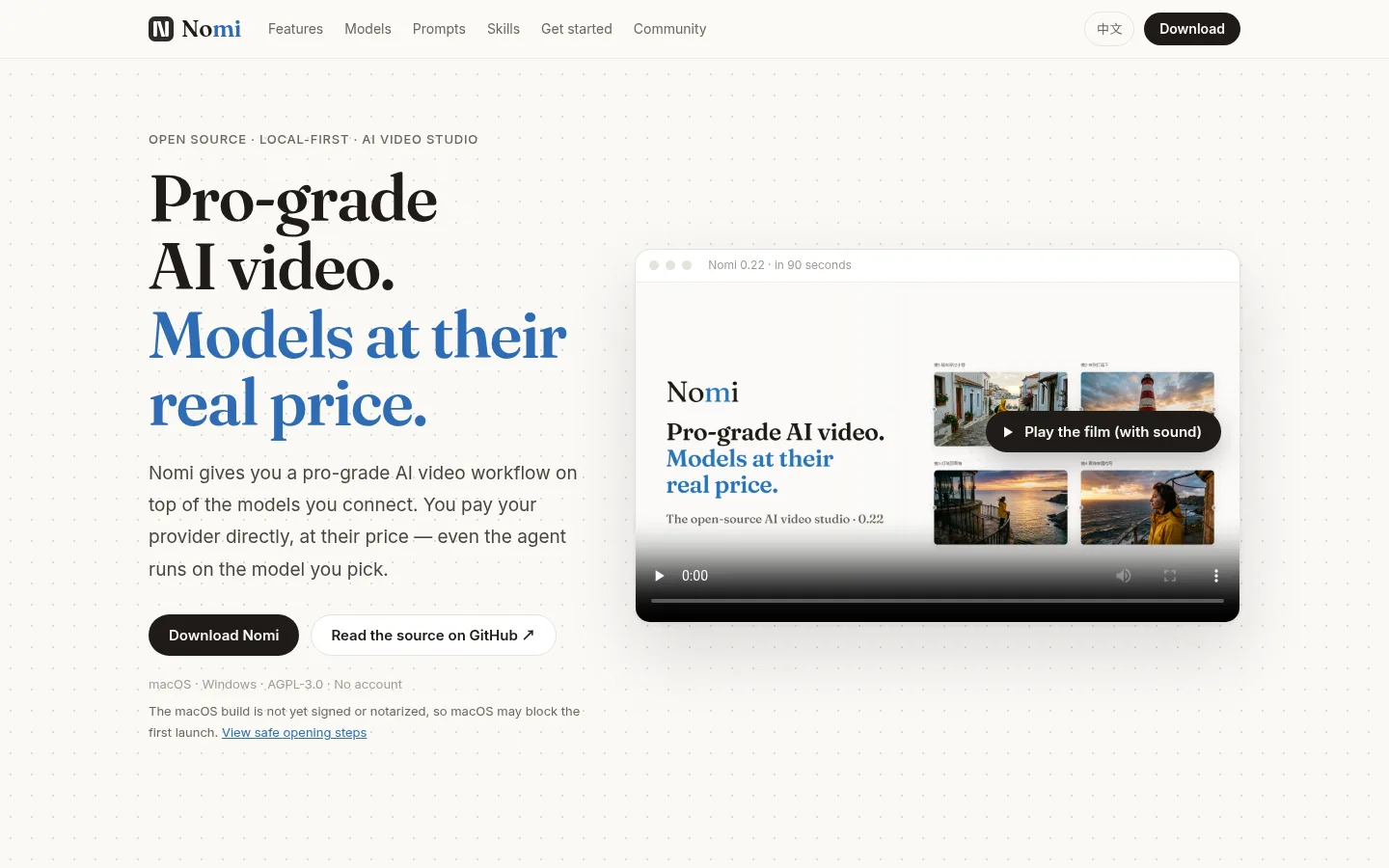
Open-source, local-first AI video studio: an agent plans shots and builds the timeline with models you pay for directly.

Sources checked

Visit website ↗
Pricing
Nomi itself is free and open source with no account. Generation is paid to the model provider you connect, at that provider's price; Nomi never proxies or resells inference. Some free models (for example on ModelScope) and a local ComfyUI cost nothing. Official source 1 ↗ · Official source 2 ↗
Available as
Desktop installers for Windows 10 and 11 (x64) and macOS 12 or later on Apple silicon or Intel. · No GPU is needed by default because generation uses cloud APIs; a local ComfyUI is optional for people with a GPU. · Coding agents such as Claude Code or Codex can drive Nomi through a bundled CLI or by adding Nomi as an MCP server. Official source 1 ↗ Official source 1 ↗ Official source 1 ↗
Primary group
Video & Animation

Also consider

See all 6 similar tools ↓

What it does

Nomi is an open-source (AGPL-3.0), local-first desktop studio for making AI video on macOS and Windows. You describe a film and its agent reads your canvas, splits the story into shots, generates keyframes, turns them into video clips and arranges them on a timeline, which you then edit and export as MP4. Nomi does not sell model access: you connect your own keys for providers such as APIMart, Kie.ai, Volcengine or ModelScope, an OpenAI-compatible relay or a local ComfyUI, and pay the provider directly. The agent also runs on a model you connect. It is a fast-moving project started by one person.

Official source 1 ↗

Features

  • Agent from one request. Describe the film you want; the agent reads your canvas, splits the story into shots, generates keyframes and video and arranges the timeline. Everything it makes lands on the canvas for you to change. Official source 1 ↗
  • Three autonomy levels. Choose Ask each step, Auto-edit (paid generation still asks) or Full auto. Full auto needs explicit confirmation, and irreversible actions always ask first. Official source 1 ↗
  • Storyboard with reference cards. Each shot is a row with its prompt, first frame, model and duration. Lock a reference card for a character or place so every shot that uses it keeps the same face. Official source 1 ↗
  • Generation canvas with versions. Shots become canvas nodes with four modes (text, first frame, first and last frame, multi-reference); every take is kept as a version so you can pick the best. Official source 1 ↗
  • 3D director's stage. Pose characters and place cameras in a 3D scene, frame the shot with your phone, and use the capture as the shot's first frame. Official source 1 ↗
  • Any model, per shot. Re-run a shot with Seedance, Kling, Wan or Hailuo; the model library lists 39 video and image models (16 video, 23 image) and which providers offer each. Official source 1 ↗ · Official source 2 ↗
  • AI-assisted model hookup. “Let AI connect it for me” hands a new model to Claude Code or Codex, which looks up the endpoint and parameters; you paste the key on Nomi's own page, and one real test runs before the model is listed. Official source 1 ↗
  • Timeline and MP4 export. Order the chosen shots on the timeline, add captions and music, preview the whole film and export MP4. Official source 1 ↗
  • Directing and writing skills. The agent draws on 48 written skills for directing, writing and ad films, such as how a director breaks a scene into shots. Official source 1 ↗ · Official source 2 ↗

Pricing & free limits

Nomi app

FreeOpen source (AGPL-3.0), no account

The full app is free; you pay only the model provider you connect, directly and at their price. Free ModelScope models and local ComfyUI cost nothing. Official source 1 ↗ · Official source 2 ↗

Billing details

Model costs are settled directly between you and the provider; Nomi neither prices nor handles your money, and the agent runs on your connected model with no subscription or markup. Official source 1 ↗ · Official source 2 ↗

Free access & limits

Free access and its limits were not established by the checked official sources.

Best for & limitations

Turn a one-sentence idea into a short multi-shot film: the agent plans shots and keyframes, generates clips with the model you choose, and lays them on a timeline you finish and export. Official source 1 ↗ · Official source 2 ↗

Keep a recurring character consistent across shots of a story or ad by locking a reference card in the storyboard. Official source 1 ↗

Compare the same shot across models such as Seedance, Kling, Wan and Hailuo while paying each provider's own price. Official source 1 ↗
  • No precise lip sync. Precise lip sync is not supported yet; Nomi suggests making those shots in another tool and importing them. Official source 1 ↗ · Official source 2 ↗
  • Unsigned macOS build. The macOS build is not signed or notarized by Apple, so the first launch is blocked until you allow it, and updates need a fresh download. Official source 1 ↗ · Official source 2 ↗
  • Long tasks pause. On long tasks the agent pauses to check in, especially before spending money, and needs you to reply to continue. Official source 1 ↗
Nomi product screenshot
Website previewFixed desktop viewport · 1440 × 900

Similar tools

Published tools that share its categories.
ngramAI video maker for business teams: onboarding, training, demos and explainers from a prompt, screen recording or doc, edited by chatting.
Video & AnimationFree planChecked Oct 13
Visit
ReelsyAI product video and image studio for small ecommerce teams, with multi-model video generation, a chat-based Video Agent and a Codex/ChatGPT plugin.
Video & AnimationFree planChecked Oct 13
Visit
InvideoAI-assisted video editing with natural-language directions, a multitrack timeline and real-time collaboration.
Video & AnimationFree planChecked Sep 28
Visit