



Ordalin
Submit a tool

Reviewed tool profile

Burncaps

Turns long podcasts and talks into ranked, captioned 9:16 clips, without uploading the video.

Sources checked

Visit website ↗
Pricing
Free covers 2 videos every 30 days, each with captions and up to 3 clips, no watermark and no sign-up. Starter is $9.98 a month or $49 once for unlimited captioned videos but no clip exports. Pro, $29 a month or $174 a year for unlimited clips, has a 7-day free trial without a card but is not yet on general sale. Official source 1 ↗ · Official source 2 ↗

Available as
Runs in the browser on a computer or a phone; nothing to install. · Exports MP4 in 9:16, 4:5, 1:1 or the original shape, plus SRT, VTT, ASS and text subtitle files, and can post to YouTube. Official source 1 ↗ · Official source 2 ↗ Official source 1 ↗
Primary group
Video & Animation

Also consider

See all 6 similar tools ↓

What it does

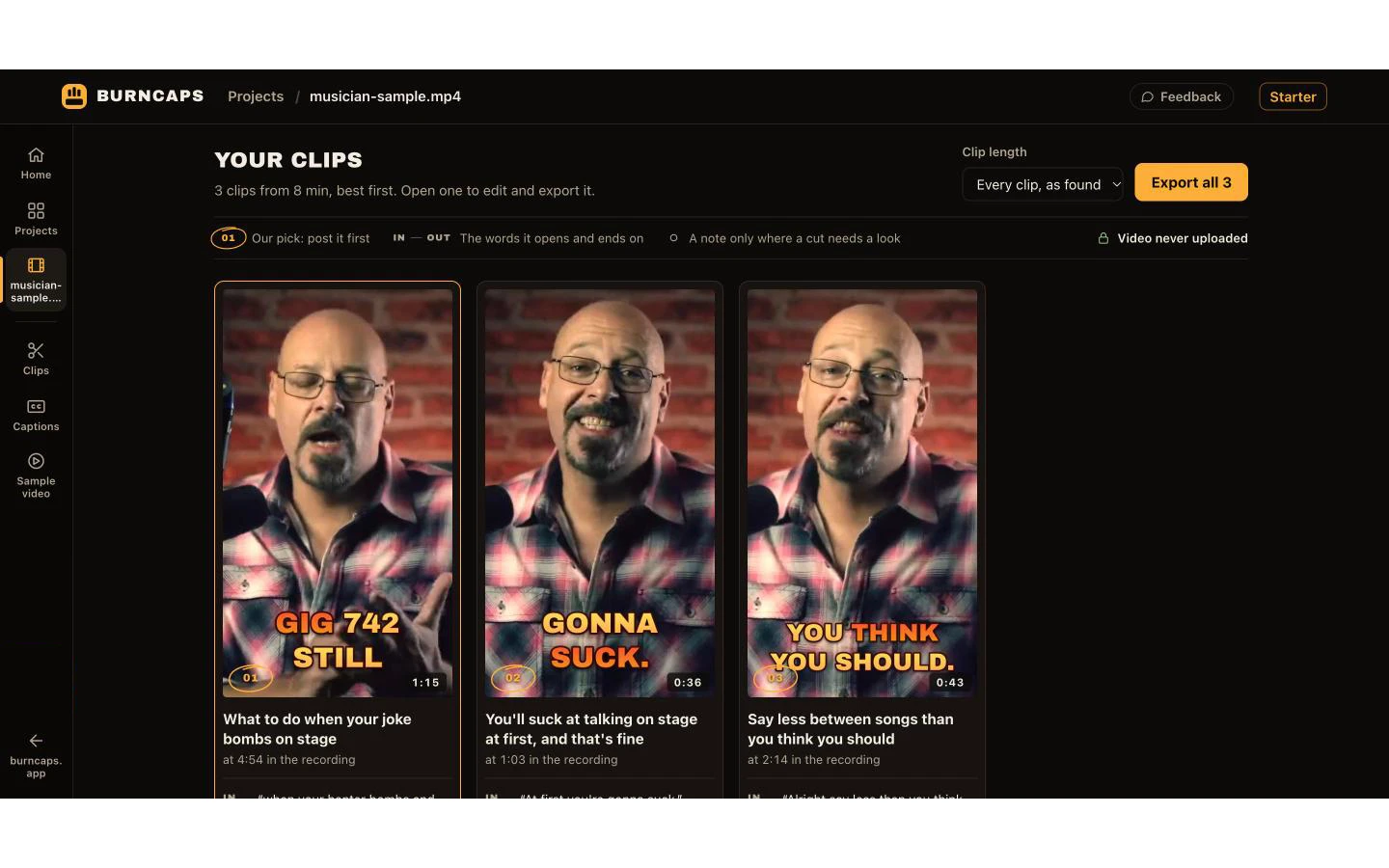
Burncaps is a browser-based caption and clip tool from Jordan Labs Ltd, a UK company. Drop in a long podcast, talk, webinar or interview and it returns the best moments as ranked 9:16 clips with word-by-word captions burned in, framed on whoever is talking; or it captions a whole video without cutting it, in sixty styles. Transcription and video encoding run on your own device, so the video is never uploaded; only the transcript text goes to Burncaps' AI when it finds clips.

Official source 1 ↗ · Official source 2 ↗

Features

  • Ranked clips from long recordings. Finds the best moments of a recording up to three hours long, about one clip for every two minutes of talk, and returns them ranked, cut and captioned in 9:16. Official source 1 ↗ · Official source 2 ↗
  • Word-by-word burned-in captions. Captions a whole video without cutting anything, in sixty styles and any shape, with control over font, outline, highlight colour and how many words show at a time. Official source 1 ↗
  • Framing on the speaker. Clips follow whoever is talking, or you can fix the frame, fit the whole picture or split two people. Official source 1 ↗ · Official source 2 ↗
  • Video stays on your device. A speech model downloaded once transcribes locally and the browser writes the MP4; phones send only the sound to Microsoft's EU speech service unless you switch it off. Official source 1 ↗ · Official source 2 ↗
  • Translated captions in 59 languages. Captions can stay in the spoken language or be translated, with a list of names to spell right. Official source 1 ↗ · Official source 2 ↗
  • B-roll and brand presets. Pro adds stock B-roll over the things you name; Starter and Pro add your or a client's logo and up to ten saved brand presets. Official source 1 ↗ · Official source 2 ↗

Pricing & free limits

Starter

$9.98/month or $49 onceMonthly or one-time

Unlimited captioned videos on up to three devices, five hours of the speech service in any 30 days, logo and brand presets; no clip exports. Official source 1 ↗

Pro

$29/monthMonthly, or $174 a year

Unlimited clips and captions, B-roll, ten devices and 20 hours of the speech service in any 30 days. 7-day free trial with no card; Pro itself opens soon. Official source 1 ↗

Billing details

Payment is by card through Stripe, with a 14-day money-back guarantee on the first payment. Official source 1 ↗

Free access & limits

Free is 2 videos every 30 days with up to 3 clips each; subtitle files are free without limit for recordings up to ten minutes. Official source 1 ↗ · Official source 2 ↗

Best for & limitations

Podcasters cutting a weekly episode into short clips for Shorts, Reels and TikTok. Official source 1 ↗ · Official source 2 ↗

Adding burned-in captions to a talking-head video without uploading it anywhere. Official source 1 ↗ · Official source 2 ↗

Agencies captioning client videos with the client's logo and saved style presets. Official source 1 ↗
  • Whole-video captions stop at ten minutes. Burning captions into a whole video is limited to ten minutes and 1.2 GB per file, with no date for longer; 4K exports at that length are not promised. Official source 1 ↗
  • Pro is not on sale yet. Unlimited clips need Pro, which is only available as a 7-day trial for now; Starter does not export clips and the Agency plan is not on sale. Official source 1 ↗ · Official source 2 ↗
  • Transcript goes to Burncaps' AI for clips. Finding clips sends the transcript text, not the video, to Burncaps' AI; a device-only mode uses a simpler built-in rule instead. Official source 1 ↗ · Official source 2 ↗
  • Usage analytics. The site uses PostHog analytics, including page recordings outside the European Economic Area with your video and words left out. Official source 1 ↗
  • Unpublished account limits. Speech-service hours are capped per plan, and safety limits on translations and clip finding exist but are not published. Official source 1 ↗
Burncaps product screenshot
Submitted screenshotFixed desktop viewport · 1440 × 900

Similar tools

Published tools that share its categories.

Lucy 2.6Decart's realtime and batch video editing model that swaps characters, clothing, products and backgrounds from a prompt or reference image.
Video & AnimationFree trialChecked Nov 6
Visit
VoyagerDesktop agent harness for creative work that drives Photoshop, Premiere, Resolve and Blender and generates video, images, voice and music.
Video & AnimationFree planChecked Nov 5
Visit