
Ordalin
Submit a tool

Reviewed tool profile

Kids Drawing to Life

Turns a child's drawing into realistic, cartoon or plush-style images and short animated videos.

Sources checked

Visit website ↗
Pricing
Paid credits in USD on one shared balance for images and videos. Monthly plans are Standard $7.99 (50 credits), Pro $14.99 (100) and Premium $30.00 (500); yearly plans are $59.00 (600 credits), $99.00 (1,200) and $199.00 (6,000). One-time packs run from $5.99 for 30 credits to $59.99 for 750. A 1K image costs 2 credits and a default 8-second video 15. Purchased credits never expire. Official source 1 ↗
Available as
Web browser; sign-in is through a Google account. Official source 1 ↗ · Official source 2 ↗
Primary group
Image & Design

Also consider

See all 6 similar tools ↓

What it does

Kids Drawing to Life is a web app for parents that turns a photo or scan of a child's drawing into a new image in a realistic, 3D cartoon, plush-toy or hand-drawn style, and can animate the drawing or the new image into a short video of 1–15 seconds. You describe the details to keep, see the credit cost before generating, and keep the original next to every version. Requests are processed through the Kie and Evolink AI provider APIs; the site does not name the underlying image or video models.

Official source 1 ↗ · Official source 2 ↗

Features

  • Four transformation styles. Turn a drawing into a Real world, 3D cartoon, Plush toy or hand-drawn style image, describing the details you want kept. Official source 1 ↗
  • Animate a drawing. Animate the original drawing or a transformed image with one motion (gentle movement, wave, dance or walk) for 1–15 seconds; the default is an 8-second 480P clip. Official source 1 ↗ · Official source 2 ↗
  • Photo or scan upload. Upload a photo or scan as JPG, PNG or WebP up to 10MB, then crop and rotate it before generating; sample sketches are available to try. Official source 1 ↗ · Official source 2 ↗
  • Versions and comparison. Every image and video stays with the original in My creations, with a comparison slider and regenerate, download, share and delete controls. Official source 1 ↗ · Official source 2 ↗
  • Private by default with revocable sharing. Drawings are private until you create a share link, which you can turn off; you can also download a before-and-after comparison. Official source 1 ↗
  • Cost shown before generating. The studio shows the credit charge before each generation, and technical failures return the credits automatically. Official source 1 ↗ · Official source 2 ↗

Pricing & free limits

Standard (monthly)

$7.99per month

50 credits added each month; unused credits carry over. Official source 1 ↗
Pro (monthly)

$14.99per month

100 credits added each month; unused credits carry over. Official source 1 ↗

Premium (monthly)

$30.00per month

500 credits added each month; unused credits carry over. Official source 1 ↗

Billing details

One credit balance covers images and videos: a 1K image costs 2 credits, a 5-second video 10 and an 8-second video 15; other lengths are charged pro rata, rounded up. Official source 1 ↗ · Official source 2 ↗

Purchased credits never expire, including after you cancel a subscription; yearly plans are charged as one annual total with all credits issued upfront. Official source 1 ↗

Failed generations return credits to the balance, not money to the card; a new variation of a completed result is charged again. The terms promise no universal refund window. Official source 1 ↗ · Official source 2 ↗ · Official source 3 ↗

Free access & limits

Free access and its limits were not established by the checked official sources.

Best for & limitations

Turn a child's drawing of a creature into a plush-style or realistic picture to keep as a family keepsake, comparing it with the original. Official source 1 ↗

Animate a drawn character with a wave or a small dance and download the short video to share with family. Official source 1 ↗
  • Results may not match the drawing. The AI can change colours, shapes or anatomy; keeping a detail is a goal, not a guarantee. Official source 1 ↗ · Official source 2 ↗
  • Images and videos only, no 3D models or products. Styles such as Plush toy produce a new image, not a physical product or downloadable 3D model. Official source 1 ↗
  • Third-party providers may retain data. Drawings are sent to the Kie or Evolink providers, and the policy does not promise they never retain the data or use it for training. Official source 1 ↗
  • Storage is not permanent. Generated files are stored, but the service does not promise permanent storage and advises keeping your own backup. Official source 1 ↗
  • Short, low-resolution videos. Videos run 1–15 seconds, with an 8-second 480P clip as the default. Official source 1 ↗ · Official source 2 ↗
  • TikTok sharing is manual. The TikTok share option only copies a link and explains how to upload the media yourself. Official source 1 ↗
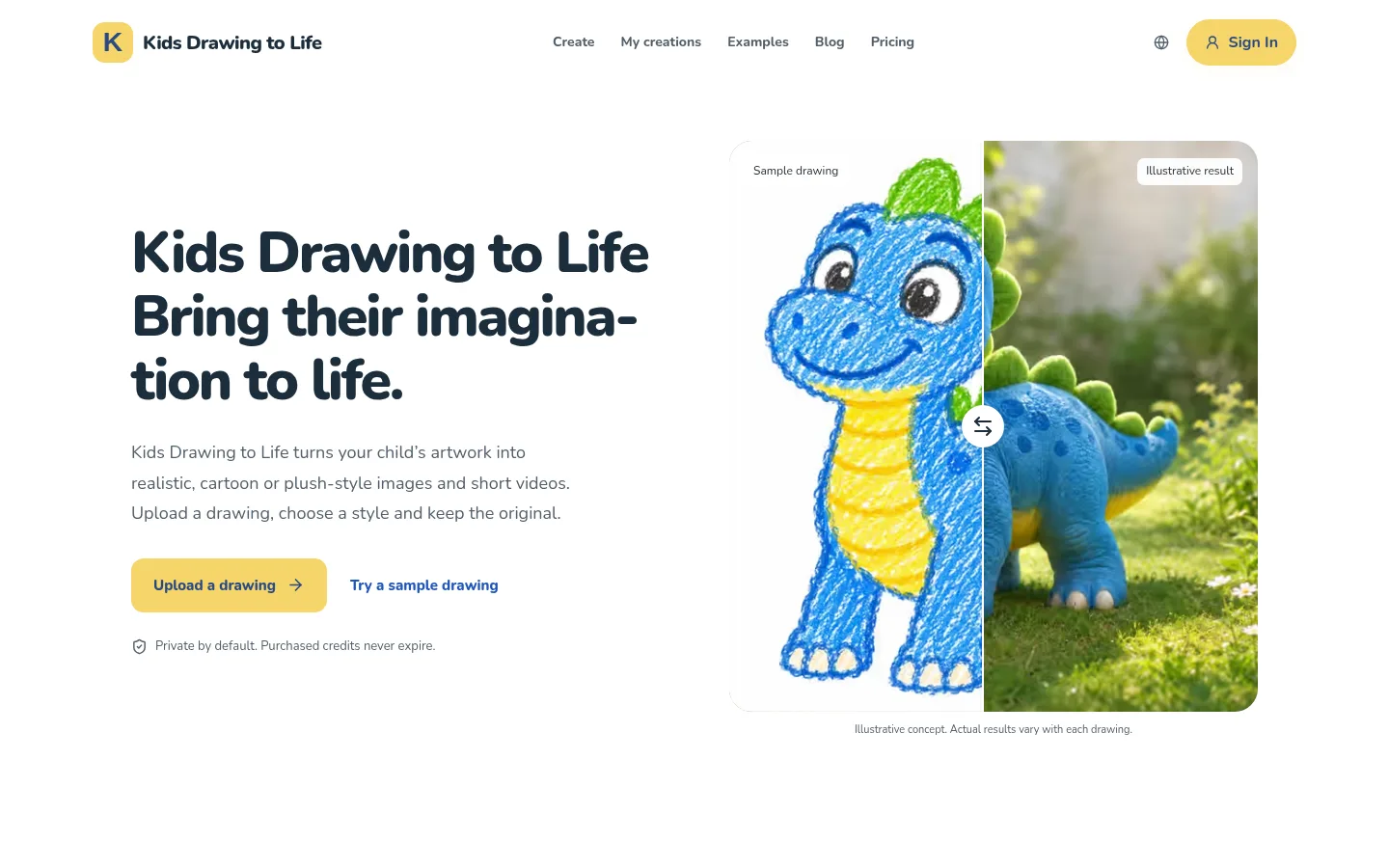
Kids Drawing to Life product screenshot
Website previewFixed desktop viewport · 1440 × 900

Similar tools

Published tools that share its categories.
Crealo AISpanish-language AI content platform for copy, images, video, avatars, voice and chatbots, built on many third-party models.
Writing & LanguageFree trialChecked Nov 11
Visit
HeraAI canvas where several agents generate images, designs and motion graphics as editable layers, for ads and launch videos.
Video & AnimationFree planChecked Nov 5
Visit
ComfyUIA free, open-source node-based app for building AI image, video, audio and 3D workflows, with an optional hosted cloud.
Image & DesignFree planChecked Oct 31
Visit