



Ordalin
Submit a tool

Reviewed tool profile

Filmera

Browser AI filmmaking workspace: plan shots on a canvas, generate with many video models, and cut them on a timeline.

Sources checked

Visit website ↗
Pricing
Free plan with 100 credits a month and 2 GB storage. Paid plans are Casual ($12/month, 1,200 credits), Starter ($45/month, 6,000 credits) and Pro ($89/month, 14,400 credits), with Pro 2x and Pro 3x sizes. Annual billing is discounted and charged up front. One credit costs $0.01, and every plan includes all models. Official source 1 ↗
Available as
Runs in the web browser; sign-in is by email code or Google. The docs also cover use from AI agents over MCP, an agent skill and a REST API. Official source 1 ↗
Primary group
Video & Animation

Also consider

See all 6 similar tools ↓

What it does

Filmera is a browser-based AI filmmaking workspace. You plan a film on a node canvas, generate shots with a range of image and video models, keep every take in a library, and cut the result on a timeline. A built-in agent can turn an idea or script into a shot list and remake an existing film from plain-language changes.

Official source 1 ↗

Features

  • Node canvas for planning. Characters, locations and shots are cards on a node graph, and the connections decide which references each generation sees, so characters and style stay consistent across shots. Official source 1 ↗
  • Filmmaking agent with cost proposals. The agent turns an idea or script into a shot list, wires references and queues generations, but it asks for approval with a credit total before spending anything. Official source 1 ↗
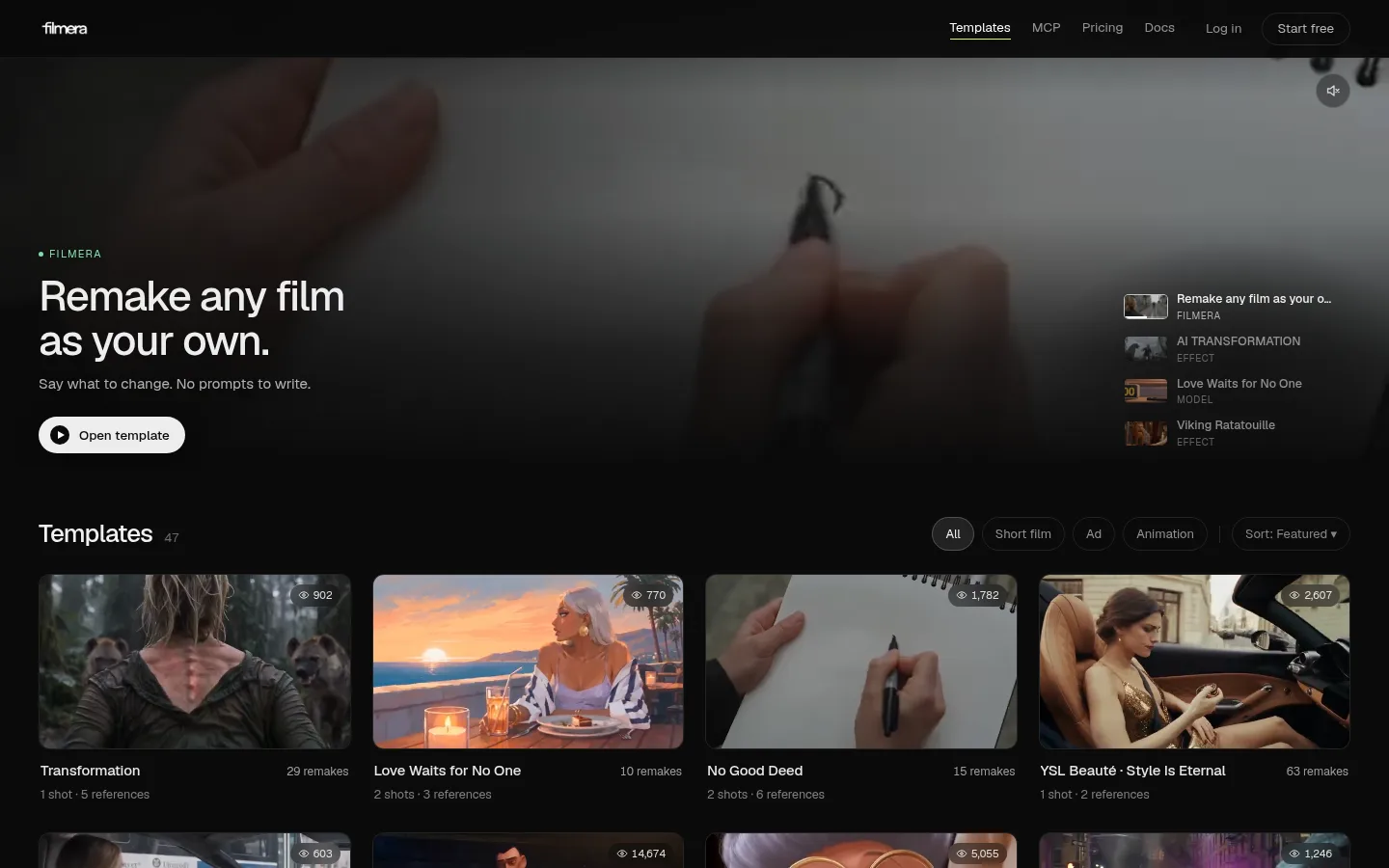
  • Remake a film in plain words. Open any template film in Theater, type a change such as a new actor, place or ending, and the agent updates the prompts and regenerates in about two minutes. Official source 1 ↗
  • Open templates. Templates are real projects with prompts, characters, settings and takes visible; duplicating one costs no credits and gives you an editable copy. Official source 1 ↗
  • Price shown before every generation. The Generate button shows the exact credit cost, and a compare view lists every compatible model priced for the same settings, cheapest first. Official source 1 ↗
  • Library and timeline editing. Every take is kept without overwriting, and the Edit timeline lets you recut and export an MP4 without regenerating. Official source 1 ↗

Pricing & free limits

Free

$0per month

100 credits a month (about 16 default images or ~4 seconds of Seedance 2.5 Draft video), 2 GB storage, no top-ups. Official source 1 ↗

Casual

$12per month, or $120 per year

1,200 credits a month, 100 GB storage, top-ups at $12 per 1,000 credits. Official source 1 ↗

Starter

$45per month, or $432 per year

6,000 credits a month, 500 GB storage, top-ups at $10 per 1,000 credits. Official source 1 ↗

Pro

$89per month, or $828 per year

14,400 credits a month, 1 TB storage, top-ups at $8 per 1,000 credits. Official source 1 ↗

Pro 2x

$160per month, or $1,584 per year

28,800 credits a month, 2 TB storage, top-ups at $8 per 1,000 credits. Official source 1 ↗

Pro 3x

$227per month, or $2,244 per year

43,200 credits a month, 3 TB storage, top-ups at $8 per 1,000 credits. Official source 1 ↗

Enterprise

Custom quoteannual terms

For studios: dedicated producer, shared Slack channel, volume credit pricing and invoicing. Official source 1 ↗

Billing details

Annual billing charges the whole year up front at the discounted rate, while credits still arrive monthly. Official source 1 ↗

Plan credits reset monthly and do not roll over; extra credits you buy never expire. Official source 1 ↗

Credits are spent when a generation is queued and refunded automatically if it fails. Official source 1 ↗

Free access & limits

The Free plan gives 100 credits a month and 2 GB of storage; top-ups are for paid plans only. Official source 1 ↗

Best for & limitations

Remaking a template film with your own actor and setting, for example attaching a photo and moving the scene to a Tokyo apartment at night. Official source 1 ↗

Turning a script into a planned shot list with consistent characters, then generating and cutting the shots into an MP4. Official source 1 ↗ · Official source 2 ↗
  • Pro templates are partly gated. A few templates marked Pro show truncated prompts and limit downloads to subscribers. Official source 1 ↗
  • Prompts go to third-party model providers. Generating media means sending your prompts and reference files to third-party AI model providers. Official source 1 ↗
Filmera product screenshot
Website previewFixed desktop viewport · 1440 × 900

Similar tools

Published tools that share its categories.

NomiOpen-source, local-first AI video studio: an agent plans shots and builds the timeline with models you pay for directly.
Video & AnimationFreeChecked Nov 11
Visit
ngramAI video maker for business teams: onboarding, training, demos and explainers from a prompt, screen recording or doc, edited by chatting.
Video & AnimationFree planChecked Oct 13
Visit
ReelsyAI product video and image studio for small ecommerce teams, with multi-model video generation, a chat-based Video Agent and a Codex/ChatGPT plugin.
Video & AnimationFree planChecked Oct 13
Visit