



Ordalin
Submit a tool

Reviewed tool profile

TextRemover.video

Removes burned-in text, captions and hardcoded subtitles from videos up to 60 seconds by rebuilding the background with AI.

Sources checked

Visit website ↗
Pricing
Billing is per second of video (1 credit = 1 second). New accounts get 30 free seconds once, valid for 30 days. Subscriptions are Starter at $24.90/month for 600 seconds and Pro at $74.90/month for 2,000 seconds, or $249 and $749 per year; one-time packs cost $4.90 (100 s), $22.90 (500 s) and $54.90 (1,200 s) and never expire. Prices are in USD. Official source 1 ↗
Available as
Runs in the browser; no editing software or installation is needed, and an account is required to process videos. Official source 1 ↗
Primary group
Video & Animation

Also consider

See all 6 similar tools ↓

What it does

TextRemover.video is a web tool that removes burned-in text, captions and hardcoded subtitles from short videos. You upload an MP4 or MOV of up to 60 seconds, pick a mode (Subtitles, All text or Select area), and AI rebuilds the background behind the text instead of blurring it, keeping the source resolution. The site is operated by Sirius and does not name the AI model or provider it uses.

Official source 1 ↗ · Official source 2 ↗

Features

  • Subtitles mode. Detects and removes subtitle lines that change across frames, including word-by-word captions. Official source 1 ↗
  • All text mode. Removes all detected text across the whole video, such as subtitles plus titles, labels or timestamps. Official source 1 ↗
  • Select area mode. Draw a box around a word, date, logo or fixed text band; the whole box, including a safety margin, is rebuilt. Official source 1 ↗
  • Background reconstruction, no blur. AI reconstructs the picture behind the text instead of covering it with blur or mosaic, and keeps the original resolution with no added watermark. Official source 1 ↗
  • Vertical social clips. Vertical 9:16 MP4 and MOV files saved from TikTok, Instagram Reels and Snapchat are supported. Official source 1 ↗

Pricing & free limits

Free signup gift

$0One-time, valid 30 days

30 processing seconds for new accounts, no credit card, same processing model as paid jobs; up to two new accounts per network per month get it. Official source 1 ↗

Starter

$24.90per month ($249 per year)

600 seconds (10 min) per month; unused credits expire at the monthly reset. Official source 1 ↗

Pro

$74.90per month ($749 per year)

2,000 seconds (33 min 20 s) per month; unused credits expire at the monthly reset. Official source 1 ↗

Credit packs

$4.90 / $22.90 / $54.90One-time

100, 500 or 1,200 seconds; pack credits never expire and are spent after free and subscription credits. Official source 1 ↗

Billing details

Each video is charged for its full length, rounded to the nearest second with a minimum of 1 credit; selecting a smaller area does not reduce the charge. Official source 1 ↗ · Official source 2 ↗

Annual plans cost ten monthly fees for twelve monthly allowances, released month by month. Prices are in USD, with tax shown at checkout. Official source 1 ↗

Credits for failed jobs are returned automatically, but submitted jobs cannot be cancelled. Payment refunds are requested by email for incorrect charges, duplicates or service issues, and cancelling a subscription does not itself request a refund. Official source 1 ↗ · Official source 2 ↗

Free access & limits

The free tier is a one-time 30 seconds of processing for new accounts, valid for 30 days and not renewed; only up to two new accounts per signup network each month receive it. Official source 1 ↗

Best for & limitations

Remove hardcoded subtitles from an interview or talking-head clip before adding new captions. Official source 1 ↗

Clean a TikTok, Reels or Snapchat video of overlaid text before re-posting it. Official source 1 ↗

Erase a title, date or label from travel or drone footage with Select area. Official source 1 ↗
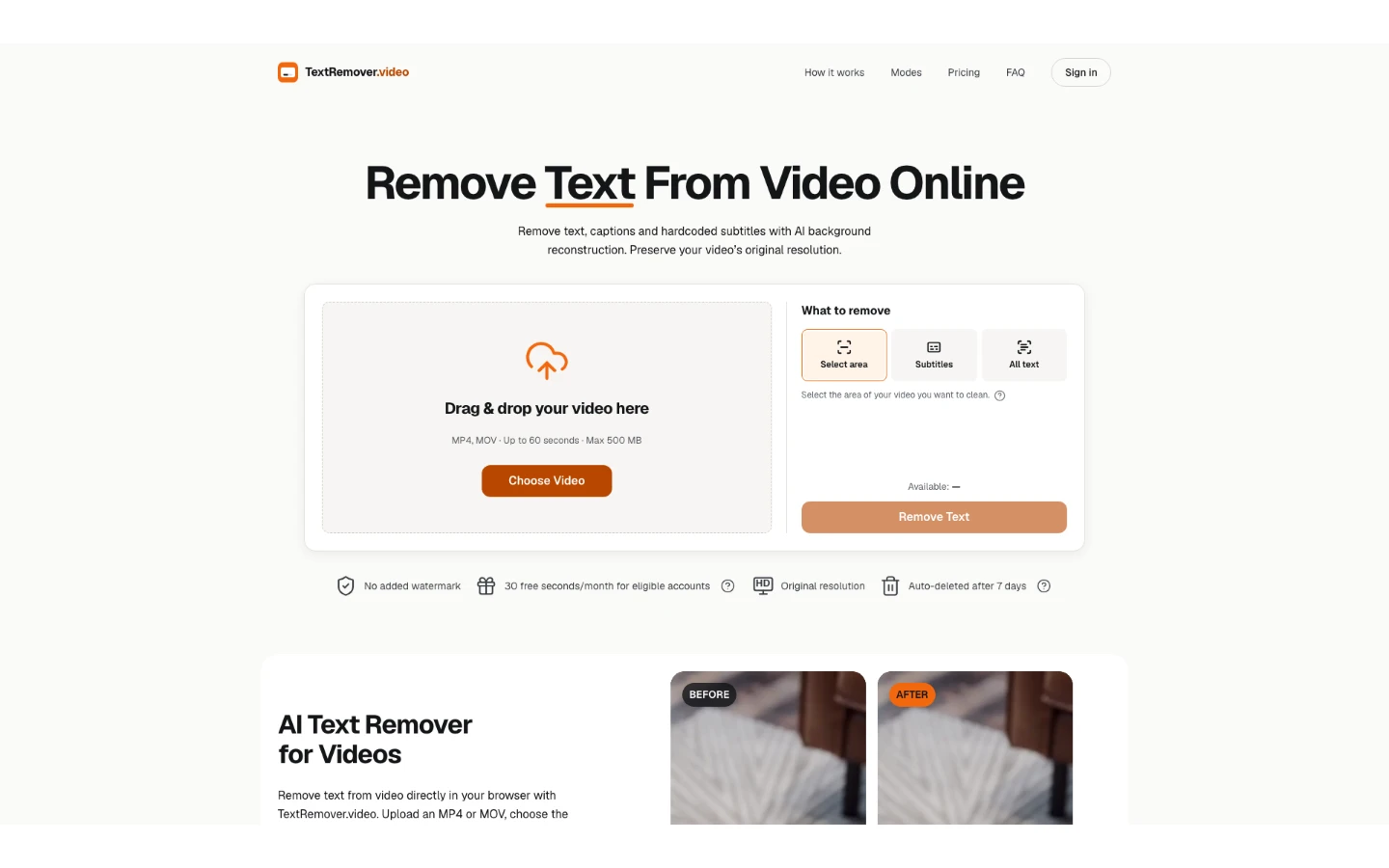
  • Short clips only. Uploads are limited to MP4 or MOV files of up to 60 seconds and 500 MB; longer footage has to be split into clips. Official source 1 ↗
  • Artifacts are possible. Large lettering, fast movement and detailed backgrounds can leave artifacts, and complete removal or exact reconstruction is not guaranteed. Official source 1 ↗ · Official source 2 ↗
  • Videos go to unnamed AI providers. Uploads are sent to storage and AI processing providers that the site does not name, and are deleted 7 days after processing. Official source 1 ↗ · Official source 2 ↗
  • No rights to the underlying video. Removing text, a logo or a watermark does not give you rights to the video. Official source 1 ↗
  • Data requests by email only. Account deletion and data export are handled through support, with no self-service button. Official source 1 ↗
  • Session replay on public pages. The site may use Microsoft Clarity session replays and heatmaps on its public pages. Official source 1 ↗
TextRemover.video product screenshot
Submitted screenshotFixed desktop viewport · 1440 × 900

Similar tools

Published tools that share its categories.

NomiOpen-source, local-first AI video studio: an agent plans shots and builds the timeline with models you pay for directly.
Video & AnimationFreeChecked Nov 11
Visit