

Ordalin
Submit a tool

Reviewed tool profile

Yogurt

Free, open-source AI meeting notes that run locally on Mac, Windows and Linux. No bot joins the call; nothing is uploaded.

Sources checked

Visit website ↗
Pricing
Free. Yogurt is open source under the MIT license and needs no account; there are no paid plans, and the AI models run locally, so there are no usage fees. Official source 1 ↗ · Official source 2 ↗

Available as
Desktop app for Mac (Apple silicon, macOS 14.4 or newer), Windows 10 version 2004 or newer (64-bit) and Linux (64-bit, Ubuntu 22.04 or newer, as an AppImage). Each needs at least 8 GB of memory; calendar access and speaker names from calls are Mac only for now. · Records calls in any app through microphone and system audio; automatic call detection covers Zoom, Teams and Meet. Official source 1 ↗ Official source 1 ↗
Primary group
Productivity

Also consider

See all 6 similar tools ↓

What it does

Yogurt is a free, open-source (MIT) desktop app from Frigade, a Y Combinator-backed company, that takes AI meeting notes without sending a bot into the call. It records your microphone and the audio playing on your computer, transcribes the call live, merges the transcript with any notes you jot, writes a summary with next steps, and answers questions about past meetings with links back to the transcript. Transcription (Whisper large-v3-turbo via whisper.cpp) and summaries (a local open-weight model) happen on your own computer, so recordings, transcripts and notes are never uploaded, and no account is needed.

Official source 1 ↗ · Official source 2 ↗

Features

  • No meeting bot. Yogurt records your microphone and your computer's audio, so nothing joins the call and other participants don't install anything. It offers to record when a supported call starts and stops when the call ends. Official source 1 ↗ · Official source 2 ↗
  • Live local transcription. Speech is turned into text as you talk using Whisper (large-v3-turbo or a smaller model, depending on your computer) through whisper.cpp; multi-language mode covers 99 languages. Official source 1 ↗
  • Notes plus transcript summaries. Jot your own notes during the call; afterwards Yogurt combines them with the conversation into one summary with the plan and next steps, written by a local open-weight model (Gemma 4, gpt-oss or Qwen3 families). Official source 1 ↗ · Official source 2 ↗
  • Ask questions across meetings. Ask what you missed and get answers drawn from your meetings, with links back to the source transcript. Official source 1 ↗ · Official source 2 ↗
  • Speaker names and calendar (Mac). On Mac, Yogurt names who spoke in Zoom, Teams and Meet calls and can show events from the calendars already on your computer. Official source 1 ↗
  • Search, export and local MCP. Find meetings by folder, title, notes or transcript, copy or save notes and transcripts as Markdown, and optionally let an assistant app read your notes through a local, read-only MCP server. Official source 1 ↗

Pricing & free limits

Billing details

There is nothing to pay: the app is MIT-licensed and the AI runs on your computer, so there are no subscriptions or per-minute charges. The cost is local storage and hardware: setup downloads a notes model of about 5 GB, then a better one that can be 14 GB or more. Official source 1 ↗ · Official source 2 ↗

Free access & limits

No usage limits are stated; the limit is your hardware. Yogurt needs at least 8 GB of memory and tells you during setup if your computer is too slow. Official source 1 ↗

Best for & limitations

Take private notes on a confidential client or internal call without a visible bot and without the recording leaving your computer. Official source 1 ↗

Leave a planning meeting with a summary of the plan and each person's next steps, then ask follow-up questions later. Official source 1 ↗

Transcribe and summarise calls offline, for example while travelling, once the models are downloaded. Official source 1 ↗
  • Heavy hardware and download. Requires 8 GB of memory, Apple silicon on Mac, and a model download of about 5 GB that can grow to 14 GB or more. Official source 1 ↗ · Official source 2 ↗
  • Some features are Mac only. Calendar access and speaker names from calls work only on Mac for now. Official source 1 ↗ · Official source 2 ↗
  • You must tell people you're recording. Because no bot joins, other participants aren't notified automatically; Yogurt asks you to let them know. Official source 1 ↗
  • Unsigned Windows installer. Windows shows a “Windows protected your PC” warning because the app isn't signed with a Microsoft certificate yet. Official source 1 ↗
  • English-only by default; MCP has no per-app access control. Multi-language transcription must be switched on, and while MCP access is on any app running under your account can read your notes. Official source 1 ↗
  • Not fully offline. Meeting data stays local, but the app goes online for model downloads and update checks. Official source 1 ↗
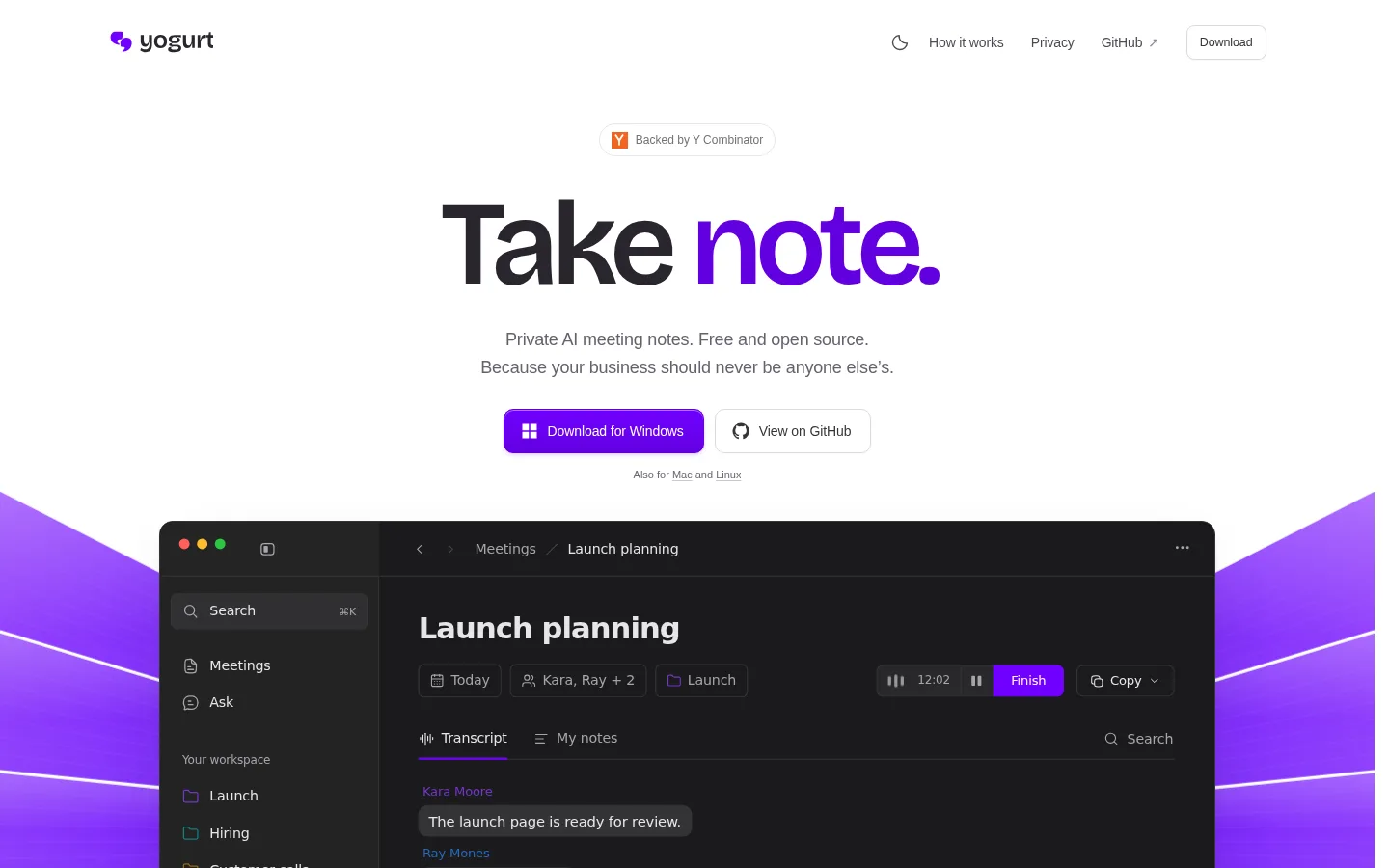
Yogurt product screenshot
Website previewFixed desktop viewport · 1440 × 900

Similar tools

Published tools that share its categories.
TellPipA Mac call assistant that suggests what to say from your documents and client memory, with local transcription.
ProductivityFree trialChecked Nov 5
Visit
CluinnAI dictation for any Mac app, plus a call assistant that answers questions mid-call and lists action items after.
Voice & SpeechPaidChecked Oct 31
Visit
TwinMindAI memory app that transcribes your meetings and day, builds a second brain, and gives any AI your context.
ProductivityFree planChecked Oct 22
Visit
EarnoteFree, open-source lecture and meeting recorder for Mac and iPhone that transcribes on the device and writes notes, flashcards and study sheets.
Education & LearningFree planChecked Oct 17
Visit
Otter.aiRecord meetings, generate transcripts and action items, and search conversations with AI chat.
ProductivityFree planChecked Sep 28
Visit