



Ordalin
Submit a tool

Reviewed tool profile

Zen Whisper

Local-first Mac dictation and transcription that types into your existing apps.

Sources checked

Visit website ↗
Pricing
A 14-day trial is free. After that, transcription continues on a free tier of 3,000 words a week, or you can buy a one-time Pro seat at launch prices from $59.99 for 1 Mac to $299.99 for 10 Macs. Seats are a single payment, not a subscription, and include one year of updates. Official source 1 ↗
Available as
Mac only: requires an Apple Silicon Mac (M1 or newer) running macOS 14 Sonoma or later, with Microphone and Accessibility permissions. The app is downloaded from Gumroad. Official source 1 ↗
Primary group
Voice & Speech

Also consider

See all 6 similar tools ↓

What it does

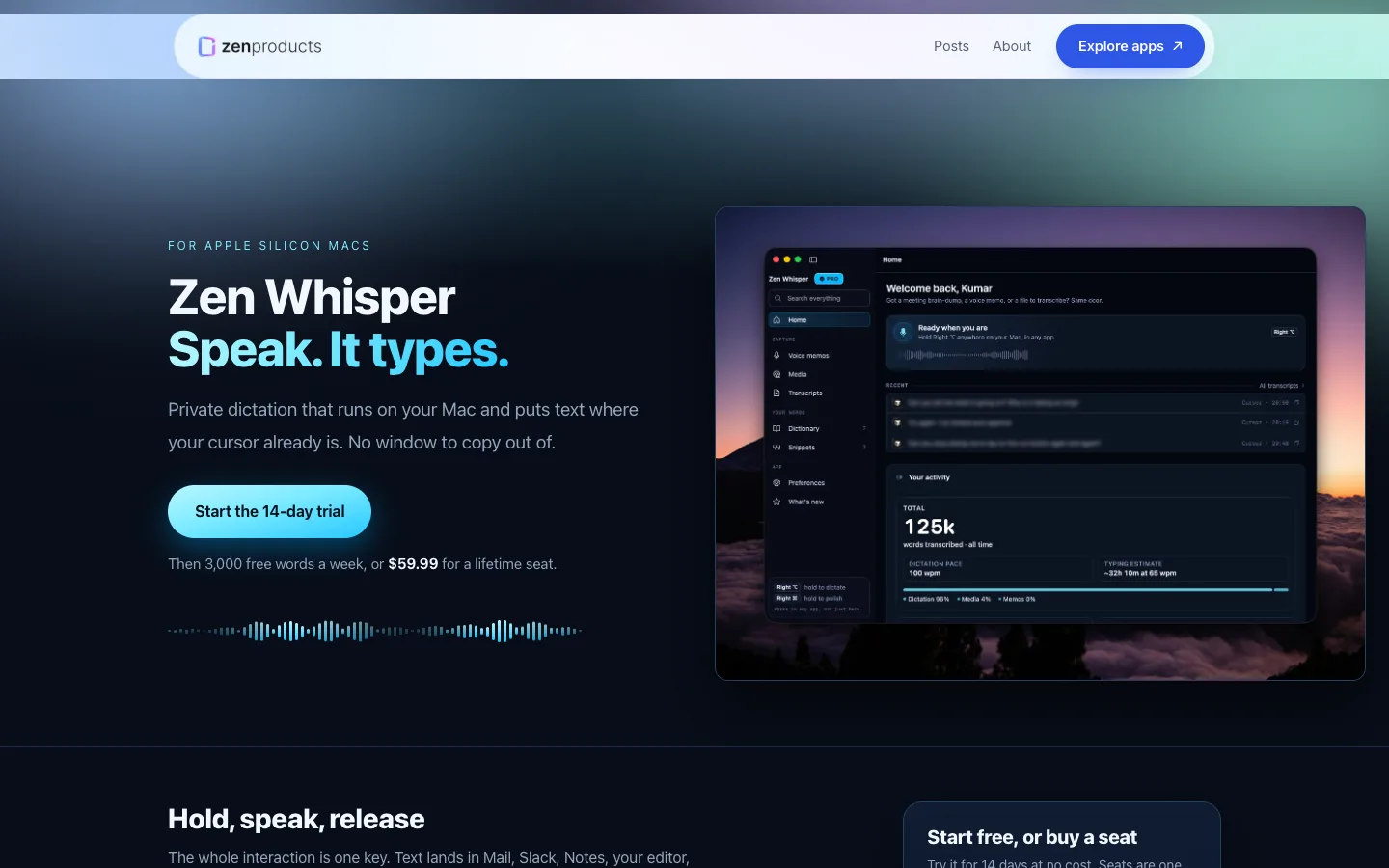
Zen Whisper is a Mac dictation and transcription app from Zen Products. Hold a key, speak, and the text is inserted at the cursor in Mail, Notes, browsers, chat apps and editors. It can also transcribe recorded audio and video files. Core speech recognition runs on the Mac with downloaded speech packs; cloud engines are optional and use your own API keys.

Official source 1 ↗

Features

  • Hold-to-talk dictation at the cursor. Hold Right Command, Option or Control, speak naturally and release; punctuation and capitals are added and the text appears at the cursor without copying or pasting. Official source 1 ↗
  • App-aware formatting and context. Formatting adapts to the app: chat stays casual, mail formal, terminals get light technical cleanup. In Chrome, Arc and Safari it reads the tab title, domain and issue keys so names and ticket references are spelled correctly. Official source 1 ↗
  • Personal dictionary and snippets. Add names, brands and jargon to a dictionary that also learns from repeated corrections. Snippets expand a short spoken trigger into a longer reply, and rewrite flows tidy rough speech. Official source 1 ↗
  • File and link transcription with speakers. Transcribe MP3, WAV, M4A, MP4 and similar files, or paste a YouTube or Instagram link. Recorded conversations are split by speaker with editable names, and results can be exported as timestamped captions. Official source 1 ↗
  • 110 languages including Hinglish. Supports 110 languages with auto-detection, returning text in each language's own script. Hinglish is a separate option that returns Roman script. Official source 1 ↗
  • Searchable history and meeting notes. Sessions are saved in a searchable, timestamped history tagged with the app used, and a meeting-notes mode turns long speech into structured lines and bullets. Official source 1 ↗
  • Selectable speech engines and packs. Choose local speech packs (Standard about 1.5 GB, Precision about 2.9 GB) or optional cloud engines from Sarvam, OpenAI, Deepgram, Groq and Gemini using your own API keys. Official source 1 ↗

Pricing & free limits

Free Trial

$014 days

Full Pro features; the trial starts on your first transcription, not at install. Official source 1 ↗

Free tier

$0ongoing

After the trial: 3,000 words of transcription a week; Writing polish and Rewrite are switched off. Official source 1 ↗

Pro, 1 Mac

$59.99one-time (launch price)

Lifetime seat for one Mac with one year of updates. Official source 1 ↗

Billing details

Seats are a one-time payment with one year of updates; the installed version keeps working after that. Licences are bought on Gumroad and entered in Preferences. A 14-day money-back guarantee applies if the app does not work on a supported Mac, and approved refunds deactivate the licence. Official source 1 ↗

Free access & limits

After the 14-day trial, the free tier allows 3,000 transcribed words a week, with Writing polish and Rewrite turned off. Existing dictated text is kept. Official source 1 ↗

Best for & limitations

Reply to email, chat messages and notes by voice in the app you are already using, with tone matched to the thread. Official source 1 ↗

Transcribe a recorded interview or two-person meeting into a speaker-labelled transcript, and reuse it as subtitles for the video. Official source 1 ↗

Dictate in Hinglish or another of the supported languages and get text in the script people normally type. Official source 1 ↗
  • Apple Silicon Macs only. Requires an M1 or newer Mac on macOS 14 or later; there is no Intel, Windows or mobile version listed. Official source 1 ↗
  • Some features need the internet. Licence checks, the first model download and optional features connect online, and larger speech packs need several gigabytes of disk space. Official source 1 ↗
  • Analytics on by default. In-app product analytics are enabled by default and can be turned off in Preferences. Official source 1 ↗
Zen Whisper product screenshot
Website previewFixed desktop viewport · 1440 × 900

Decision notes

Context-specific guidance, not a universal ranking.

Good fit if
you want dictation and media transcription to stay primarily on your Mac
Why this one
Runs core recognition on Apple Silicon and can type at the active cursor or transcribe uploaded media without making cloud processing the default.
Consider alternatives if
It is Mac-focused, and optional network-backed features have different privacy boundaries from core local recognition.

Similar tools

Published tools that share its categories.
VowiseVoice dictation and transcription app that turns spoken notes into a journal, reviews and AI memory.
Voice & SpeechFree planChecked Nov 3
Visit
CluinnAI dictation for any Mac app, plus a call assistant that answers questions mid-call and lists action items after.
Voice & SpeechPaidChecked Oct 31
Visit
YogurtFree, open-source AI meeting notes that run locally on Mac, Windows and Linux. No bot joins the call; nothing is uploaded.
ProductivityFreeChecked Nov 12
Visit