


Ordalin
Submit a tool

Website-checked tool profile

Assistly

Get real-time AI guidance and automatic notes during live calls.

Sources checked

Visit website ↗
Pricing
A free plan gives 3 sessions a month of up to 15 minutes each, with no card required. Pro is $9 a month billed annually ($108) or $14.99 billed monthly, with unlimited sessions. Enterprise is priced per seat annually on request. Assistly Solo is a $199 one-time lifetime licence for one computer that runs locally. Every plan includes every feature. Official source 1 ↗
Available as
Native apps for macOS (Apple silicon) and Windows 10/11. On a phone it runs in Safari or Chrome at app.tryassistly.com for in-person meetings and speaker calls. It works alongside Zoom, Google Meet, Microsoft Teams, Webex, Slack huddles and phone calls. Official source 1 ↗
Primary group
Productivity

Also consider

See all 6 similar tools ↓

What it does

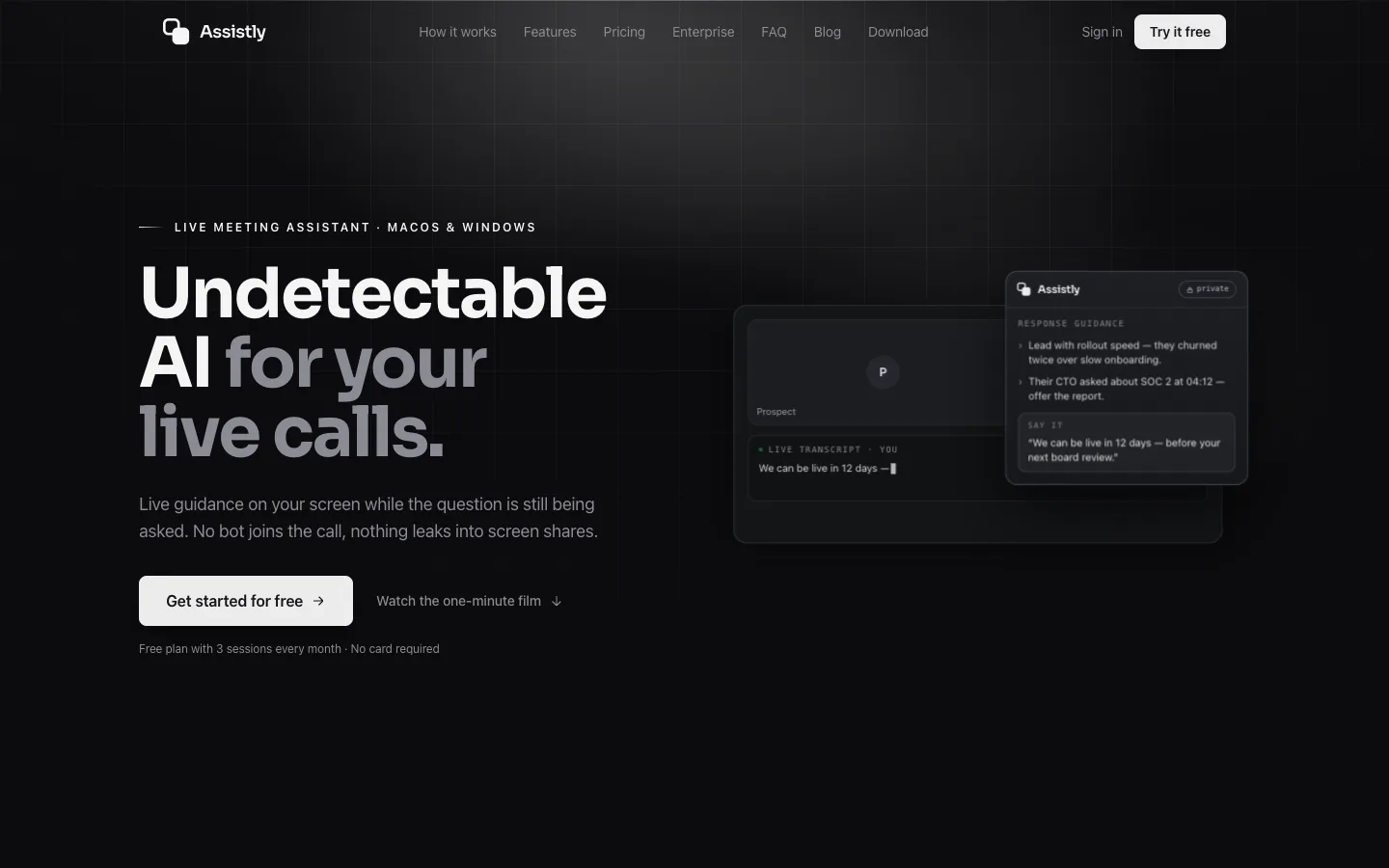
Assistly is a desktop meeting assistant for macOS and Windows. It transcribes the call from your computer's audio, tracks each speaker and shows talking points in a private overlay while a question is being asked, then writes a summary with action items when the call ends. No bot joins the meeting, and the overlay is excluded from screen shares and recordings.

Official source 1 ↗

Features

  • Hands-free live guidance. Auto-assist is on by default: when someone asks a question, talking points and a structure appear in the overlay without a hotkey or prompt. It is powered by Assistly's own model, Cue. Official source 1 ↗
  • Multi-speaker transcription in many languages. It captures the call's own audio rather than only your microphone, separates speakers, and detects dozens of languages automatically, including mid-call switches. Guidance is given in English. Official source 1 ↗
  • Summary and action items. After each session the transcript becomes a short summary and a list of action items with owners, saved and searchable across sessions. Official source 1 ↗
  • Projects per client or deal. Create a project for each client, deal or search; calls are filed from the calendar and answers stay inside the active project. Official source 1 ↗
  • Personas and modes. Build a persona from your CV, docs and notes and switch modes for sales calls, client reviews or interviews. Official source 1 ↗
  • Integrations and MCP server. Connect Google Calendar (read-only), Notion, Linear or any MCP server for context. A read-only MCP server lets Claude, ChatGPT, Cursor or Codex search your transcripts, recaps and action items. Slack is on Enterprise plans for now. Official source 1 ↗ · Official source 2 ↗ · Official source 3 ↗

Pricing & free limits

Pro

$9/month billed annually ($108); $14.99/month billed monthlyper month

Unlimited sessions with no time cap. Official source 1 ↗

Enterprise

Customper seat, annually

Team spaces, admin controls and SSO, with shared memory across clients and deals. Official source 1 ↗

Assistly Solo

$199one-time, lifetime licence for one computer

Transcription and answers run on your computer and work offline, with no account or session limits; excludes the dashboard, sync, projects, integrations and phone app. Official source 1 ↗

Billing details

Pro billed annually saves 40% versus monthly. Plans differ only in usage and team workspace, not features. You can upgrade or cancel at any time. Official source 1 ↗

Free access & limits

The free plan allows 3 sessions a month, each up to 15 minutes, and needs no card. Official source 1 ↗

Best for & limitations

On sales calls, see objection handling, pricing and competitor comparisons live, with a project per deal. Official source 1 ↗

Follow busy group calls and leave with a recap of decisions and owned action items. Official source 1 ↗

Ask Claude Code to pull up today's call and start on the action items assigned to you. Official source 1 ↗
  • Cloud processing of call audio. On the subscription plans, mic and call audio stream to the cloud for transcription; only the Solo licence runs locally. Official source 1 ↗
  • Mobile browser needs the screen on. The phone web app stops listening when the phone locks, and the desktop app is recommended for video calls. Official source 1 ↗
  • Guidance only in English; responsible use. Guidance is delivered in English. Assistly asks users to follow the rules of any meeting, call or interview they use it in. Official source 1 ↗ · Official source 2 ↗
Assistly product screenshot
Website previewFixed desktop viewport · 1440 × 900

Similar tools

Published tools that share its categories.
YogurtFree, open-source AI meeting notes that run locally on Mac, Windows and Linux. No bot joins the call; nothing is uploaded.
ProductivityFreeChecked Nov 12
Visit
TellPipA Mac call assistant that suggests what to say from your documents and client memory, with local transcription.
ProductivityFree trialChecked Nov 5
Visit
CluinnAI dictation for any Mac app, plus a call assistant that answers questions mid-call and lists action items after.
Voice & SpeechPaidChecked Oct 31
Visit
TwinMindAI memory app that transcribes your meetings and day, builds a second brain, and gives any AI your context.
ProductivityFree planChecked Oct 22
Visit
EarnoteFree, open-source lecture and meeting recorder for Mac and iPhone that transcribes on the device and writes notes, flashcards and study sheets.
Education & LearningFree planChecked Oct 17
Visit
Otter.aiRecord meetings, generate transcripts and action items, and search conversations with AI chat.
ProductivityFree planChecked Sep 28
Visit