



Ordalin
Submit a tool

Reviewed tool profile

Cisel Media

Windows video editor that cuts silences in one click and generates offline subtitles in 20 languages.

Sources checked

Visit website ↗
Pricing
The Free version includes every editing tool but exports with a watermark, up to 1080p / 30 FPS, and with five text and ten visual items per project. Annual Pro costs US$19.99 a year and Perpetual Pro US$49.99 once; both remove the watermark and allow 4K/8K at 60 FPS. Buy in-app through Microsoft Store (local prices) or on the web via Lemon Squeezy. Official source 1 ↗ · Official source 2 ↗ · Official source 3 ↗
Available as
Windows 10 22H2 or Windows 11 (x64), distributed through Microsoft Store. Official source 1 ↗ · Official source 2 ↗
Primary group
Video & Animation

Also consider

See all 6 similar tools ↓

What it does

Cisel Media is a Windows video editor from CiselSoft (Selim Kara, Türkiye) for recording and editing talking-head, tutorial and social videos. It records screen, camera and audio, cuts speech pauses with a one-click Auto edit, and generates subtitles from speech locally after a one-time model download, with SRT import and export. Editing, recording and transcription run on your computer.

Official source 1 ↗ · Official source 2 ↗ · Official source 3 ↗

Features

  • Offline automatic subtitles. Transcribes speech in its original language on your computer, in 20 spoken languages or with automatic detection; captions are editable and can be imported or exported as SRT. Official source 1 ↗
  • One-click silence cutting. Analyzes speech pauses or low audio; you can listen and choose intervals yourself, or let Auto edit shorten suitable silences while keeping risky ones, with full undo. Official source 1 ↗
  • Screen, camera and audio recording. Captures the whole screen or a selected area, the camera, microphone and system audio for tutorials and presentations. Official source 1 ↗
  • Audio cleanup. Moves video audio to its own track, reduces noise, balances levels and lowers music under speech. Official source 1 ↗
  • Timeline editing with zoom and overlays. Trim and join clips, add text, music and images, and use animated zoom, shapes, arrows and logos to highlight details. Official source 1 ↗
  • Social platform presets and export. Platform presets set aspect ratio, resolution and FPS for Shorts, Reels and other networks; export is MP4 (H.264/AAC) from 720p up to 8K at 30 or 60 FPS. Official source 1 ↗

Pricing & free limits

Free

US$0free

All editing tools; output carries a watermark and is limited to 1080p / 30 FPS, with up to five text items and ten visual items per project (subtitles don't count). No monthly export quota. Official source 1 ↗ · Official source 2 ↗

Billing details

Prices are US base list prices; Microsoft Store shows local in-app prices, and Lemon Squeezy (the Merchant of Record for web orders) shows taxes at checkout. Official source 1 ↗ · Official source 2 ↗

Cancelling Annual Pro takes effect at the end of the paid period and is not itself a refund request; CiselSoft offers no voluntary money-back guarantee beyond mandatory consumer rights. Official source 1 ↗ · Official source 2 ↗

Free access & limits

Free exports carry a Cisel Media watermark, are capped at 1080p / 30 FPS and allow five text items and ten visual items per project; there is no unlimited Pro trial. Official source 1 ↗

Best for & limitations

A creator records a screen tutorial with camera and microphone, cuts the pauses with Auto edit, adds offline subtitles and exports a 9:16 version for Shorts or Reels. Official source 1 ↗

Someone who doesn't want to upload footage edits MP4 or MTS videos and transcribes speech entirely on their own PC. Official source 1 ↗ · Official source 2 ↗
  • Windows only. Runs on Windows 10 22H2 or Windows 11 (x64); Perpetual Pro does not automatically include other operating systems. Official source 1 ↗ · Official source 2 ↗
  • Internet needed for setup steps. The first subtitle engine/model download, initial Pro activation and purchase restoration need internet. Official source 1 ↗ · Official source 2 ↗
  • One computer per licence. A paid licence covers one user on one computer at a time; moving it means deactivating the previous computer. Official source 1 ↗
  • Captions need review. Automatic captions may contain errors and should be reviewed. Official source 1 ↗
  • Export constraints. HDR sources are converted to SDR, and the noise-reduction/sharpen enhancement upscales without adding new detail. Official source 1 ↗
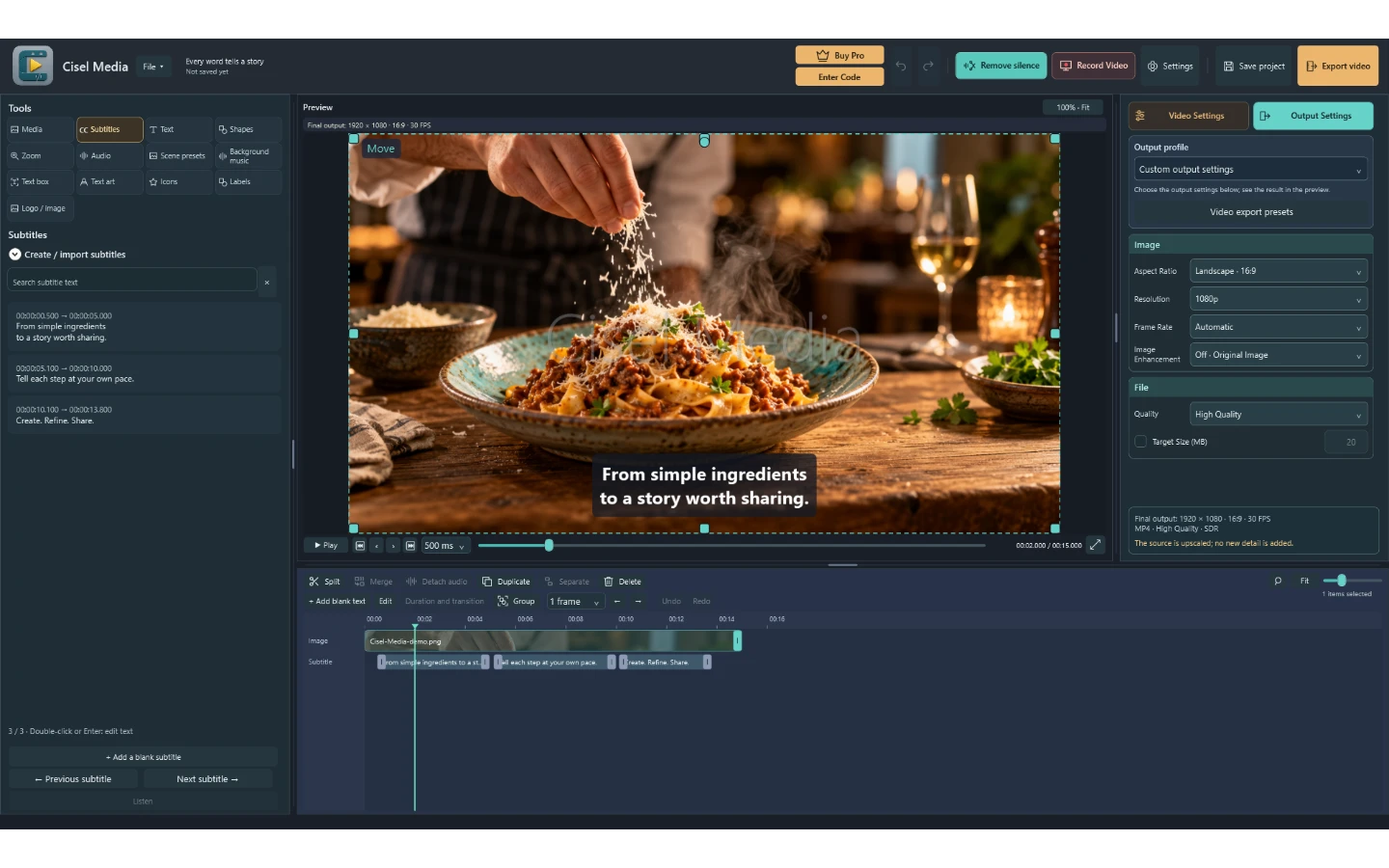
Cisel Media product screenshot
Submitted screenshotFixed desktop viewport · 1440 × 900

Similar tools

Published tools that share its categories.

TakesFree, open-source Mac app for talking-head videos: teleprompter recording, then Claude Code storyboards, edits and drafts social posts.
Video & AnimationFreeChecked Oct 13
Visit
OpenScreenFree, MIT-licensed screen recorder and editor for Windows, macOS and Linux with on-device Whisper captions, text-based cuts and an optional bring-your-own-key AI editing agent.
Video & AnimationFreeChecked Oct 12
Visit
CluesoAgentic video platform that turns prompts, screen recordings, slides and documents into product videos and step-by-step guides.
Video & AnimationFree planChecked Oct 30
Visit